


More and more of the developers building on AssemblyAI are shipping voice agents—AI agents that take orders at the drive-through, handle new patient intake over the phone, or triage support issues live. And they're doing it at real scale: thousands of calls a day, sometimes hundreds of thousands, all with actual users on the other end.
I demoed this approach at Render's localhost conference. The teams I works with range from AI-native startups to Fortune 500 enterprises, running wildly different audio stacks and logging wildly different things. But underneath all that variety, almost every one of them hits the same wall.
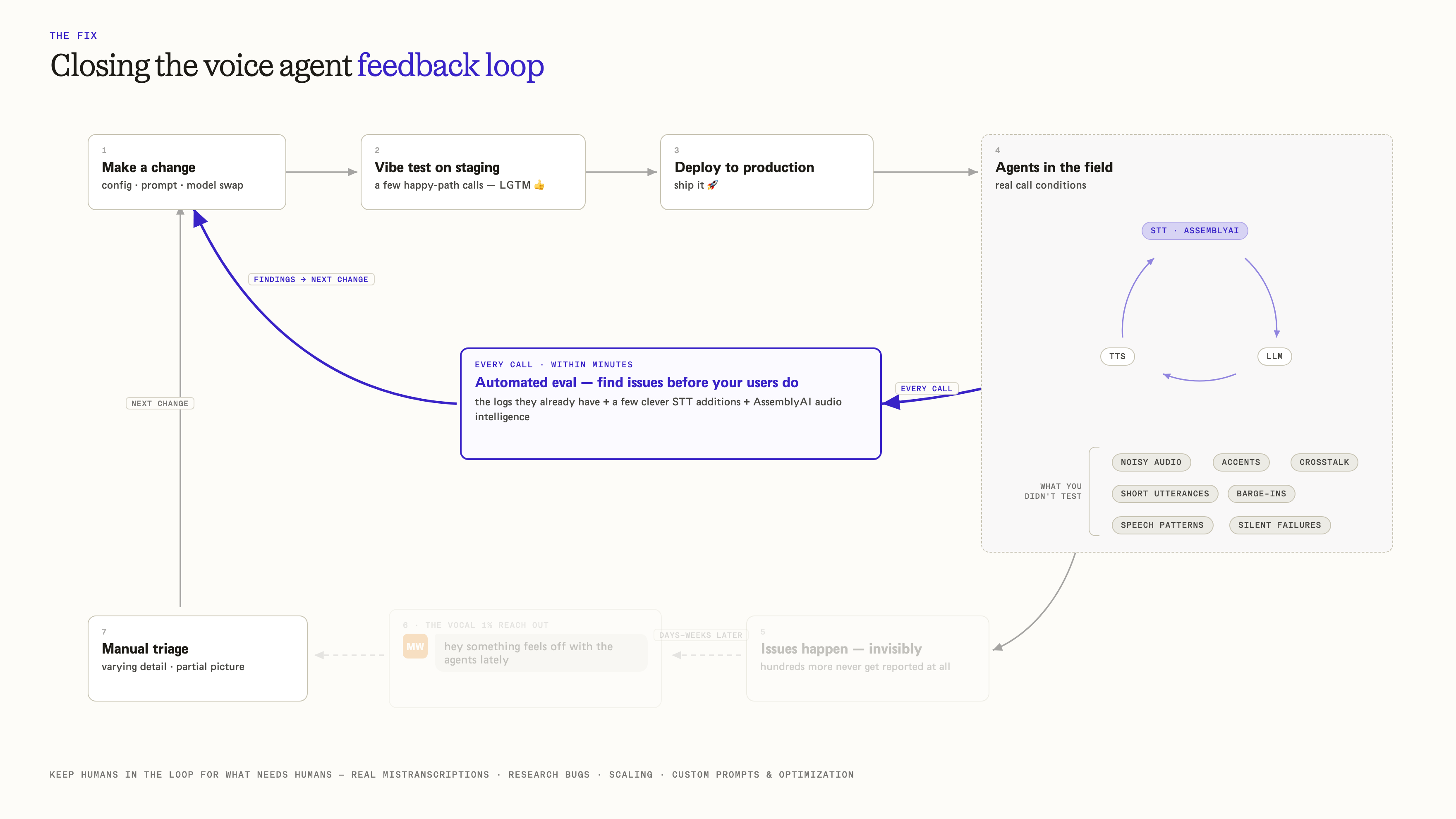
The feedback loop is broken
The pattern shows up over and over.
A team makes a change to their agent. They do a little vibe testing on staging. It looks good, so they ship it. The agent goes out into the field and starts taking real calls—and immediately runs into everything staging never showed them: noisy audio, strong accents, crosstalk, short utterances, people talking over the agent.
There's no good way to catch these problems early, so teams fall back on customer signals. They wait for one of the few vocal users who cares enough to reach out and say, "Hey, the agent's broken."
Even when a customer does reach out, the investigation is slow. In the best case they come with everything you'd need—transcripts, detailed logs, audio files ready to go. That's rare, and even then it isn't efficient or scalable. These aren't hard errors with codes and clear reasons. They're complex systems with a lot of moving parts and a lot of ways to quietly go wrong. After a long back-and-forth, the root cause might not even be speech-to-text. It could be text-to-speech, LLM orchestration, or network latency.
Which raises the question: what's a faster, more automated, more intelligent way to catch configuration mistakes before users do?
The goal: a self-serve diagnostic pipeline
There are great companies building agent observability tools, and this approach borrows ideas from all of them. But a lot of teams are too early in their journey to invest in a full platform. They want something they control and deploy themselves—something they can bolt onto the logging they already have, using a few extra tools from AssemblyAI.
That's what this pipeline is. The idea is almost boring on purpose: use the data you're already collecting, and let a fleet of small analysis jobs tell you what went wrong.
.png)
Here's the setup. Imagine 50 voice agent calls came in over the course of an hour—in this case, a patient-booking scenario—with AssemblyAI handling real-time speech-to-text. Each call already logs the things any agent should be emitting: when the agent connects, the config and parameters in use, partial and final transcripts as they arrive, voice activity detection, who was speaking and when, and events from the orchestrator. That's a lot of valuable signal.
At the top of the hour—on a cron job, or manually—a voice agent analysis fleet kicks off across all 50 calls at once.
How the pipeline works
For every call, concurrently, there are three steps, followed by one final synthesis step across the whole fleet.
Step one: retranscribe with Universal-3 Pro. The full audio recording runs through AssemblyAI's asynchronous API for prerecorded audio using the Universal-3 Pro model.
Why retranscribe when there's already a real-time transcript? Because the prerecorded pass has context the live pass never did—the complete recording, separated speakers per channel, and no real-time latency constraint. That makes it possible to compare the two transcripts, and if the asynchronous transcript differs from the real-time one, that difference is itself a signal worth digging into.
Step two: summarize with LLM Gateway. The async transcript goes to LLM Gateway with a prompt for a quick summary: what information was collected, whether the booking succeeded, and the overall outcome.
Step three: score against a rubric. A second LLM Gateway request takes in everything text-based available at this point—the live transcript, all the logs, the ground-truth async transcript, and the summary from step two. The prompt is a diagnostic rubric that asks where the live agent went wrong, looking for interruptions, split sentences, dropped digits, the agent mishearing something, slow turn-taking, and similar failure modes.
Step four: fleet synthesis. Once all 50 calls are scored, one final job aggregates every per-call diagnosis, folds in the CI/CD deployment history, and sends it all to LLM Gateway one last time to answer the single question that matters: if anything, what went wrong with these agents?
Where Render comes in
The analysis runs as a chained Render Workflow, one per call, all kicked off at the same time. Each call is a parent task—process_call—with three child tasks chained in order: transcribe, summarize, score. For every task run, Render spins up a fresh container, executes it, and tears it down, so each step gets its own compute on demand. Each step also has its own retry policy: if the summarize step fails, it retries from summarize, not all the way back at transcription.
After all 50 calls are scored, a final standalone task—fleet synthesis—queries the per-call diagnostics out of Postgres and writes the report.
Add it up and that's 50 parent tasks, 150 child tasks, and one final analysis task: 201 total task runs, all handled by a single Render Workflow Service.
What it caught
The whole point is the report at the end, and it delivered.
The synthesis step flagged that a recent deployment had likely caused a major endpointing regression: phone number and entity capture failures jumped from 7% to 83%. It laid out the reasons, the deployment correlation, and—best of all—a concrete recommendation.
There was no need to roll back the entire deploy. The culprit was min turn silence, the setting that decides when a speaker's turn is over, and it had been set too low. The agent was cutting users off mid-sentence. The fix was to bump that one value back up.
The takeaway
The signal to catch this mistake was already sitting in the logs. The pipeline just made it surface on its own, before a single frustrated user had to pick up the phone and report it.
That's the part worth internalizing. You don't need a full observability platform on day one to close the feedback loop. If you're already logging your calls and keeping your audio, you're most of the way there. A handful of asynchronous transcriptions, a couple of well-prompted LLM Gateway calls, and something like Render to fan the work out—and you've got a diagnostic loop that catches configuration mistakes proactively.
That frees up the humans for the problems that actually need them: real mistranscriptions, hallucinations, bugs, and scaling questions worth escalating.
For teams that want to build something like this, the demo source code is available here. Get started and create an AssemblyAI account with $50 in free credits here.

