AI in learning management systems: 5 high-impact use cases
Five voice AI use cases for AI-powered learning management systems: accessibility, course search, comprehension scoring, and smarter study tools.


Every LMS vendor now has an AI story. Most of them are about text.
Course recommendations from enrollment data, quiz generation from written material, a chatbot over the help center — useful, but all built on the content that was already machine-readable. Meanwhile the single largest body of content in any learning platform sits in a format nobody has indexed: recorded lectures, seminar captures, discussion sections, language-practice sessions, training videos. A mid-size university puts thousands of hours of spoken instruction into its LMS every term, and to the platform it's a blob with a filename.
That's the gap. An AI-powered learning management system that can't read its own audio is running AI over a fraction of what it holds.
This post is for people evaluating or building one. It starts with what "AI-powered" should actually mean when you're comparing platforms, then walks through the five voice AI capabilities that have the clearest impact on learning outcomes and platform economics.
What makes a learning management system "AI-powered"?
An AI-powered learning management system uses AI models to do work that previously required manual effort from instructors, administrators, or students — generating captions and transcripts, tagging and indexing course content for search, scoring open-ended responses, surfacing struggling learners, and producing study material from source content. The meaningful distinction between platforms isn't whether they have AI features; it's which parts of the content they can actually process and how much of the pipeline runs without a human in it.
If you're evaluating platforms, the questions that separate them:
| Question to ask | What a weak answer looks like | What a strong answer looks like |
|---|---|---|
| Does it process audio and video natively? | Captions via a third-party upload-and-wait workflow | Transcription runs automatically on upload; transcripts are first-class objects |
| Is spoken content searchable? | Search covers titles, descriptions, and PDFs only | Full-text search inside lectures, with timestamped jump-to-moment results |
| How many languages does it handle? | English, with "more coming" | Named language list, plus behavior on mixed-language audio |
| Can it distinguish speakers? | One undifferentiated transcript per recording | Speaker-labeled transcripts, so instructor and student turns are separable |
| Where does the data go? | Unclear subprocessors, no residency options | Named processors, documented retention, EU residency available |
Notice how many of those come back to the same underlying capability. Captions, search, speaker attribution, and multilingual support are all downstream of one thing: whether the platform can turn speech into accurate, timestamped, structured text. That's the layer worth understanding before you compare feature grids.
Why lecture transcription is the foundation layer
Lecture transcription converts recorded instruction into timestamped, searchable text, and it's the prerequisite for nearly every other AI feature an LMS can offer. Captions, in-video search, auto-generated study guides, comprehension scoring, and content tagging all read from the transcript. Get it wrong and every feature built on top inherits the error.
Lecture audio is genuinely harder than it looks. A single recording can include a lecturer pacing away from the mic, a student question from the back row that's barely audible, domain vocabulary that no general model has seen ("cholecystectomy," "heteroskedasticity," "Gödel"), and — in language courses and international programs — two languages in the same sentence.
AssemblyAI's flagship model for recorded audio is Universal-3.5 Pro (universal-3-5-pro), at $0.21/hr. Three things about it matter specifically for education audio:
Contextual prompting. You can prime the model with the course syllabus, the reading list, the instructor's name, and the term glossary before transcribing. The published measurements are substantial: against the same audio, a detailed contextual prompt cut overall word error rate by 20.7%, name-entity errors by 48.6%, and specialist-terminology errors by 42.8%. A 14-week course has a far richer context document than most use cases, which is exactly the situation contextual prompting is built for — the technical vocabulary that wrecks generic speech-to-text is what it fixes. One caveat worth carrying: scope the terms you supply to what a given recording could plausibly contain, because an over-broad list can push the model toward a term you supplied and away from the one that was actually said.
Native code-switching across 18 languages. English, Spanish, French, German, Italian, Portuguese, Arabic, Danish, Dutch, Finnish, Hebrew, Hindi, Japanese, Mandarin, Norwegian, Swedish, Turkish, and Vietnamese — handled in one pass, no configuration, each word transcribed in the language it was spoken. On a five-language code-switching benchmark, it averages 7.69 normalized WER against 8.77 for ElevenLabs Scribe v2 and 12.22 for Deepgram Nova-3 Multilingual. For language-learning platforms and institutions with international cohorts, this is the difference between a usable transcript and a mess. Full detail is in the Universal-3.5 Pro release post.
Speaker diarization built into the model. Universal-3.5 Pro produces the transcript and the speaker turns jointly rather than clustering after the fact, optimized for cpWER rather than DER, with an average cpWER of 30.17. In a seminar recording, that's what separates the instructor's explanation from a student's question — which turns out to matter a great deal for participation analytics and for study guides that shouldn't quote a student's wrong answer as fact.
For live sessions — virtual classrooms, office hours, language-practice conversations — Universal-3.5 Pro Realtime (universal-3-5-pro, $0.45/hr base) runs over a WebSocket at wss://streaming.assemblyai.com/v3/ws and delivers the same 18-language coverage with live speaker labels. If you need the background on how streaming speech-to-text differs from batch, that's the place to start.
Broader language coverage at lower cost is available through Universal-2 (99+ languages, $0.15/hr), which is a reasonable fit for institutions whose archive spans languages outside the Universal Pro line.
Test Universal-3.5 Pro on real lecture recordings — speaker labels, 18 languages, and contextual prompting for course-specific vocabulary. Free API key to start.
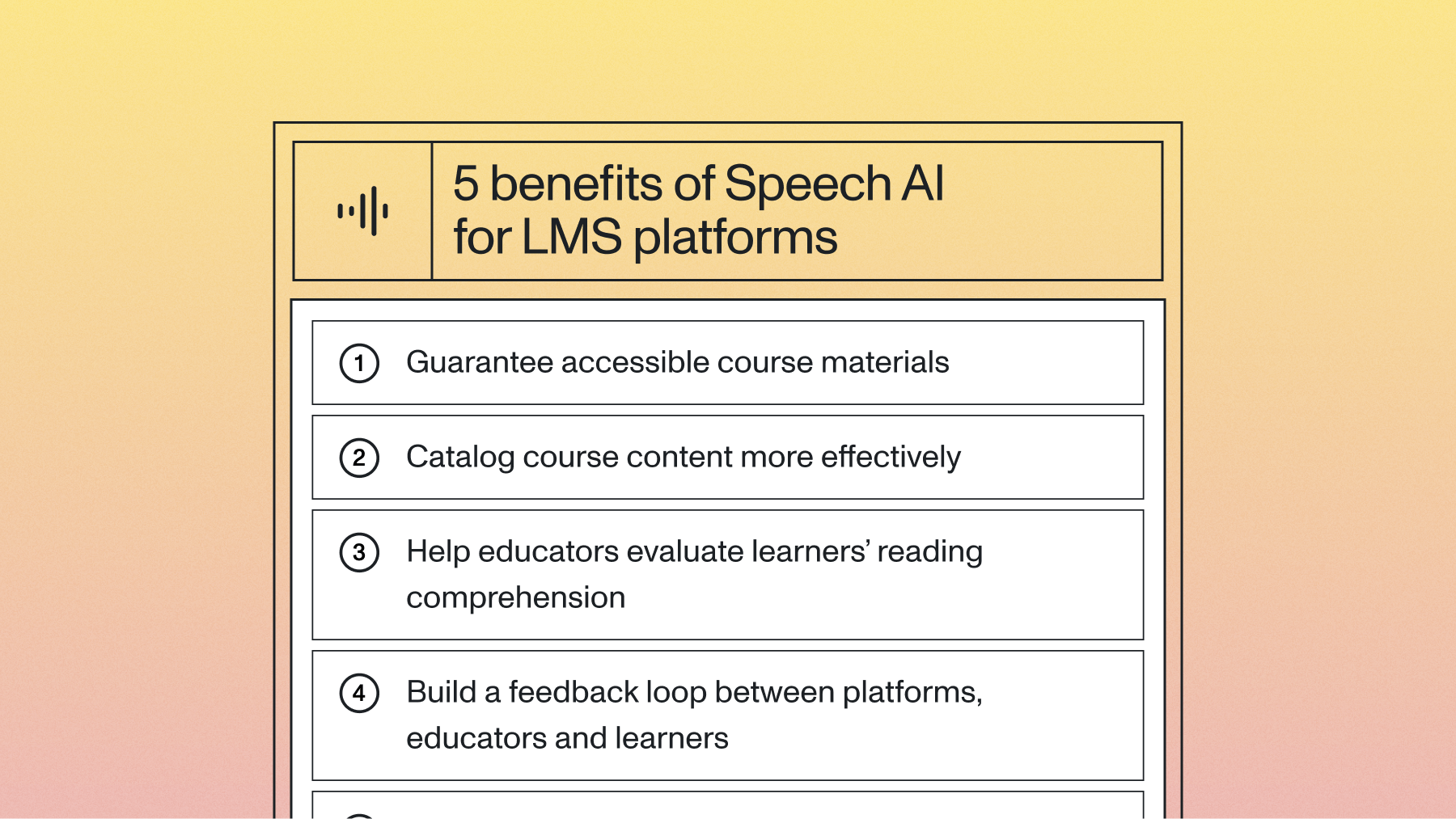
5 voice AI use cases for AI-powered learning management systems
Here are the five that consistently produce measurable change, ordered roughly by how quickly institutions see results.
1. Accessibility and inclusion that doesn't require a request queue
Automatic transcription and captioning makes every piece of spoken course content usable by deaf and hard-of-hearing learners, non-native speakers, and anyone studying in an environment where audio isn't practical — which, based on how students actually work, is most of them.
The operational change matters as much as the compliance one. Most institutions run accessibility as a request-and-fulfill process: a student registers a need, a coordinator queues the content, a vendor turns it around in days. Automatic transcription inverts it. Every recording is captioned on upload, so accommodation stops being something a student has to ask for and starts being the default state of the platform.
Accuracy carries real weight here, because a caption that garbles the one technical term the lecture was about is worse than no caption — it teaches the wrong thing confidently. This is the argument for spending on the transcription layer rather than treating it as commodity plumbing. We went deep on the accuracy question in how accurate is speech-to-text in 2026.
2. Course cataloguing and search inside the content
Once lectures are transcripts, the LMS search box stops searching filenames and starts searching what was said. A student typing "confidence interval" gets timestamped hits inside week 7's lecture at 34:12, not a list of course titles.
The cataloguing side is just as valuable to administrators. Running topic detection and entity recognition over transcripts through the Speech Understanding API auto-tags every recording with the concepts it covers, which makes three things possible that were previously manual projects: mapping actual delivered content against the published curriculum, finding redundancy across courses and departments, and building prerequisite chains from what's genuinely taught rather than what the catalog claims.
One institution-scale observation worth naming: the gap between the syllabus and the delivered lecture is usually larger than anyone expects, and it's invisible until the content is indexed.
3. Reading-comprehension and spoken-response evaluation
This is where voice AI stops supporting instruction and starts doing some of it. Having a student read a passage aloud or answer a question verbally, then transcribing and scoring the response, produces assessment data that written quizzes can't reach — fluency, pace, hesitation, pronunciation, and whether the student can explain a concept in their own words rather than recognize the right multiple-choice option.
For early-literacy programs, oral reading fluency is the assessment, and it's traditionally been a one-on-one activity that consumes an enormous share of teacher time. Automating the capture-and-score loop lets it run weekly instead of termly. For language learning, transcribing the learner's speech and comparing it against the target gives specific, per-phoneme feedback within seconds.
Children's speech is also the hardest audio in this category — higher pitch, different phonetics, incomplete articulation, unpredictable pacing — and the variance between models is much larger here than on adult speech. If you're building for K-12 or early literacy, make it the majority of your evaluation set rather than a spot check.
The design caution: treat model output as a signal for the instructor, not a grade. Accented speech, speech differences, and young voices all deserve a human in the loop before a score becomes a transcript entry.
4. A feedback loop across platform, educator, and learner
Transcripts turn classroom audio into a measurable signal, and that signal closes loops that used to depend entirely on end-of-term surveys.
For educators, speaker-labeled transcripts of seminars and discussion sections quantify participation — who spoke, for how long, how often the instructor talked versus the students, which questions generated discussion and which landed flat. Speaker diarization is what makes this possible at all; without it, a discussion transcript is one undifferentiated wall of text.
For learners, sentiment and topic analysis across office hours and help-channel audio shows where a cohort is stuck before the midterm reveals it. If forty students ask about the same concept in week 6, that's actionable in week 6.
For the platform itself, aggregated content analysis reveals which material formats correlate with completion and which lectures get abandoned at minute nine. That's product data an LMS vendor can act on, and it comes free with transcription you were doing anyway.
5. Study tools generated from what was actually taught
The last use case is the one students notice. Feeding lecture transcripts to an LLM through the LLM Gateway generates summaries, key-concept lists, flashcards, practice questions, and structured notes — all grounded in the specific lecture rather than in the model's general knowledge of the subject.
That grounding is the whole point. A generic AI study tool will happily generate quiz questions about thermodynamics that the instructor never covered and won't be on the exam. A tool reading the transcript generates questions about what was taught, in the framing the instructor used, with timestamps back to the source. Pair it with the summarization patterns in automatically summarize audio and video at scale and you have a study-guide pipeline that runs on upload.
The honest caveat: students will use these tools to avoid watching the lecture. Some of that is fine — a student reviewing week 3 before a week 11 exam shouldn't have to rewatch 50 minutes. Some of it isn't. Platforms that link every generated claim back to its timestamp at least make the tradeoff visible.
Upload a lecture recording and watch transcripts, speaker labels, and topic tags come back. No integration or account setup required to try it.
How do you add voice AI to an existing LMS?
You add voice AI to an existing LMS by calling a speech-to-text API from your media upload pipeline, storing the returned transcript alongside the media object, and then building features that read from the transcript rather than the audio. No model training, no infrastructure, and no change to how content gets into the platform.
The usual implementation order:
- Transcribe on upload. When a recording lands, send it to the API and store the timestamped transcript and speaker labels against the content record. Turn on diarization for anything with more than one voice.
- Ship captions first. Generate WebVTT from the transcript and attach it to the player. This is the lowest-effort, highest-visibility win, and it gets stakeholders bought in.
- Index the transcript. Push transcript text into whatever search index the LMS already runs, with timestamps preserved so results can deep-link into the recording.
- Layer understanding. Add topic detection, entity recognition, and sentiment where they map to a feature you're actually shipping. Skip the ones that don't.
- Add generation last. Study guides, flashcards, and summaries are the most visible features and the most dependent on everything above being right. Build them once the transcripts are trustworthy.
A few things worth planning for rather than discovering. Pricing is per second with no minimums, so pilot costs are small and predictable, but a full archive backfill is a real line item — model it before you commit, and note that the constraint there is usually throughput rather than price. Pre-recorded transcription runs a fixed number of jobs in parallel per account, and anything you submit beyond that is queued and processed automatically as earlier jobs finish rather than rejected, so a backfill degrades to latency rather than errors. Higher limits are available on request at no additional cost, which is worth arranging before you start a term's worth of archive rather than during it. EU data residency is available through api.eu.assemblyai.com at the same price, which matters for European institutions under GDPR. And if your platform's ASR knowledge is thin, what is automatic speech recognition is a decent primer for the team, with current rates on the pricing page.
The part nobody's built yet
Everything above treats spoken content as an archive to be processed. The more interesting direction is treating it as a conversation the platform can join.
Real-time transcription accurate enough to run inside a live class changes what the LMS is during instruction rather than after it. A seminar where the platform is tracking which concepts came up and which students haven't spoken in twenty minutes. A language-practice session where feedback arrives in the pause, not the next day. Office hours where the questions get clustered live and the instructor sees "six people have now asked this" on their second monitor.
None of that is blocked on model capability anymore — the streaming models are fast enough and accurate enough today, and they now take direction from the application, so the model can know the course glossary before the first word is spoken. It's blocked on product imagination and, more honestly, on institutional comfort with a system that listens to a classroom. That's a policy conversation worth having deliberately rather than discovering after someone ships it.
The platforms that work through that question carefully are going to have a very different product in three years than the ones still generating quiz questions from PDFs.
Transcription, speaker labels, topic detection, and summarization through one API — per-second pricing, no minimums, EU data residency available. Start free.
Frequently asked questions
What is an AI-powered learning management system?
An AI-powered learning management system is an LMS that uses AI models to automate work that previously required manual effort — captioning and transcribing recorded content, tagging and indexing courses, scoring open-ended and spoken responses, flagging at-risk learners, and generating study material from source lectures. The practical difference between platforms is how much of the institution's content the AI can actually read. Platforms that can't process audio and video are running AI over a small fraction of what they hold.
How does lecture transcription work in an LMS?
Lecture transcription works by sending a recording to a speech-to-text API from the platform's media pipeline, then storing the returned timestamped transcript and speaker labels alongside the content record. Modern models handle this without training or configuration — AssemblyAI's Universal-3.5 Pro transcribes at $0.21/hr and supports contextual prompting, so you can prime it with the course syllabus and term glossary to improve accuracy on domain vocabulary. Captions, in-video search, and study tools then read from the stored transcript rather than the audio.
Can AI transcription handle lectures in multiple languages?
Yes. Universal-3.5 Pro supports 18 languages with native code-switching, which means a recording that moves between two languages mid-sentence is transcribed with each word in the language it was actually spoken — no configuration and no separate pass. That covers language courses, international programs, and multilingual cohorts. For archives spanning languages outside that set, Universal-2 covers 99+ languages at $0.15/hr.
Is AI transcription accurate enough for accessibility compliance?
Accuracy on current flagship models is high enough that automatic captions serve as the default for most recorded course content, but institutions with formal accessibility obligations typically keep a human review step for high-stakes material, and many apply an internal accuracy bar you should ask about specifically. The stronger argument for a quality model is pedagogical rather than legal: a caption that garbles the one technical term the lecture was about teaches the wrong thing confidently. Contextual prompting with the course glossary substantially reduces exactly those errors.
What's the difference between AI transcription and AI-driven learning analytics?
Transcription converts spoken content into text; learning analytics interprets data about learner behavior and performance. Transcription is the layer that makes spoken content available to analytics at all — participation rates, concept coverage, and question clustering can't be measured from an audio file, only from a speaker-labeled transcript of one. In practice, most useful analytics on classroom audio is transcription plus a downstream model reading the result.
How much does it cost to add transcription to a learning platform?
AssemblyAI charges per second with no minimums or commitments: $0.21/hr for Universal-3.5 Pro on recorded audio, $0.45/hr base for Universal-3.5 Pro Realtime on live sessions, and $0.15/hr for Universal-2 where broader language coverage matters more than flagship accuracy. Ongoing costs for a typical course catalog are modest; the line item to model carefully is a one-time backfill of an existing archive, where the binding constraint is usually how many jobs you can run in parallel rather than the per-hour rate.
Lorem ipsum dolor sit amet, consectetur adipiscing elit, sed do eiusmod tempor incididunt ut labore et dolore magna aliqua. Ut enim ad minim veniam, quis nostrud exercitation ullamco laboris nisi ut aliquip ex ea commodo consequat. Duis aute irure dolor in reprehenderit in voluptate velit esse cillum dolore eu fugiat nulla pariatur.
Related posts