Real-Time Transcription in Python with Universal-3.5 Pro Realtime: Build in 5 Minutes
Build real-time transcription in Python with streaming WebSockets and Universal-3.5 Pro Realtime. Includes setup, working code, turn detection, and production configuration.

.png)

Real-time transcription is the process of converting speech-to-text as you speak, not after you're done talking. This means you get transcripts in under 300 milliseconds while the conversation continues.
Think of it like live TV captions—words appear on screen as people talk.
Your Python application sends small chunks of audio (20–100 milliseconds each) through a WebSocket connection and receives text back immediately.
Here's what makes real-time transcription different from regular transcription:
- WebSocket connections: Keep an open channel between your app and transcription service instead of sending complete files
- Streaming sessions: Process audio continuously until you close the connection
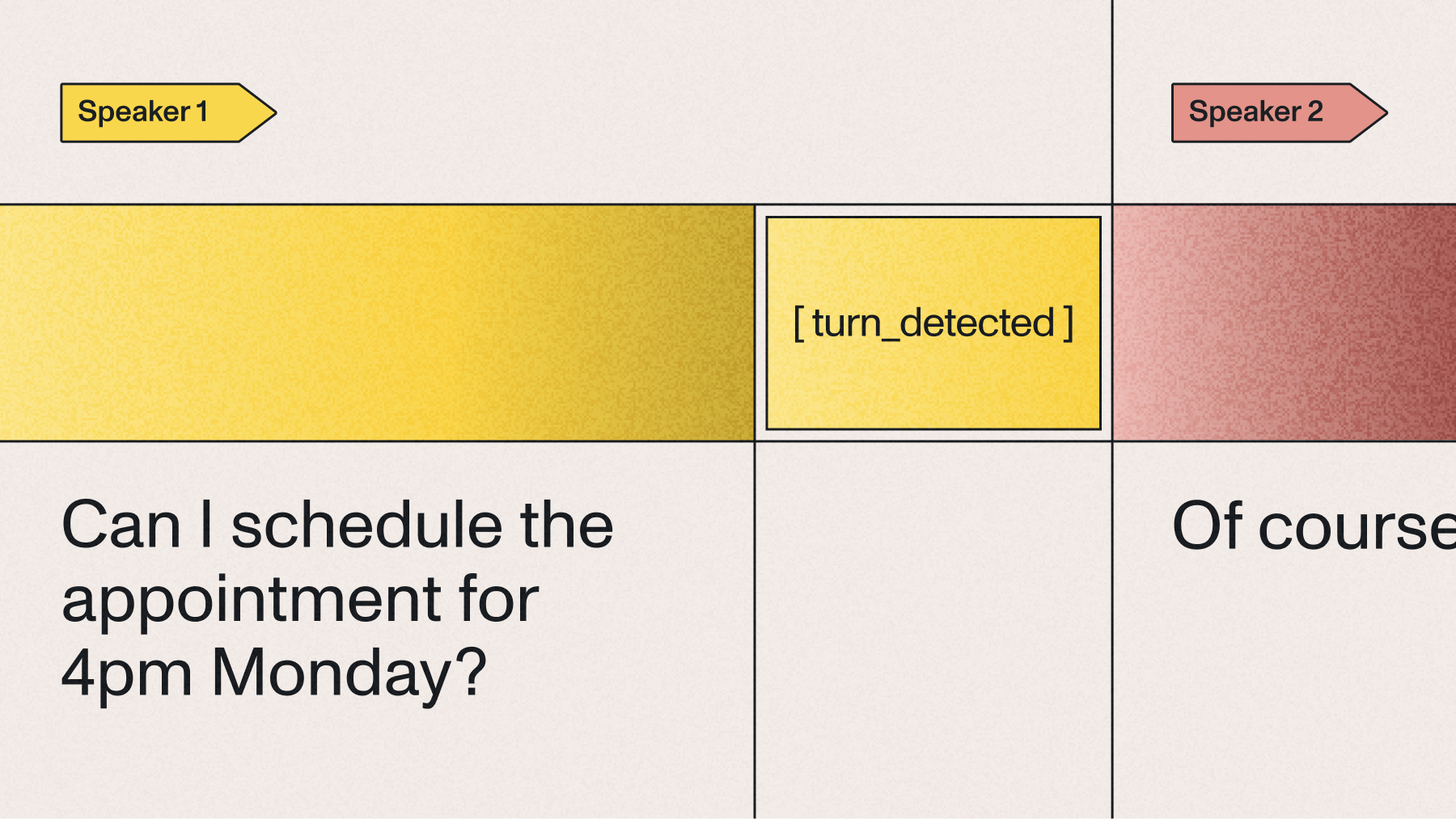
- Turn objects: Data structures that contain transcript text, timing info, and metadata about each speaking turn
- Voice activity detection: Automatically identifies when someone starts and stops speaking
When to use streaming transcription
You need real-time transcription when your application requires immediate responses to speech. Voice agents can't wait two seconds for transcripts without breaking conversation flow. Live captioning needs instant text to stay synchronized with speakers.
The best use cases include voice assistants, customer service bots, and meeting transcription where people interact with the text as it appears. If you're transcribing pre-recorded content like podcasts or videos, batch transcription works better since speed doesn't matter.
Before you start
You'll need Python 3.7 or higher and an AssemblyAI API key to access Universal-3.5 Pro Realtime. Sign up for a free account to get your API key—it takes less than a minute.
Universal-3.5 Pro Realtime costs $0.45 per hour of audio processed. Free accounts can start up to 5 new sessions per minute, which works fine for development. Paid accounts start with 100 new sessions per minute and unlimited concurrent connections.
Basic requirements:
- Python 3.7+: With pip package manager for installing libraries
- Microphone access: For capturing audio input from your system
- Internet connection: WebSocket connections need stable connectivity
- 4GB RAM minimum: For smooth real-time audio processing
Create an account to access your API key.
You'll use an API key to authenticate the Python SDK in this tutorial. Create an account to access Universal-3.5 Pro Realtime.
Set up your Python environment
Create a separate folder for your transcription project to keep packages organized. Virtual environments prevent conflicts between different Python projects on your system.
mkdir realtime-transcription
cd realtime-transcription
python -m venv venv
Activate your virtual environment before installing packages:
# On macOS/Linux
source venv/bin/activate

# On Windows
.\venv\Scripts\activate
Install the required packages for real-time transcription:
pip install assemblyai pyaudio python-dotenv- assemblyai: Python SDK for the Universal-3.5 Pro Realtime API
- pyaudio: Handles microphone input and audio streaming
- python-dotenv: Manages environment variables securely
Your system needs audio processing libraries that vary by operating system:
Create a .env file in your project folder to store your API key:
ASSEMBLYAI_API_KEY=your_api_key_hereAdd .env to .gitignore so you don't accidentally commit your credentials:
echo ".env" >> .gitignore
echo "venv/" >> .gitignore
Implement real-time transcription with Universal-3.5 Pro Realtime
Universal-3.5 Pro Realtime processes audio through WebSocket connections that the Python SDK manages automatically. You focus on sending audio and handling the transcripts that come back.
Create a file called transcribe.py and add these imports:
import os
from dotenv import load_dotenv
import pyaudio
from assemblyai.streaming.v3 import (
    RealTimeEvents, RealTimeParameters, RealTimeSessionParameters, RealTimeTranscriber, RealTimeTranscriberOptions
)

load_dotenv()
API_KEY = os.getenv('ASSEMBLYAI_API_KEY')
Understand Universal-3.5 Pro Realtime transcription responses
Universal-3.5 Pro Realtime returns transcripts as Turn objects that represent complete speaking segments. Each Turn contains formatted text with punctuation, word timing, and metadata about the transcription state.
The model uses punctuation to detect when someone finishes speaking. This means you get properly formatted sentences instead of run-on text.
The end_of_turn property tells you when someone finished a complete thought. When this is true, the transcript is final and won't change. When it's false, more text might come for this speaking turn.
Key differences in Universal-3.5 Pro Realtime:
- Partial turns: Appear when there's silence but no punctuation—they won't be revised
- Final turns: Include punctuation and proper formatting
- Immutable transcripts: Once sent, partial transcripts never change
Set up event handlers
Event handlers are functions that run when specific things happen during transcription. You need to define these before creating your client so they're ready when events occur.
def on_begin(client, event):
    print(f"Session started - ID: {event.id}")
    print("Speak into your microphone...\n")

def on_turn(client, event):
    if event.end_of_turn:
        print(f"✓ {event.transcript}")
    else:
        print(f"... {event.transcript}", end='\r')

def on_terminated(client, event):
    print(f"\nSession ended - {event.audio_duration_seconds}s processed")

def on_error(client, error):
    print(f"Error: {error}")
The on_turn handler shows you both partial and final transcripts. Voice agents typically wait for end_of_turn: true before generating responses since these transcripts include proper punctuation and formatting.
Create and run the streaming client
The StreamingClient handles WebSocket connections and audio processing automatically. You configure it with your preferences and let it manage the technical details.
FRAMES_PER_BUFFER = 800  # 50ms at 16kHz

def start_transcription():
    client = RealTimeTranscriber(
        RealTimeTranscriberOptions(),
        api_key=API_KEY,
    )

    client.on(RealTimeEvents.Begin, on_begin)
    client.on(RealTimeEvents.Turn, on_turn)
    client.on(RealTimeEvents.Termination, on_terminated)
    client.on(RealTimeEvents.Error, on_error)

    # Configure transcription settings
    params = RealTimeParameters(
        speech_model="universal-3-5-pro",
        sample_rate=16000,
        format_turns=True
    )

    pa = pyaudio.PyAudio()
    mic = None
    try:
        # Connect to Universal-3.5 Pro Realtime
        client.connect(params)

        # Start streaming from microphone
        mic = pa.open(format=pyaudio.paInt16, channels=1, rate=16000,
                      input=True, frames_per_buffer=FRAMES_PER_BUFFER)
        while True:
            client.stream(mic.read(FRAMES_PER_BUFFER,
exception_on_overflow=False))

    except KeyboardInterrupt:
        print("\nStopping transcription...")
    finally:
        if mic is not None:
            mic.stop_stream()
            mic.close()
        pa.terminate()
        client.disconnect(terminate=True)

if __name__ == "__main__":
    start_transcription()
The speech_model="universal-3-5-pro" parameter selects Universal-3.5 Pro Realtime for fast voice agent performance. Setting sample_rate=16000 matches your microphone input for accurate transcription.
Complete working example
Here's everything combined into a working transcription application:
import os
from dotenv import load_dotenv
import assemblyai as aai
from assemblyai.streaming.v3 import (
    StreamingClient, StreamingClientOptions, StreamingEvents, StreamingParameters
)

load_dotenv()
aai.settings.api_key = os.getenv('ASSEMBLYAI_API_KEY')

def on_begin(client, event):
    print(f"Session started - ID: {event.id}")
    print("Speak into your microphone...\n")

def on_turn(client, event):
    if event.end_of_turn:
        print(f"✓ {event.transcript}")
    else:
        print(f"... {event.transcript}", end='\r')

def on_terminated(client, event):
    duration = event.audio_duration_seconds
    print(f"\nSession ended - {duration:.1f} seconds processed")

def on_error(client, error):
    print(f"Error: {error}")

def start_transcription():
    options = StreamingClientOptions(
        api_key=aai.settings.api_key,
        api_host="streaming.assemblyai.com"
    )

    client = StreamingClient(options)

    client.on(StreamingEvents.Begin, on_begin)
    client.on(StreamingEvents.Turn, on_turn)
    client.on(StreamingEvents.Termination, on_terminated)
    client.on(StreamingEvents.Error, on_error)

    params = StreamingParameters(
        speech_model="universal-3-5-pro",
        sample_rate=16000,
        format_turns=True,
        min_turn_silence=100,
        max_turn_silence=1200
    )

    try:
        client.connect(params)

        print("Initializing microphone...")
        mic_stream = aai.extras.MicrophoneStream(sample_rate=16000)

        print("Streaming to Universal-3.5 Pro Realtime...")
        client.stream(mic_stream)

    except KeyboardInterrupt:
        print("\n\nStopping...")
    finally:
        client.disconnect(terminate=True)

if __name__ == "__main__":
    print("Real-time Transcription with Universal-3.5 Pro Realtime")
    print("-" * 45)
start_transcription()Configure advanced options
Production applications need specific configurations to balance speed, accuracy, and user experience. Universal-3.5 Pro Realtime provides parameters that control how it detects when someone stops speaking and formats the text.
Configure turn detection
Universal-3.5 Pro Realtime uses punctuation to detect when someone finishes speaking, not confidence scores like other systems. When silence reaches min_turn_silence (default 100ms), it transcribes the audio and looks for periods, question marks, or exclamation points.
If it finds punctuation, you get a final transcript with end_of_turn: true. Without punctuation, you get a partial transcript and the system keeps listening until max_turn_silence (default 1200ms) forces an end.
params = StreamingParameters(
    speech_model="universal-3-5-pro",
    sample_rate=16000,
    min_turn_silence=150,  # Wait a bit longer for better accuracy
    max_turn_silence=2000  # Allow longer pauses for thinking
)
Tuning silence parameters:
- Too low min_turn_silence (under 100ms): Splits phone numbers and email addresses
- Too high min_turn_silence (over 300ms): Makes the system feel slow
- Too low max_turn_silence: Cuts off slow speakers
- Too high max_turn_silence: Creates awkward pauses in conversations
You can also force turns to end based on external signals like button presses:
# End turn immediately when user presses stop
def on_button_press():
    client.send({"type": "ForceEndpoint"})
Update configuration mid-stream with keyterms
The UpdateConfiguration message lets you change settings without reconnecting. This works great for voice agents that handle different conversation stages requiring different vocabulary.
A medical intake bot needs different keyterms when collecting patient information versus discussing symptoms:
def update_keyterms_for_stage(client, stage):
    stage_keyterms = {
        "identification": ["account number", "member ID", "date of birth", "policy number"],
        "medical": ["metformin", "hypertension", "MRI scan", "blood pressure"],
        "payment": ["credit card", "expiration date", "billing address"],
    }
    keyterms = stage_keyterms.get(stage, [])

    client.send({
        "type": "UpdateConfiguration",
        "keyterms_prompt": keyterms or None
    })
Clear keyterms when they're no longer relevant to prevent false matches:
# Remove medical terms after symptom discussion
config = {
    "type": "UpdateConfiguration",
    "keyterms_prompt": None
}
client.send(config)
You can adjust other settings mid-stream for specific interactions:
- Increase max_turn_silence when expecting long credit card numbers
- Decrease min_turn_silence for rapid-fire Q&A sessions
- Update prompt text to guide transcription for new topics
Control text formatting
Universal-3.5 Pro Realtime applies punctuation and capitalization as an integral part of its punctuation-based turn detection system. The formatting is built into the model's processing and cannot be disabled.
The format_turns parameter is not applicable to the universal-3-5-pro model:
# format_turns parameter has no effect on the universal-3-5-pro model
params = StreamingParameters(
    speech_model="universal-3-5-pro",
    sample_rate=16000,
    format_turns=True  # Not applicable to universal-3-5-pro
)
Voice agents receive formatted text with proper punctuation automatically. This enables accurate intent analysis and natural language processing without additional formatting steps.
Use temporary authentication tokens
Never put API keys directly in client-side code. Temporary tokens provide secure authentication without exposing your credentials. Generate tokens on your server and pass them to client applications.
Server-side token generation:
import os
from flask import Flask, jsonify
from assemblyai.streaming.v3 import RealTimeTranscriber, RealTimeTranscriberOptions

app = Flask(__name__)

@app.route('/get-token')
def get_token():
    client = RealTimeTranscriber(
        RealTimeTranscriberOptions(),
        api_key=os.getenv('ASSEMBLYAI_API_KEY'),
    )
    token = client.create_temporary_token(
        expires_in_seconds=600,
        max_session_duration_seconds=1800
    )
    return jsonify({'token': token})
Client-side usage with the token:
import requests
from assemblyai.streaming.v3 import RealTimeTranscriber, RealTimeTranscriberOptions

response = requests.get('https://your-server.com/get-token')
token = response.json()['token']

client = RealTimeTranscriber(RealTimeTranscriberOptions(token=token))
Real-time transcription use cases
Voice agents for customer service use Universal-3.5 Pro Realtime to handle account questions, payment processing, and technical support. The fast response times enable natural conversation flow that feels helpful rather than robotic.
Live captioning transforms meetings, conferences, and educational sessions by making content accessible in real-time. Universities report higher engagement when providing live captions for remote learning.
Common applications include:
- Meeting transcription: Automatic note-taking with speaker attribution
- Voice assistants: Hands-free control for smart devices and applications
- Customer service bots: Automated support that escalates complex issues to humans
- Healthcare documentation: Voice-powered clinical note-taking during patient visits
- IVR modernization: Natural speech instead of touch-tone menu navigation
Healthcare applications benefit from keyterms prompting for medical terminology accuracy. Doctors speak naturally during examinations while the system captures clinical notes with correct medication names and diagnostic codes. For teams building voice assistants and clinical healthcare documentation tools, real-time accuracy on names and numbers is what separates a usable transcript from a broken one.
Final words
"Real-time transcription with Universal-3.5 Pro Realtime gives you sub-300ms response times through punctuation-based turn detection and WebSocket connections." The Python SDK handles the complex audio processing while you focus on building your voice application features.
Universal-3.5 Pro Realtime's streaming transcription model delivers industry-leading accuracy with features like dynamic keyterms prompting and mid-stream configuration updates. AssemblyAI's Voice AI infrastructure scales automatically from development to production, handling millions of hours of audio without outages or performance issues.
Frequently asked questions
What audio sample rates work best with Universal-3.5 Pro Realtime?
Use 16kHz sample rate with mono linear16 PCM encoding for optimal accuracy and performance. Higher sample rates don't improve transcription quality but increase bandwidth usage unnecessarily.
How do partial transcripts differ from final transcripts in Universal-3.5 Pro Realtime?
"Partial transcripts have end_of_turn: false and appear when silence reaches min_turn_silence without terminal punctuation." Final transcripts have end_of_turn: true with complete punctuation—these never change once emitted.
Can I stream audio from files instead of a microphone?
Yes, replace MicrophoneStream with a custom function that reads audio files in chunks. Add delays between chunks to maintain real-time streaming pace and avoid overwhelming the API.
When should I disable text formatting in Universal-3.5 Pro Realtime?
The format_turns parameter is not applicable to Universal-3.5 Pro Realtime (the universal-3-5-pro model) as formatting is integral to its punctuation-based turn detection system. The model always returns formatted text with proper punctuation.
How do I handle WebSocket connection errors in production?
Implement retry logic with exponential backoff and connection health checks. Monitor for network interruptions and automatically reconnect with the same session parameters when connections drop.
Lorem ipsum dolor sit amet, consectetur adipiscing elit, sed do eiusmod tempor incididunt ut labore et dolore magna aliqua. Ut enim ad minim veniam, quis nostrud exercitation ullamco laboris nisi ut aliquip ex ea commodo consequat. Duis aute irure dolor in reprehenderit in voluptate velit esse cillum dolore eu fugiat nulla pariatur.
Related posts

.png)