Universal-3.5 Pro Realtime vs. Voice Agent API: Which one should you actually build on?
Voice agent API guide: compare voice agent APIs with U-3.5 Pro Realtime and learn how to evaluate latency, tool calling, speech accuracy, and production fit



Here's the decision that trips up most teams shipping a voice product: do you wire up the speech-to-text yourself and bring your own brain and mouth, or do you hand the whole conversation loop to a managed service and move on?
Both paths run on AssemblyAI—and, as of this release, on the same speech model. One gives you a single WebSocket that bundles speech-to-text, an LLM, and text-to-speech into one connection. The other gives you raw, low-latency transcription from AssemblyAI's new flagship realtime model and lets you own every layer above it. Picking wrong means either rebuilding orchestration logic you didn't need to, or boxing yourself out of the control you actually wanted.
So let's settle it. This is a developer-to-developer breakdown of the Voice Agent API versus Universal-3.5 Pro Realtime, AssemblyAI's latest streaming model—what each one does, what you can build on top, the code to get started, and a clear rule for choosing. No marketing fog. Just the tradeoffs.
What is a voice agent API, anyway?
A voice agent API is a service that handles the full back-and-forth of a spoken conversation so you don't have to glue the pieces together yourself.
Think about what a real-time voice agent has to do. It listens to a caller, figures out when they've stopped talking, transcribes what they said, sends that to a language model, gets a response, converts it to speech, and plays it back—all fast enough that the human on the other end doesn't feel the lag. Then it does it again. And it has to gracefully handle the caller cutting in mid-sentence.
The naive version of this is three separate services stitched together: a speech-to-text stream, an LLM call, and a text-to-speech engine. That works, but you're now the systems integrator. You own the turn-detection timing, the interruption logic, the reconnection handling when a socket drops, and three separate bills with three separate sets of logs to correlate when something breaks at 2am.
A managed voice agent API collapses that into one connection. You send audio, you get audio back, and the orchestration in between is handled for you.
One thing worth being precise about, because it gets muddled constantly: AssemblyAI's Voice Agent API is not a single speech-to-speech model. It orchestrates speech-to-text, an LLM, and text-to-speech behind one interface. That's a cascading architecture, and it's a deliberate design choice—it means you keep model-level control (swap the LLM, tune the prompt, pick a voice) instead of being locked into one opaque end-to-end model's personality and limits. The speech-to-text layer underneath it is Universal-3.5 Pro Realtime, the same model you'd build on directly if you went the bring-your-own-stack route.
How the Voice Agent API works
The whole thing runs over one WebSocket: wss://agents.assemblyai.com/v1/ws. You open the connection, configure the session, then stream audio in and receive audio out. One connection, one bill, one set of logs.
Underneath, four capabilities do the heavy lifting.
Turn detection
The agent needs to know when the caller is done talking before it responds. End-pointing too early and you interrupt people mid-thought; too late and the conversation feels sluggish. The Voice Agent API handles turn detection natively, watching the audio stream and deciding when a turn has actually ended rather than just pausing on the first silence.
Interruption handling
Real conversations aren't tidy. People talk over each other, change their minds, jump in before the agent finishes. When the caller starts speaking while the agent is mid-response, the API detects it and cuts the agent off—so the bot stops talking and starts listening, the way a human would. You don't write any of that barge-in logic yourself.
Tool calling
An agent that can only chat isn't worth much. The Voice Agent API supports tool calling, so your LLM can hit your APIs mid-conversation—look up an order, check appointment availability, create a ticket—and fold the result back into its spoken reply. You define the tools in the session config; the orchestration layer handles the round-trip.
Session resumption
Connections drop. Mobile networks are flaky. The API gives you a 30-second session-resume window, so if a socket dies you can reconnect and pick the conversation back up with context intact instead of starting cold. That one detail saves you a surprising amount of state-management code.
Put together, you get roughly 1-second end-to-end latency, a flat $4.50/hr price, unlimited concurrency, turn detection, interruption handling, tool calling, session resumption, and 34 voices to choose from. For comparison, OpenAI's Realtime API runs around $18/hr—so the cost gap here is real, not rounding.
The code
Here's the core of the official browser quickstart. Open the socket, send a session.update to configure the system prompt, greeting, voice, and tools, stream PCM audio in, and play back the audio you get out.
// Configure the agent once the socket is open
ws.onopen = () => ws.send(JSON.stringify({
  type: "session.update",
  session: {
    system_prompt:
      "You are a friendly support agent for an online bookstore. " +
      "Keep replies short and conversational. Use tools to look up orders.",
    greeting: "Hi! How can I help with your order today?",
    output: { voice: "ivy" }, // pick from 34 voices
    tools: [
      {
        name: "lookup_order",
        description: "Look up an order by its ID. Use when the caller references
an order.",
        parameters: {
          type: "object",
          properties: { order_id: { type: "string" } },
          required: ["order_id"],
        },
      },
    ],
  },
}));

ws.onmessage = ({ data }) => {
  const m = JSON.parse(data);
  switch (m.type) {
    case "session.ready":
      // Save m.session_id. Now it's safe to start streaming input.audio.
      break;

    case "reply.audio":
      // Base64 PCM of the agent speaking—pipe this to your speaker/telephony
layer.
      playReplyAudio(m.data);
      break;

    case "reply.done":
      // On barge-in, flush the buffered audio immediately.
      if (m.status === "interrupted") flushPlayback();
      break;

    case "tool.call":
      // The LLM wants to run a tool. Execute it and send tool.result back.
      handleToolCall(m);
      break;

    case "transcript.user":
    case "transcript.agent":
      // Live transcripts of both sides of the conversation.
      break;

    case "session.error":
      console.error(m.message);
      break;
  }
};
Audio is PCM16 mono at 24 kHz, base64-encoded. Once you've seen session.ready, stream the caller's audio in:
// pcmString is the raw PCM16 bytes as a binary string
ws.send(JSON.stringify({ type: "input.audio", audio: btoa(pcmString) }));
Tool calling is a tight round-trip. The arguments on tool.call arrive already parsed; the result you send back must be a JSON-encoded string, and you always echo the original call_id:
→ { type:"tool.call",   call_id:"c_123", name:"get_weather", arguments:{ location:"London" } }
← (run your tool)
→ { type:"tool.result", call_id:"c_123", result:"{\"temp_c\":22}" }
That's the entire surface area. Configure once, stream input.audio, handle reply.audio. The turn detection, interruption barge-in, and reconnection all happen inside the connection. Full setup details live in the Voice Agent API docs.
What you can build with it
The managed path shines anywhere the conversation loop matters more than custom infrastructure. A few concrete patterns.
Support and service agents
This is the obvious one. A voice agent that answers calls, authenticates the caller, looks up account state with tool calls, and resolves the common cases without a human—escalating the rest. Tool calling is what makes this real instead of a glorified IVR; the agent can actually do things, not just read a script. If you're weighing the architecture for a deployment like this, our guide on building AI voice agents walks through the moving parts.
Companions and coaching
Language tutors, interview practice, wellness check-ins, sales-call coaching. These lean hard on natural turn-taking and interruption handling—a coaching app that talks over you feels broken instantly. The low latency and native barge-in detection make the back-and-forth feel like a conversation instead of a walkie-talkie.
Clinical intake and screening
Pre-visit intake, symptom triage, appointment scheduling, post-discharge follow-up. Healthcare has two extra requirements: accuracy on clinical terminology and a defensible data-handling story.
On accuracy, Medical Mode significantly improves recognition of clinical terms—drug names, procedures, anatomy—that general models routinely mangle.
On data handling, here's the precise language that matters: AssemblyAI is a business associate under HIPAA and offers a Business Associate Addendum (BAA) for customers processing PHI. A BAA is available. That's the framing to use when you're scoping a healthcare deployment—not "HIPAA-compliant," which isn't a status a vendor confers on you.
When you'd reach for Universal-3.5 Pro Realtime instead
Now the other path. Universal-3.5 Pro Realtime is speech-to-text only—you bring your own LLM and your own text-to-speech. You get AssemblyAI's flagship transcription layer and own everything above it.
Why would you want that? Control and specialization. Some teams have already invested heavily in a particular LLM stack, a fine-tuned model, a custom RAG pipeline, or a specific TTS voice they've licensed. Some need transcription for something that isn't a two-way conversation at all—live captioning, real-time meeting notes, voice search, command parsing. Handing those to a full voice-agent orchestrator would be paying for a loop you don't run.
And this release is the reason the bring-your-own-stack path got a lot more attractive. Universal-3.5 Pro Realtime isn't just lower word error rate on clean speech; it's built around the things that actually wreck voice agents.
Context, not just transcription
The headline feature is context. A voice agent knows something no transcription model has ever had access to: it knows what it just asked. Pass that question in with agent_context and the model hears the reply through the lens of the question—so a mumbled email address resolves to user@assemblyai.com instead of "user at assembly a i dot com," and spelled-out account IDs, street addresses, and one-word confirmations finally come out right. Across a benchmark of 20,000 voice agent audio files, passing agent context cut word error rate by 10.2%, with the biggest gains on fabrications, hallucinations, and place-name and short-utterance errors.
Even when you pass nothing, the model no longer starts each turn cold—it keeps a short, rolling memory of the conversation and uses it as context for whatever comes next. On by default, nothing to configure.
It hears the speaker, not the room
voice_focus isolates the primary speaker and suppresses background speech—a TV or a passenger that would otherwise get transcribed as words and fire phantom interruptions. Use near_field for headsets and phones, far_field for rooms, kiosks, and drive-thrus. Speaker labels run live during the call, then re-cluster when the stream ends and send a single revision correcting any labels the model now knows were wrong—live labels during the call, async-grade accuracy within about half a second of it ending, up to 10 speakers.
18 languages, with steering
Universal-3.5 Pro Realtime runs in 18 languages at flagship accuracy, with mid-sentence code-switching so bilingual calls (Hinglish included) never pause for the model to catch up. When you already know the language—a support line in Osaka runs in Japanese—the new language_code parameter commits the model to one language instead of asking it to detect one, the cleanest way to head off wrong-language slips on short or ambiguous audio. Feed it your domain vocabulary with keyterm prompting and "metoprolol succinate" doesn't turn into something else.
Pick a mode, not a stack of flags
For live audio, open a WebSocket and pick a mode: min_latency for the fastest transcripts, balanced (the default) for strong all-around performance, or max_accuracy for noisy, far-field audio. End-of-turn detection reads tonality, pacing, and rhythm—not just silence—and lands around 300ms. On Pipecat's open STT benchmark of real agent conversations, Universal-3.5 Pro Realtime posts a market-leading pooled word error rate of 6.99%.
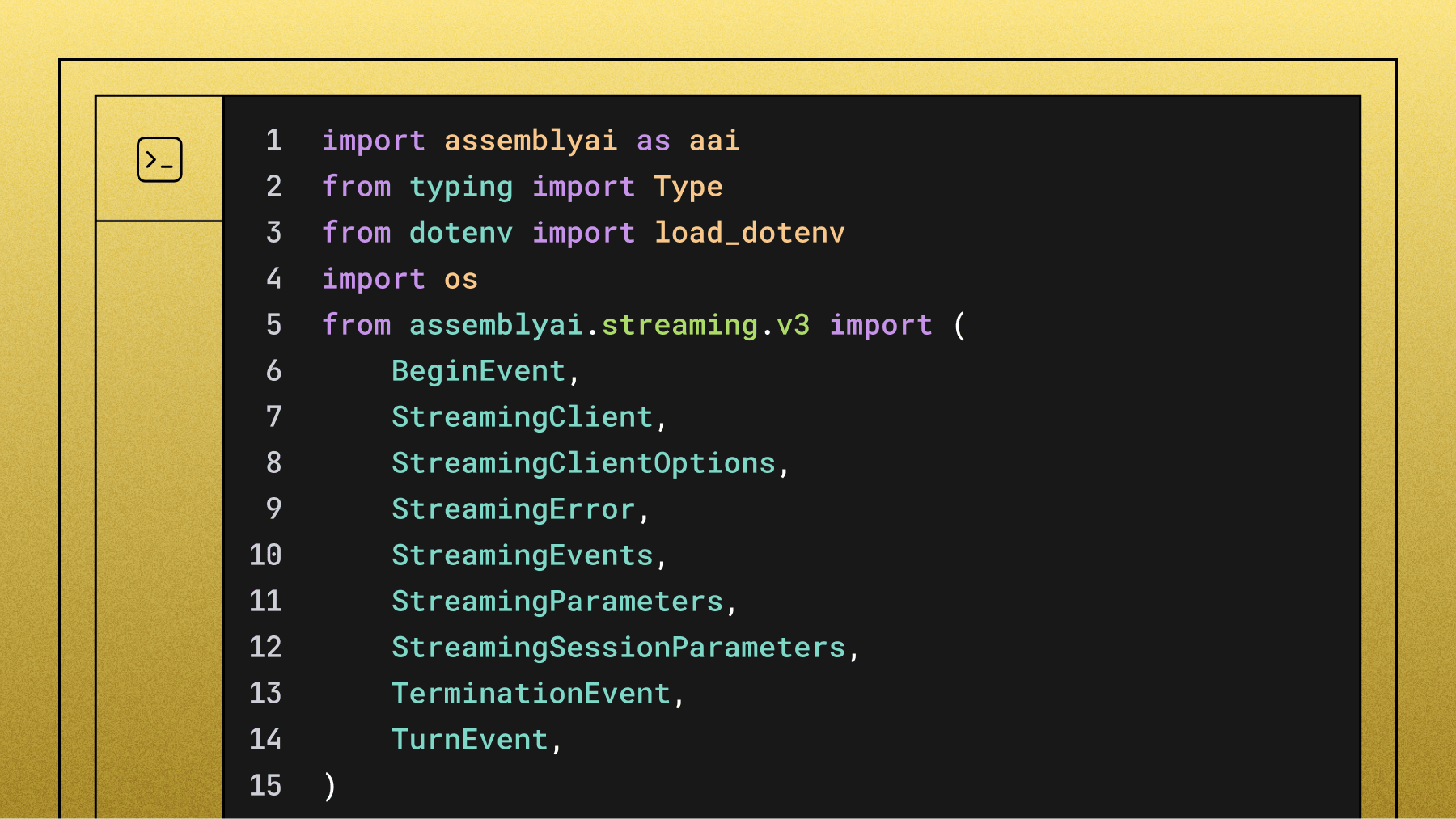
The streaming speech-to-text model connects over wss://streaming.assemblyai.com/v3/ws and takes 16 kHz PCM. Here's the Python SDK version—connect, stream the mic, and disconnect when you're done:
from assemblyai.streaming.v3 import (
    BeginEvent,
    StreamingClient,
    StreamingClientOptions,
    StreamingError,
    StreamingEvents,
    StreamingParameters,
    TerminationEvent,
    TurnEvent,
)

client = StreamingClient(
    StreamingClientOptions(
        api_key=api_key,
        api_host="streaming.assemblyai.com",
    )
)

client.on(StreamingEvents.Begin, on_begin)
client.on(StreamingEvents.Turn, on_turn)
client.on(StreamingEvents.Termination, on_terminated)
client.on(StreamingEvents.Error, on_error)

client.connect(
    StreamingParameters(
        speech_model="u3-rt-pro",
        sample_rate=16000,
    )
)

try:
    client.stream(
        aai.extras.MicrophoneStream(sample_rate=16000)
    )
finally:
    client.disconnect(terminate=True)
u3-rt-pro is the streaming Pro model, and Universal-3.5 Pro Realtime is the new default behind it—most teams get the upgrade automatically, so anything you've already built on it gets sharper today. Sessions bill by duration, so close them explicitly (disconnect(terminate=True)) when you're done, or they'll auto-close after 3 hours.
If you're building a voice agent from streaming STT plus your own LLM and TTS, our breakdown on choosing an STT API for voice agents covers what to actually evaluate, and the real-time speech-to-text primer covers the streaming fundamentals.
How to choose: the actual rule
Strip away the nuance and it comes down to one question: do you need to own the LLM and TTS layers, or do you just need a working conversation?
If you're building a two-way spoken conversation and you're happy letting AssemblyAI orchestrate the stack, use the Voice Agent API. You'll ship faster, you'll have one bill and one log stream, and you won't write turn-detection or barge-in code—and you still get Universal-3.5 Pro Realtime doing the transcription underneath.
If you need a custom LLM, a specific TTS voice, a non-conversational use case, or surgical control over every layer—including direct access to agent_context, voice_focus, language_code, and the latency modes—use the streaming model and build up from there.
Here's the three-way comparison, including OpenAI's Realtime API as the managed competitor most teams benchmark against.
The pattern that falls out: the Voice Agent API is the fastest route to a working conversation at a fraction of the managed-competitor cost, and Universal-3.5 Pro Realtime is the right call when you need to own the stack and want direct access to its context features.
More model, same price
If you're building on Universal-3.5 Pro Realtime directly, the base price is $0.45/hr ($0.0075/min), unchanged from the previous Pro model. Context is included—both the rolling memory and agent_context—and so is keyterm prompting. Add-ons stack only as you use them: diarization with revision (+$0.12/hr), prompting (+$0.05/hr), and voice isolation (+$0.10/hr). Unlimited concurrency, no rate limits, no upfront commitments, with volume discounts at scale. Always check the live numbers on the pricing page.
Getting started
For the managed path, grab an API key, open a connection to wss://agents.assemblyai.com/v1/ws, send a session.update, and start streaming audio. The example above is genuinely most of the work. If you want to integrate with telephony or a media server, AssemblyAI works with partners like Twilio, LiveKit, and Daily, so you're not building the audio transport from scratch.
For the bring-your-own-stack path, start with the streaming getting-started guide, wire the transcripts into your LLM, and pipe responses to your TTS of choice. You're trading some build time for total control—and direct access to every one of the model's context features.
And if you're transcribing recorded audio rather than live streams—call recordings, podcasts, meeting archives—that's a different product entirely: the async speech-to-text API, which runs on the Universal-3 Pro model for the highest accuracy.
Frequently asked questions
What is Universal-3.5 Pro Realtime?
Universal-3.5 Pro Realtime is AssemblyAI's flagship realtime speech-to-text model and the new default for streaming transcription. It runs over a WebSocket, delivers around 300ms end-of-turn detection, and posts a market-leading 6.99% pooled word error rate on Pipecat's open STT benchmark of real agent conversations. What sets it apart is context: it can take your agent's question as input via agent_context, keeps a rolling memory of the conversation on its own, isolates the primary speaker with voice_focus, and runs in 18 languages with mid-sentence code-switching. It's also the speech-to-text layer underneath the Voice Agent API.
How much does Universal-3.5 Pro Realtime cost?
The base price is $0.45/hr ($0.0075/min), with rolling memory, agent_context, and keyterm prompting included. Add-ons stack only as you use them: diarization with revision (+$0.12/hr), prompting (+$0.05/hr), and voice isolation (+$0.10/hr). Concurrency is unlimited with no rate limits. The Voice Agent API, which bundles speech-to-text with an LLM and TTS, is priced separately at a flat $4.50/hr. Always check the current rates on the AssemblyAI pricing page.
What is the best speech-to-text API for voice agents?
The best speech-to-text API for voice agents is one with low latency, accurate real-time transcription, and features built for conversation like turn detection, speaker diarization, and conversation context. Universal-3.5 Pro Realtime delivers around 300ms end-of-turn detection with unlimited concurrency, keyterm prompting, voice isolation, and the ability to take the agent's question as input—which is why it's a common foundation for custom voice-agent stacks. If you'd rather not assemble the stack yourself, the Voice Agent API bundles the same transcription model with the LLM and TTS layers.
When should I use the managed Voice Agent API vs. just streaming STT?
Use the managed Voice Agent API when you're building a two-way spoken conversation and want to ship fast without owning the LLM and TTS layers. Use Universal-3.5 Pro Realtime directly when you need a custom LLM, a specific TTS voice, surgical control over every layer, direct access to context features like agent_context and voice_focus, or a non-conversational use case like live captioning or voice search. The deciding question is whether you need to own the layers above transcription or just need a working conversation. Either way, the same speech model is doing the transcription.
AssemblyAI Voice Agent API vs OpenAI/Vapi: how do they compare?
AssemblyAI's Voice Agent API is a cascading orchestration model on one WebSocket at a flat $4.50/hr, with built-in turn detection, interruption handling, tool calling, and session resumption, running on Universal-3.5 Pro Realtime underneath. OpenAI's Realtime API is a speech-to-speech model that runs around $18/hr and locks you into the OpenAI stack, while orchestration platforms like Vapi sit on top of separate STT, LLM, and TTS providers you assemble. The main tradeoffs are cost, how much model-level control you keep, and whether the architecture is cascading or end-to-end speech-to-speech.
Lorem ipsum dolor sit amet, consectetur adipiscing elit, sed do eiusmod tempor incididunt ut labore et dolore magna aliqua. Ut enim ad minim veniam, quis nostrud exercitation ullamco laboris nisi ut aliquip ex ea commodo consequat. Duis aute irure dolor in reprehenderit in voluptate velit esse cillum dolore eu fugiat nulla pariatur.
Related posts