Streaming speaker diarization: How to identify who's speaking in real time
Streaming speaker diarization assigns speaker labels in real time as people talk. Here's how it works, how it differs from batch, and when to use each.

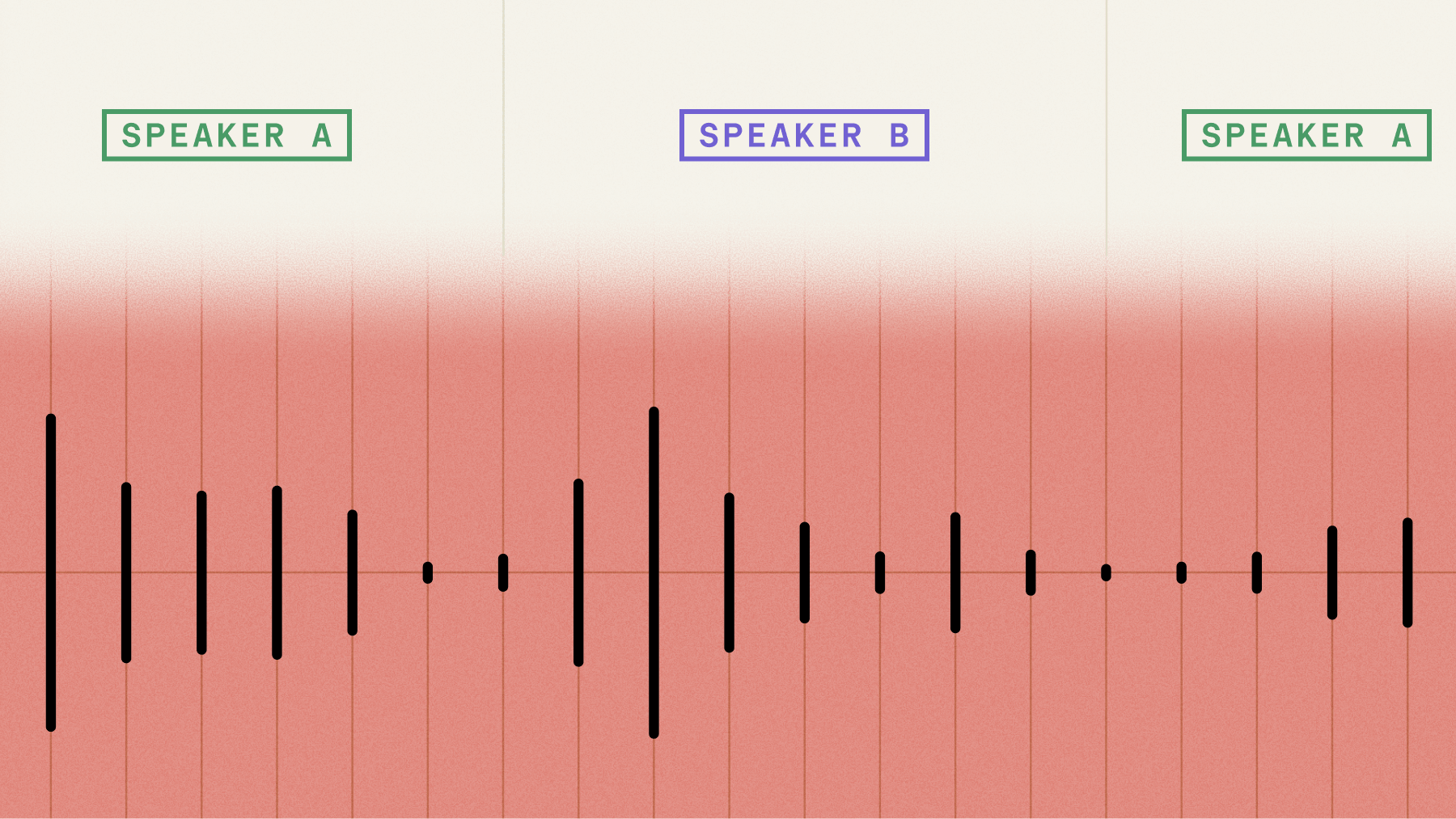

Streaming speaker diarization identifies who’s speaking during live audio capture, assigning speaker labels like SPEAKER_A and SPEAKER_B in real time as conversations unfold. Unlike traditional batch processing that waits for complete recordings, streaming diarization makes speaker assignments within milliseconds while people are still talking. This creates a fundamental constraint: once the system assigns a speaker label to audio, that decision becomes permanent with no ability to revise it later.
This real-time capability matters when your application needs to act on speaker identity during conversations rather than afterward. Voice agents routing responses based on who’s speaking, live contact center coaching systems, and meeting platforms showing labeled transcripts to participants all depend on immediate speaker attribution. The technology trades some accuracy for speed, but enables entirely new categories of voice applications that weren’t possible with batch-only processing.
What is streaming speaker diarization?
Streaming speaker diarization is the real-time identification of who’s speaking during live audio capture—assigning speaker labels (SPEAKER_A, SPEAKER_B) instantly as audio arrives rather than waiting for complete recordings. It enables applications like voice agents, live meeting transcription, and contact center coaching to act on speaker identity while conversations are still happening.
This capability is increasingly important as 76% of companies now embed conversation intelligence in more than half of their customer interactions—and most of those interactions happen in real time.
Traditional batch diarization waits for the entire audio file before processing. Streaming diarization works while you’re still talking, making decisions about who said what within milliseconds.
Think of a customer service call where the CRM system needs to track which parts came from the agent versus the customer—right now, not after the call ends. That’s streaming diarization in action.
The technology faces a critical constraint that shapes everything about how it works. Once it assigns a speaker label to a piece of audio, that decision is final. There’s no going back to fix mistakes like batch processing allows.
Accuracy builds over time: Early in a conversation, speaker assignments might be less stable because the system has limited data to work with. As more audio comes in, the assignments get more reliable.
You need streaming diarization when speaker attribution matters during the conversation itself—for real-time agent coaching, live meeting transcription, or voice agents that need to know who’s talking to respond appropriately.
How does streaming speaker diarization work?
Streaming diarization builds on top of speech-to-text technology to identify speakers in real time. The process follows three main steps: detecting when someone stops talking, creating a voice fingerprint for that turn, and deciding if it matches a known speaker or represents someone new.
The system depends heavily on speech recognition to determine turn boundaries. When the speech-to-text model decides a speaker has finished talking, that triggers the diarization process for that chunk of audio.
Chunked processing and windowing
The system doesn’t process random chunks of audio—it works with complete speaker turns. A “turn” means one person speaking from start to finish, like saying “Hello, how can I help you today?” before the other person responds.
This approach gives you two major benefits. It keeps natural speech boundaries intact, and it aligns transcription output with speaker labels so you get both words and speaker identity together.
Turn boundary accuracy matters: If the speech-to-text gets confused about when turns end, the speaker assignments will be wrong too. The two systems need to work together seamlessly. This is where neural turn detection—which uses both acoustic and linguistic signals to determine when someone is actually done speaking, rather than just detecting silence—gives streaming diarization a significant edge over systems that rely on voice activity detection (VAD) alone. VAD-only systems frequently misfire on mid-sentence pauses, which cascades into incorrect speaker assignments.
The system maintains a “speaker cache”—a memory bank of voice characteristics from recent turns in the conversation. For each new turn, it compares the new voice against this cache to decide if it’s from a known speaker or someone new.
Unlike batch processing, streaming can’t look ahead. The system must make decisions using only the audio it has received so far, unlike batch processing that can analyze the entire recording before making any assignments.
- Session start challenge: The first couple turns often get misassigned because there isn’t enough voice data yet
- Self-correction: As the conversation continues, assignments become more stable and accurate
- No second chances: Once a turn gets labeled, that label sticks—there’s no going back to fix it
Speaker caching and memory management
The speaker cache is where the system stores voice fingerprints from everyone who’s spoken so far. When new audio comes in, it extracts a voice fingerprint (called an embedding) and compares it to everything in the cache.
The embedding model itself doesn’t learn or change during a conversation. It’s like a fixed calculator that always produces the same output for the same voice input. Only the clustering part accumulates memory, building up profiles of each speaker as more turns come in.
Speaker labels follow arrival order. The first person to speak becomes SPEAKER_A, the second becomes SPEAKER_B, and so on. These labels stay consistent throughout the conversation—SPEAKER_A always refers to the same person.
- Short utterances create problems: Brief responses like “yes” or “okay” don’t provide enough voice data for reliable identification. The system might label these as UNKNOWN or incorrectly assign them to the previous speaker.
- Background noise hurts accuracy: Microphone bleed, cross-talk, and environmental noise all make voice fingerprints less reliable. Clean audio with minimal overlap between speakers works best.
Streaming vs. batch diarization: latency and accuracy trade-offs
Streaming diarization forces you to choose between speed and accuracy. More context leads to better speaker identification, but waiting for more context means higher latency. Less context enables faster responses but less stable labels.
The biggest latency factor isn’t the diarization itself—it’s turn detection. The system must wait for someone to stop talking before it can process their voice. With the Universal-3.5 Pro Realtime model (universal-3-5-pro) using aggressive settings (min_turn_silence=100ms), you can get turn delivery in around 221ms, but the diarization overhead on top of that is minimal.
Independent benchmarks from Hamming.ai across 4M+ production calls put Universal-3 Pro Streaming at 307ms P50 latency and 8.14% word error rate—compared to Deepgram Nova-3’s 516ms P50 and 9.87% WER. That latency advantage matters for diarization because faster, more accurate turn detection means the diarization system gets cleaner inputs to work with.
The context window is your main accuracy control. With only one or two turns in memory, the system struggles to distinguish similar voices. With five or more turns per speaker, the voice profiles become well-defined and assignments stabilize.
Why context matters so much: Early in a conversation, the system is essentially guessing based on limited voice data. As it hears more from each person, it builds stronger voice profiles and makes more confident assignments.
You can improve accuracy by setting the max_speakers parameter when you know how many people are talking. For a customer service call, setting it to 2 helps the system focus on just two voice profiles instead of constantly wondering if there’s a third person.
How to implement streaming speaker diarization
Getting streaming diarization running takes about five minutes if you already have a streaming transcription setup. The core idea: you’re adding speaker awareness to the same WebSocket connection you’re already using for real-time transcription.
Setting up a streaming connection with speaker labels
Speaker diarization is an opt-in feature on any streaming WebSocket connection. Add speaker_labels: true to your connection parameters, and the API starts tracking who’s speaking alongside the transcript.
That’s it for the basic setup. There’s no separate diarization endpoint or second API call — the speaker labels flow through the same WebSocket as your transcript data.
Four models support streaming diarization:
If you’re building something where accuracy matters—voice agents, medical transcription, contact centers—Universal-3.5 Pro Realtime is the right choice.
Configuring max speakers and turn detection
The max_speakers parameter (1–10) tells the model how many distinct speakers to expect. This isn’t a hard limit—it’s a hint that improves accuracy. Setting max_speakers: 2 for a phone call, for example, helps the model avoid splitting one speaker into two or merging two speakers into one.
When you know the expected speaker count, set it. A customer support call? max_speakers: 2. A panel discussion? max_speakers: 4 or max_speakers: 5. If you’re unsure, leave it unset and let the model figure it out—but expect slightly lower accuracy on the first few turns.
Turn detection sensitivity controls how aggressively the model identifies speaker transitions. For fast-paced conversations where people interrupt each other, you may want higher sensitivity. For structured dialogues with clear turn-taking, the defaults work well.
Handling the response
Speaker labels arrive in Turn events. Each Turn includes a speaker_label field with a value like “A”, “B”, “C”—corresponding to distinct speakers in the conversation.
You also get word-level speaker attribution. Each final word in the response carries a speaker field (note: this field only appears on words where word_is_final is true). This enables mid-turn speaker change detection—useful when two people talk at the same time, since the API assigns each segment to whichever speaker it identifies as dominant.
One edge case to handle: if a turn contains less than 1 second of audio, the speaker label may come back as “UNKNOWN”. Short utterances like “yeah,” “uh-huh,” or “okay” don’t always contain enough audio signal for confident speaker identification. Build your client to gracefully handle UNKNOWN labels—either by attributing them to the previous speaker or flagging them for review.
A few things to expect during the first seconds of a conversation:
- The first few turns may have lower diarization accuracy as the model builds speaker profiles
- Labels can shift as the model refines its understanding—a speaker initially labeled “A” might get relabeled in subsequent turns
- Noisy environments (background music, HVAC systems, crosstalk) reduce diarization accuracy across the board
For full code examples covering WebSocket setup, event handling, and speaker label parsing, check the streaming diarization documentation. For multi-speaker scenarios with separate audio channels per speaker, see the multichannel vs. diarization guide.
Multichannel streaming as an alternative
If your audio setup captures each speaker on a separate channel—common in contact centers where the agent and customer are on different phone lines—you can skip diarization entirely. Create a separate streaming session for each channel, and you get perfect speaker separation without any diarization overhead or accuracy trade-offs.
This approach works well for telephony integrations where the infrastructure already separates audio channels. You get the speed of streaming with the certainty of channel-based speaker attribution. For details and code examples, see the multichannel streaming audio section in the docs.
When to use streaming speaker diarization
The decision is straightforward: use streaming when you need speaker labels during the conversation, use batch when you need them afterward. Ask yourself: does your application need to act on speaker identity before the conversation ends?
Streaming is required for:
Voice agents and conversational AI — Voice agents that respond in real time need to know who is speaking, not just what was said. Streaming diarization enables speaker-aware routing—the agent can respond differently based on whether it’s hearing the primary user, a secondary participant, or background conversation.
In contact center deployments, a voice agent handling a support call needs to differentiate the customer from the human agent in real time. Without streaming diarization, the voice agent treats every utterance the same—it can’t tell if the customer asked a question or if the human agent is whispering to a colleague.
With per-speaker labels arriving in real time, the voice agent routes responses to the right person and avoids interrupting internal side conversations.
The pattern extends beyond simple two-party calls. Multi-speaker scenarios—conference calls, group customer sessions, panel-style interactions—all benefit from real-time speaker identification. A voice agent in a group meeting can track action items per speaker, attribute questions to the right participant, and maintain context about who said what throughout the conversation.
Companies like Goodcall, Speechlab, and Callbook are building voice agent systems that rely on these streaming diarization capabilities. Their use cases range from automated phone answering to real-time call coaching—all scenarios where knowing the speaker identity frame-by-frame changes the application’s behavior.
- Live contact center coaching where supervisors need real-time visibility
- Meeting transcription that shows live labeled text to participants
- Broadcast captioning for live TV or radio shows
Batch works better for:
- Post-call analysis where accuracy trumps speed
- Podcast production that needs clean speaker separation
- Legal transcription requiring high accuracy and revision capability
- Meeting summaries generated after calls complete
Consider a hybrid approach for maximum benefit. Use streaming diarization for real-time features during the conversation, then run batch diarization on the same audio afterward for higher-accuracy records. This gives you both immediate functionality and reliable documentation.
Speaker count significantly affects streaming performance. The system works most reliably with two speakers, like agent-customer calls. As you add more speakers, accuracy degrades because the system has less audio per person to build reliable voice profiles.
How to evaluate streaming diarization quality
Key metrics (DER, latency, label stability)
Diarization Error Rate (DER) is the standard metric, and it captures three types of errors in a single number: missed speech (a speaker talks but isn’t detected), false alarm (speech is detected where there’s silence), and speaker confusion (speech is attributed to the wrong person). Lower is better—production systems typically target DER below 10%.
But DER alone doesn’t tell you enough for streaming use cases. Two additional metrics matter:
Latency measures the delay between when someone speaks and when a labeled transcript appears. In a voice agent or live captioning system, 200ms of diarization latency is fine. Two seconds isn’t. Measure end-to-end latency under realistic conditions—not just on clean benchmark audio.
Label stability tracks how often speaker labels change or correct themselves over time. Streaming diarization is inherently incremental—the model makes its best guess with limited context and may revise as more audio arrives. If speaker “A” becomes speaker “B” three times in 30 seconds, your UI will look broken even if the final transcript is accurate. Track the rate of label reassignments per minute as a first-class metric alongside DER.
Testing with real-world audio
Benchmark datasets—AMI, CALLHOME, DIHARD—are useful for comparing models, but they won’t predict how your system performs in production. Test with audio that matches your actual use case.
For voice agents, record real calls (with consent) and compare diarized output against manual annotations. Pay attention to:
- Turn-taking speed — How quickly does the system identify a new speaker? Fast-paced customer support calls expose latency issues that scripted test audio won’t.
- Audio quality variation — Cell phone audio, Bluetooth headsets, speakerphone in a conference room. Each degrades accuracy differently.
- Short utterances — “Yes,” “No,” “Go ahead.” These are the hardest segments to diarize and the most common in real conversations.
- Overlapping speech — Two people talking simultaneously. Streaming systems must assign each segment to one speaker, so measure how often the assignment is correct versus random.
Build a small test suite—20 to 50 audio clips covering your worst-case scenarios—and run it against every model update or configuration change. Automated DER calculation on your own data tells you more than any published benchmark number.
Streaming speaker diarization solutions
Most published speaker diarization benchmarks measure batch processing, not streaming. Streaming numbers are rarely published because they’re harder to measure and typically lower than batch results. When evaluating solutions, test with your actual use case rather than relying on benchmark claims.
AssemblyAI’s streaming diarization works by adding speaker_labels: true to any streaming connection. You can set max_speakers (1-10) to hint at the expected number of people and improve accuracy. It works with Universal-3.5 Pro Realtime and all multilingual streaming models. Streaming diarization is priced at $0.12/hour as an add-on to your streaming transcription costs.
The feature is in public beta with ongoing infrastructure improvements. Companies like Goodcall report strong performance: “Turn detection latency is best we have seen, transcript quality in a noisy environment unmatched.”
Evaluation criteria for streaming solutions:
- Test with your actual audio conditions, not ideal laboratory samples
- Measure how quickly speaker labels stabilize in real sessions
- Check short utterance handling—can it identify brief responses?
- Verify maximum speaker count support for your use case
- Understand pricing models for your expected volume
The improvement in AssemblyAI’s speaker embeddings specifically targeted the failure modes that hurt streaming performance most: quiet segments, short responses, background noise, and overlapping voices. Since streaming can’t revise its decisions, getting these edge cases right matters more than in batch processing.
Build voice applications with streaming diarization
Streaming speaker diarization is a building block, not a destination. The real value shows up when you combine it with other real-time capabilities to build complete voice applications. A recent survey of 450+ voice agent builders found that 95% feel confident about the technology—but users still expect accuracy and natural turn-taking above all else.
AssemblyAI’s Voice Agent API takes this a step further—a single WebSocket connection that replaces separate speech-to-text, LLM, and text-to-speech providers. One WebSocket, one bill, one set of logs. Instead of stitching together three services and managing the latency between them, the entire pipeline runs as invisible infrastructure behind a single connection at $4.50/hr flat rate.
Universal-3.5 Pro Realtime—the model powering the streaming transcription layer—currently ranks #1 on the Hugging Face Open ASR Leaderboard. That accuracy advantage compounds in voice agent scenarios where every transcription error cascades into a wrong LLM response and an irrelevant TTS output.
Streaming diarization also pairs well with other real-time features that have shipped alongside it: PII redaction for streaming (with billing enabled), profanity filtering priced to match async, and continuous partials for note-taking use cases. These can all be enabled on the same WebSocket connection—no additional integration work required.
Where to go from here depends on what you’re building:
- Voice agents — Explore the Voice Agent API documentation to see how streaming diarization, LLM orchestration, and speech synthesis work together in a single connection
- Real-time transcription — The streaming transcription docs cover WebSocket setup, event handling, and language configuration in detail
- Evaluation and testing — Set up automated DER testing with your own audio data before deploying to production
- Contact center analytics — Combine streaming diarization with speech understanding features like sentiment analysis and topic detection for per-speaker insights
- Multilingual streaming — Universal 3.1 Pro is expanding language support for streaming, with additional languages launching soon
Frequently asked questions
How fast can streaming speaker diarization identify speakers?
With AssemblyAI’s Universal-3.5 Pro Realtime model (universal-3-5-pro) and aggressive turn detection (min_turn_silence=100ms), speaker identification adds minimal overhead to the ~221ms turn delivery time. Independent benchmarks from Hamming.ai across 4M+ production calls show 307ms P50 latency for Universal-3 Pro Streaming. The main latency comes from waiting for someone to finish speaking, not from processing their voice.
Can streaming diarization separate overlapping speech?
No—when two people talk simultaneously, streaming diarization assigns the entire overlapping segment to one speaker. If you frequently deal with cross-talk, use separate microphones for each speaker to eliminate the overlap problem entirely. For contact center setups where each party is on a separate phone line, multichannel streaming provides perfect speaker separation without diarization.
How many speakers can streaming diarization handle accurately?
AssemblyAI’s max_speakers parameter supports 1–10 speakers. The system works most reliably with 2 speakers (like phone calls) and accuracy decreases as speaker count increases, since less audio per person means weaker voice profiles.
Why is batch diarization more accurate than streaming?
Batch diarization can analyze the complete recording before making any speaker assignments, allowing it to revise and optimize labels across the entire audio file. Streaming must commit to labels immediately with only partial context, limiting its ability to correct early mistakes.
Can prompting improve streaming diarization for short responses?
No—prompted speaker attribution is an experimental feature for pre-recorded transcription and doesn’t work reliably in streaming. For streaming applications with short utterances, rely on automatic speaker diarization and set max_speakers to improve accuracy.
How much does streaming diarization cost?
AssemblyAI’s streaming diarization is priced at $0.12/hour as an add-on to your streaming transcription costs. This applies when speaker_labels is enabled on your streaming connection.
Lorem ipsum dolor sit amet, consectetur adipiscing elit, sed do eiusmod tempor incididunt ut labore et dolore magna aliqua. Ut enim ad minim veniam, quis nostrud exercitation ullamco laboris nisi ut aliquip ex ea commodo consequat. Duis aute irure dolor in reprehenderit in voluptate velit esse cillum dolore eu fugiat nulla pariatur.
Related posts
.png)