Organization admins and owners can now view activity logs from the dashboard settings. The log captures account-level audit events — access, key management, and configuration changes — so security teams can review who…
Organization admins and owners can now view activity logs from the dashboard settings. The log captures account-level audit events — access, key management, and configuration changes — so security teams can review who did what without filing a support request.
The Activity Logs page also shows the date range of available history and the retention period for your account, so it's clear up-front how far back you can go.
Available to anyone with the Admin or Owner role on an organization — sign in to the dashboard and open Settings to find it.
You can now enable chain-of-thought reasoning on any supported model in LLM Gateway with a single new parameter. Pass reasoning: { effort: "low" | "medium" | "high" } on a /v1/chat/completions request to let the model…
You can now enable chain-of-thought reasoning on any supported model in LLM Gateway with a single new parameter. Pass reasoning: { effort: "low" | "medium" | "high" } on a /v1/chat/completions request to let the model think through a problem before responding — useful for complex extraction, multi-step planning, math, code generation, and agentic tool use where higher-quality answers are worth a few extra tokens.
The Gateway handles provider-specific differences for you. The effort level maps to reasoning_effort on OpenAI-compatible models, to thinking_config on Gemini 3+ models, and to adaptive thinking via budget_tokens on Anthropic Claude models. When reasoning is active, the model's chain of thought is returned on a new thinking field on ResponseMessage. You can also pass reasoning.max_tokens to cap how much reasoning the model can produce.
How to use it
Add a reasoning object to your LLM Gateway request:
{ "model": "claude-opus-4-7", "messages": [ {"role": "user", "content": "Plan a 5-step migration from Postgres 14 to Postgres 17 with zero downtime."} ], "reasoning": { "effort": "high" }}
Works across OpenAI-compatible, Gemini 3+, and Anthropic Claude reasoning models — one parameter, every provider
Live now for all LLM Gateway users in every region
AssemblyAI's LLM Gateway gives you a single API to access 25+ models from Claude, GPT, Gemini, and more — swap models with a single parameter change, with built-in fallbacks, prompt caching, structured outputs, and now reasoning controls baked in. View all available models →
The Node SDK v4.34.0 introduces DualChannelCapture — a browser-side helper that captures microphone audio and the user's system audio simultaneously and tags each word in the resulting transcript with the channel it came from…
The Node SDK v4.34.0 introduces DualChannelCapture — a browser-side helper that captures microphone audio and the user's system audio simultaneously and tags each word in the resulting transcript with the channel it came from. This is what you reach for when you're building a meeting notetaker, a voice agent that needs to distinguish the caller from the agent's own TTS, or any browser app that needs per-speaker attribution without setting up a server-side mixer.
The release also ships the helpers that make per-channel streaming straightforward in the browser: an EnergyVad voice-activity detector, a LinearResampler, a VadTimeline, and attributeWord() / attributeTurn() helpers that map streaming words and turns to their originating channel. sendAudio() now accepts channel tagging, and the streaming client emits a new "vad" event. TurnEvent and StreamingWord include an optional channel field so the channel travels with every word.
How to use it
Install or upgrade the Node SDK to v4.34.0:
npm install assemblyai@latest
New DualChannelCapture class for browser-based mic + system audio capture
New helpers: attributeWord(), attributeTurn(), EnergyVad, LinearResampler, VadTimeline
New types: Channel, VadFrame, VadDetector, ChannelAttributionParams, BrowserOnlyError
New "vad" event on the streaming client
TurnEvent and StreamingWord now include an optional channel field
A batch of smaller polish updates landed across the playground and dashboard:…
A batch of smaller polish updates landed across the playground and dashboard:
Per-word speaker diarization in the playground. The transcript display now uses speaker labels from individual words rather than utterance-level attribution, so mid-utterance speaker changes are shown correctly.
Automatic Language Detection tooltip for Universal-3 Pro. A new tooltip in the async playground explains how ALD behaves when you pick Universal-3 Pro.
Multi-channel toggle disabled for mono samples. The multi-channel option in the async playground is now disabled when the selected sample is a single-channel audio file, so the UI matches what the model can actually do.
Feedback modal in playground. The streaming and async playgrounds both have a built-in feedback modal so you can send notes without leaving the page.
Use-case selection in onboarding. The onboarding wizard now includes a use-case step so we can tailor what you see next to what you're trying to build.
OpenGraph preview for shared transcripts. Shared transcript links now render a preview image when unfurled in chat tools and social platforms.
You can now enable or disable continuous_partials on an active Universal-3 Pro Streaming connection without reconnecting. Send continuous_partials: true | false in an UpdateConfiguration WebSocket message and the change…
You can now enable or disable continuous_partials on an active Universal-3 Pro Streaming connection without reconnecting. Send continuous_partials: true | false in an UpdateConfiguration WebSocket message and the change applies to the next turn — useful when a voice agent wants steady mid-turn partials only during certain conversation states (e.g. during a long readback) and the default behavior the rest of the time.
How to use it
Send an UpdateConfiguration message at any point during the session:
Requests that specify speech_models: ["universal-3-pro"] with a language that Universal-3 Pro doesn't yet support (e.g. Korean, Chinese) now succeed instead of returning a 400 error. The request is automatically routed…
Requests that specify speech_models: ["universal-3-pro"] with a language that Universal-3 Pro doesn't yet support (e.g. Korean, Chinese) now succeed instead of returning a 400 error. The request is automatically routed to universal-2 as a fallback and a warning is included in metadata.warnings so you can detect the fallback in your application.
This is a behavior change: requests that previously failed will now succeed. If your code relied on the 400 to gate model selection, switch to reading metadata.warnings instead.
How it works
When you request Universal-3 Pro with an unsupported language, the response now contains a warning like:
{ "metadata": { "warnings": [ "Universal-3 Pro does not support this language; falling back to Universal-2." ] }}
Applies to async and streaming requests that target universal-3-pro
The fallback to Universal-2 is automatic — no client changes required
Inspect metadata.warnings if you need to detect that a fallback occurred
Google's Gemini 3.5 Flash is now available through LLM Gateway. Flash is Google's fast, cost-efficient model in the Gemini 3 family — built for high-throughput workloads where latency and price-per-token matter as much…
Google's Gemini 3.5 Flash is now available through LLM Gateway. Flash is Google's fast, cost-efficient model in the Gemini 3 family — built for high-throughput workloads where latency and price-per-token matter as much as quality.
Gemini 3.5 Flash is a strong fit for real-time and high-volume use cases: voice agent reasoning, conversational AI, content moderation, classification, summarization, and large-scale document or transcript processing. As with every model in LLM Gateway, you can swap to it with a single parameter change and keep the rest of your integration — fallbacks, prompt caching, structured outputs, and post-processing — exactly as it is.
How to use it
Update the model parameter in your LLM Gateway request:
{ "model": "gemini-3.5-flash"}
Live now for all LLM Gateway users in every region
Works with existing LLM Gateway features including fallbacks, prompt caching, structured outputs, and JSON repair post-processing
AssemblyAI's LLM Gateway gives you a single API to access 20+ models from Claude, GPT, Gemini, and more — swap models with a single parameter change, with built-in fallbacks, prompt caching, and post-processing baked in. View all available models →
Streaming Speech-to-Text now supports a turn_left_pad_ms connection parameter on StreamingSessionParameters . It controls left-padding of turns in milliseconds — how much audio before the detected start of a turn is…
Streaming Speech-to-Text now supports a turn_left_pad_ms connection parameter on StreamingSessionParameters. It controls left-padding of turns in milliseconds — how much audio before the detected start of a turn is included in the transcription window. Use it to reduce clipped first words on turns that begin abruptly, or to give the model a bit more context at the start of each utterance.
How to use it
Set turn_left_pad_ms when opening a streaming connection:
{ "turn_left_pad_ms": 200}
Available on StreamingSessionParameters and via UpdateConfiguration mid-session
Available in the Python SDK starting in v0.64.3 and the Node SDK starting in v4.33.3
The LLM Gateway playground now lets you configure provider fallbacks directly from the settings panel. Pick a primary model, add one or more fallback models, and the generated code snippet on the right updates to…
The LLM Gateway playground now lets you configure provider fallbacks directly from the settings panel. Pick a primary model, add one or more fallback models, and the generated code snippet on the right updates to include the fallback chain — so you can copy a working request straight into your app without hand-editing the fallback array.
The dashboard also gains a new Code tab for LLM Gateway, with a copyable quickstart and a prominent copy button. Pair it with the playground to go from "this prompt works" to "this code works" in one click.
PII Redaction is now available for Streaming Speech-to-Text. Set redact_pii: true on a streaming connection to automatically detect and remove sensitive information — names, phone numbers, email addresses, payment…
PII Redaction is now available for Streaming Speech-to-Text. Set redact_pii: true on a streaming connection to automatically detect and remove sensitive information — names, phone numbers, email addresses, payment details, and more — from transcripts in real time, with no extra processing step in your application.
Streaming PII Redaction works across every streaming model: Universal-3 Pro Streaming (u3-rt-pro), Universal-Streaming English, and Universal-Streaming Multilingual. Choose which categories to redact with redact_pii_policies, and pick how matches are masked with redact_pii_sub — either hash (replace each character with #) or entity_name (substitute the policy label, e.g. [PHONE_NUMBER]).
To prevent unredacted text from ever reaching your client, redaction is applied to final turns only. When redact_pii is enabled, include_partial_turns defaults to false — partial transcripts are suppressed and you'll receive redacted output once a turn finalizes. This keeps the redaction guarantee strict by default while leaving the existing low-latency turn semantics intact.
How to use it
Enable PII Redaction when opening a streaming connection:
Available now on all streaming models: u3-rt-pro, universal-streaming-english, and universal-streaming-multilingual
Configure categories via redact_pii_policies — same policy names as Pre-recorded PII Redaction
Choose masking style with redact_pii_sub: hash or entity_name
Redaction applies to final turns; include_partial_turns defaults to false when redact_pii is on to prevent unredacted partials from reaching the client
Supported in the Python and JavaScript SDKs, with quickstart examples in the docs
AssemblyAI's PII Redaction gives you compliant, production-ready transcripts without bolt-on tooling — now in real time, for voice agents, contact-center applications, and any latency-sensitive workflow that touches sensitive data. Read the docs →
The Voice Agent playground now plays a sample for every voice in the picker, so you can hear how each of the 34 supported voices sounds before you commit one to your agent…
The Voice Agent playground now plays a sample for every voice in the picker, so you can hear how each of the 34 supported voices sounds before you commit one to your agent. No more flipping back and forth, restarting the session, or guessing from the voice ID — just hover, listen, and pick.
Open the Voice Agent playground from the dashboard and click the voice selector to try it.
Stereo audio files with phase-inverted channels (one channel is the polarity-flipped copy of the other) used to produce empty or near-silent transcripts after downmixing to mono — the two channels cancelled each other out…
Stereo audio files with phase-inverted channels (one channel is the polarity-flipped copy of the other) used to produce empty or near-silent transcripts after downmixing to mono — the two channels cancelled each other out. The transcoding worker now detects phase inversion over a 60-second window using ffmpeg's aphasemeter filter and inverts the second channel before downmixing, restoring the audio to its intended content.
No request changes are required. Files that previously returned empty transcripts due to phase inversion will now transcribe normally. Added processing overhead is negligible (under one second).
You can now pick the model used for Automatic Language Detection on a per-request basis. Set language_detection_model inside language_detection_options on POST /v2/transcript to choose which language-detection model…
You can now pick the model used for Automatic Language Detection on a per-request basis. Set language_detection_model inside language_detection_options on POST /v2/transcript to choose which language-detection model runs before transcription.
The tag-stripping guardrail is now on by default for async transcription. Stray markup tokens that occasionally appeared in transcripts (e.g. from upstream prompts or templated audio) are filtered out before the…
The tag-stripping guardrail is now on by default for async transcription. Stray markup tokens that occasionally appeared in transcripts (e.g. from upstream prompts or templated audio) are filtered out before the transcript is returned, leaving cleaner, agent-ready text. This is a behavior change — no client-side updates are needed, but downstream parsers that relied on those tokens being present should be reviewed.
Universal-3 Pro Streaming now exposes an interruption_delay connection parameter that controls how soon the first partial is emitted at the start of a turn…
Universal-3 Pro Streaming now exposes an interruption_delay connection parameter that controls how soon the first partial is emitted at the start of a turn. Lower values reduce time-to-first-token for voice agent barge-in; higher values are more confident about interruption detection. The parameter accepts a value in milliseconds with a default of 500 and a range of 0–1000.
Set interruption_delay: 0 for the fastest possible TTFT — roughly 300ms time-to-first-transcript after speech begins, compared to ~800ms at the default. The parameter is also settable mid-session via an UpdateConfiguration message, so a voice agent can tune responsiveness on the fly based on conversation context.
How to use it
Set interruption_delay when opening a Universal-3 Pro Streaming connection:
Universal-3 Pro Streaming now supports a continuous_partials connection parameter. Pass continuous_partials: true to receive a steady stream of non-final transcripts at roughly a 3-second cadence during long,…
Universal-3 Pro Streaming now supports a continuous_partials connection parameter. Pass continuous_partials: true to receive a steady stream of non-final transcripts at roughly a 3-second cadence during long, uninterrupted turns — for example, when a caller is reading out a credit card number, an address, or giving an extended explanation that doesn't have natural pauses.
By default, Universal-3 Pro emits one early partial near the start of a turn and additional partials around silence. With continuous_partials enabled, you also get mid-turn partials regardless of silence, so downstream consumers like LLMs, agent UIs, and speculative inference pipelines can keep up with the speaker during long monologues. The first partial at ~750ms is unaffected, and each continuous partial covers the full transcript for the current turn so far.
How to use it
Enable continuous_partials when opening a Universal-3 Pro Streaming connection:
We've shipped a major upgrade to streaming speaker diarization, with significant accuracy gains and a refined API that delivers per-word speaker labels…
We've shipped a major upgrade to streaming speaker diarization, with significant accuracy gains and a refined API that delivers per-word speaker labels. The new model is live now in production across both US and EU regions for Universal-3 Pro Streaming and Universal-Streaming — no integration changes required to benefit from the accuracy improvements.
Across our internal benchmarks, the upgrade reduces false-alarm speakers by 66% and phantom turn rate by 60%, while improving cpWER by 12% overall and 24% on 2-speaker conversations. Against the closest competitive alternative (Deepgram Nova-3), the new model delivers 2x better cpWER on 2-speaker telephony, 13% better cpWER on 4-speaker meetings, 43% fewer false-alarm speakers, and 91% fewer phantom turns and words attributed to non-existent speakers.
Alongside the accuracy gains, each word object within a Turn now carries its own speaker label, enabling much more refined mid-turn speaker change detection. Previously, every word in a Turn inherited the Turn's speaker_label; now, when a different speaker briefly cuts in mid-turn, the individual word objects reflect that change — and words the model can't confidently attribute are tagged UNKNOWN rather than rolled into the dominant speaker. This unlocks accurate attribution in fast back-and-forths, brief interjections, and noisy multi-speaker calls where speakers overlap or trade off mid-sentence.
How to use it
Live now in production across US and EU regions for Universal-3 Pro Streaming and Universal-Streaming — no config changes required to get the accuracy improvements
Each word in a Turn message now includes a speaker field alongside start, end, text, confidence, and word_is_final
Words the model cannot confidently attribute to a known speaker are labeled UNKNOWN — opt into per-word attribution by reading from words[].speaker
The Turn-level speaker_label field is unchanged, so existing integrations continue to work without modification
For best-in-class diarization accuracy, we recommend Universal-3 Pro Streaming ("speech_model": "u3-rt-pro")
AssemblyAI's Universal-Streaming API is the most accurate, lowest-latency way to build real-time voice applications — and with this upgrade, it now delivers the most precise speaker attribution in production speech AI. Read the docs →
LLM Gateway completions now support a post-processing pipeline, and the first step available is json-repair — an optional pass that automatically fixes malformed JSON returned by a model before it reaches your application…
LLM Gateway completions now support a post-processing pipeline, and the first step available is json-repair — an optional pass that automatically fixes malformed JSON returned by a model before it reaches your application. Enable it with a single new parameter on your existing request.
Anyone working with structured output or tool calling has seen the failure mode: the model returns JSON with a trailing comma, an unescaped quote, a missing brace, or a stray markdown fence — and your downstream parser blows up on a response that was 99% correct. json-repair catches these errors at the Gateway layer and returns clean, parseable JSON to your client, so you don't have to ship your own repair logic, retry the call, or wrap every parse in a try/except.
The new post_processing_steps field is designed to be extensible — JSON repair is the first transformation we support, with more steps to come. Steps run in order on the model's completion before the response is returned, so you can compose them into a deterministic post-processing pipeline that works the same across every model in the Gateway.
How to use it
Add a post_processing_steps array to your LLM Gateway request with {"type": "json-repair"}:
{
  "model": "gemini-2.5-flash-lite",
  "messages": [
    {"role": "user", "content": "return exactly with no extra characters, do not fix the json: {\"name\": \"extra comma\",}"}
  ],
  "post_processing_steps": [{"type": "json-repair"}]
}
Works with every model available through LLM Gateway — no model-specific configuration needed
Steps execute in the order they appear in the array, so future steps will compose predictably
Available now for all LLM Gateway users in every region
AssemblyAI's LLM Gateway gives you a single API to access 20+ models from Claude, GPT, Gemini, and more — swap models with a single parameter change, with built-in fallbacks, prompt caching, and now post-processing baked in. See the structured outputs docs →
The Voice Agent API is now available — a complete voice agent pipeline built on AssemblyAI's own models, delivered through a single WebSocket…
The Voice Agent API is now available — a complete voice agent pipeline built on AssemblyAI's own models, delivered through a single WebSocket. Stream audio in, get audio back, and pay one all-in rate of $4.50/hr that covers speech understanding, LLM reasoning, and voice generation.
The API runs on Universal-3 Pro Streaming, the same speech model that already powers production voice stacks — accurate on names, account numbers, domain terminology, and accented speech across six languages. Turn detection runs server-side with configurable thresholds, so the agent knows the difference between a thinking pause and an end-of-turn, and interruptions stop the agent immediately. Listening that actually works is the foundation; everything downstream gets better when the transcription and turn-taking are right.
The developer experience is designed to get out of the way. No SDK to install, no framework to learn — the entire API surface is JSON over WebSocket and most teams ship a working agent the same afternoon they start. Live configuration lets you update system prompts, tools, or turn detection mid-conversation with no reconnect. Tool calling with JSON Schema lets the agent take real actions through your custom functions. Session resumption restores full context if a WebSocket drops within 30 seconds.
How to use it
Open a WebSocket connection to the Voice Agent API endpoint and stream audio in; receive audio and event messages back as JSON
Configure agent behavior at session start or mid-conversation — system prompt, tools, turn detection thresholds — via standard JSON message types
Register custom functions with JSON Schema for tool calling; reconnect within 30 seconds with session resumption to preserve context on dropped connections
Single billing line at $4.50/hr covering STT, LLM, and TTS — measured in audio hours, no separate metering for each pipeline stage
Available now to all customers; works end-to-end with Claude Code for scaffolding integrations directly from your terminal when using our AssemblyAI Docs MCP
The Voice Agent API is invisible infrastructure for production voice products — accurate listening, natural turn-taking, and a developer surface small enough to read in 10 minutes. Your customers should feel like you built it for them, not like they're using a platform. Try the live demo →
You can now retrieve both the redacted and unredacted versions of a transcript in a single PII Redaction request. Set the new redact_pii_return_unredacted flag to true in your POST /v2/transcript body, and the response…
You can now retrieve both the redacted and unredacted versions of a transcript in a single PII Redaction request. Set the new redact_pii_return_unredacted flag to true in your POST /v2/transcript body, and the response will include the original text, words, and utterances alongside the redacted output — no second API call required.
The new fields are purely additive. text, words, and utterances stay fully redacted as before, and three new top-level fields — unredacted_text, unredacted_words, and unredacted_utterances — are returned alongside them with the original PII intact. The unredacted word and utterance arrays mirror the exact shape of their redacted counterparts (text, start, end, confidence, speaker, channel).
This is an opt-in convenience for workflows that need both versions in the same place — for example, a UI that toggles between redacted-first and unredacted views, or a dual-pipeline that stores compliance-grade redacted output for sharing while preserving the original in a trusted environment. It removes the need for previously brittle workarounds like sending two API requests, doing client-side redaction via Entity Detection, or post-hoc LLM-based redaction.
How to use it
Add redact_pii_return_unredacted: true alongside the existing PII parameters in your transcription request:
Requires redact_pii: true — sending redact_pii_return_unredacted: true on its own returns HTTP 400
Defaults to false; when off or absent, responses are unchanged and the three unredacted_* fields are not returned
Works with all existing PII params, including redact_pii_policies, redact_pii_sub, and redact_pii_audio
Available now on Pre-recorded transcription, with SDK support live across Python and JavaScript
AssemblyAI's PII Redaction automatically detects and removes sensitive information from both transcripts and audio — giving you compliant, production-ready output without extra processing steps. Learn more →
Claude Opus 4.7 is now available through LLM Gateway. Opus 4.7 is Anthropic's most intelligent model yet — the latest in the Claude family, pushing the frontier on reasoning, coding, and complex multi-step tasks…
Claude Opus 4.7 is now available through LLM Gateway. Opus 4.7 is Anthropic's most intelligent model yet — the latest in the Claude family, pushing the frontier on reasoning, coding, and complex multi-step tasks.
To use it, update the model parameter in your LLM Gateway request:
Universal-2 transcription accuracy has improved significantly for Hebrew and Swedish, with word error rates reduced by 37% and 47% respectively…
Universal-2 transcription accuracy has improved significantly for Hebrew and Swedish, with word error rates reduced by 37% and 47% respectively. No changes to your integration required — the improvements are live automatically for all users.
AssemblyAI's Universal speech model delivers industry-leading accuracy across dozens of languages, with continuous improvements rolling out automatically. See all supported languages →
LLM Gateway now supports automatic model fallbacks, giving your application resilience against model failures without changing your integration…
LLM Gateway now supports automatic model fallbacks, giving your application resilience against model failures without changing your integration. If a model returns a server error, the Gateway will automatically retry with a fallback — or retry the same model after 500ms by default.
This is available now in Public Beta for all LLM Gateway users.
How to use it
Add a fallbacks array and optional fallback_config to your request. All fields from the original request are copied over to the fallback automatically — you only need to specify what you want to override.
Simple fallback — fall back to a different model, inheriting all original parameters:
By default, if no fallbacks are set, the API will automatically retry a failed request after 500ms. For more control, set fallback_config.retry to false and implement your own exponential backoff.
AssemblyAI's LLM Gateway gives you a single API to access leading models from every major provider — with built-in resilience, load balancing, and cost tracking. Check out our docs →
Medical Mode is a new add-on for AssemblyAI's Streaming Speech-to-Text that improves transcription accuracy for medical terminology — including medication names, procedures, conditions, and dosages…
Medical Mode is a new add-on for AssemblyAI's Streaming Speech-to-Text that improves transcription accuracy for medical terminology — including medication names, procedures, conditions, and dosages. Available now on Universal-3 RT Pro, Universal Streaming English, and Universal Streaming Multilingual.
What it does
Medical Mode applies a correction pass optimized for medical entity recognition, targeting terms that general-purpose ASR frequently gets wrong. It works alongside the base model's noise handling, accent robustness, and latency characteristics — no tradeoffs.
Why it exists
General-purpose ASR can achieve strong overall accuracy on clinical audio while still consistently misrecognizing medical terminology. Because most healthcare AI pipelines feed transcripts directly into LLMs for structured output generation — SOAP notes, discharge summaries, referral letters — transcription errors on medical entities propagate rather than attenuate. Medical Mode intercepts those errors before they enter the pipeline.
How to enable it
Set the domain connection parameter to "medical-v1". No other changes to your existing pipeline are required.
Availability & pricing
Available now on Universal-3, Universal-3 Pro Streaming, Universal Streaming English, and Universal Streaming Multilingual
Supports English, Spanish, German, and French
Billed as a separate add-on — see the pricing page for details
HIPAA BAA, SOC 2 Type 2, ISO 27001:2022, PCI DSS v4.0 included
Three new models are now live in LLM Gateway for paid accounts: Qwen3 Next 80B A3B, Qwen3 32B from Alibaba Cloud, and Kimi K2.5 from Moonshot AI…
Three new models are now live in LLM Gateway for paid accounts: Qwen3 Next 80B A3B, Qwen3 32B from Alibaba Cloud, and Kimi K2.5 from Moonshot AI. These are competitive low-cost options, with Kimi K2.5 in particular offering strong performance at 1.2s latency per 10,000 tokens.
To use any of these models, update the model parameter in your LLM Gateway request:
{ "model": "qwen3-next-80b-a3b"}
{ "model": "qwen3-32B"}
{ "model": "kimi-k2.5"}
All three are available now for paid accounts via LLM Gateway.
AssemblyAI's LLM Gateway gives you a single API to access 20+ models from Claude, GPT, Gemini, and more — swap models with a single parameter change, no integration work required. View all available models →
The AssemblyAI Skill is now available for AI coding agents — giving Claude Code, Cursor, Codex, and other vibe-coding tools accurate, up-to-date knowledge of AssemblyAI's APIs, SDKs, and integrations out of the box…
The AssemblyAI Skill is now available for AI coding agents — giving Claude Code, Cursor, Codex, and other vibe-coding tools accurate, up-to-date knowledge of AssemblyAI's APIs, SDKs, and integrations out of the box.
LLM training data goes stale fast. Without the skill, coding agents default to deprecated AssemblyAI patterns: the old LeMUR API instead of the LLM Gateway, wrong auth headers, discontinued SDK usage, and no awareness of newer features like Universal-3 Pro Streaming or the voice agent framework integrations. The AssemblyAI Skill corrects all of that — and covers the full current API surface, from pre-recorded transcription to real-time streaming to LLM Gateway workflows.
In evals, agents using the skill scored 17/17 on correctness across transcription, voice agent, and LLM Gateway scenarios. Without it: 7/17. The biggest gains are in voice agent integrations and LLM Gateway usage, where agents otherwise have no training data for framework-specific patterns.
How to use it
Install via Claude Code: cp -r assemblyai ~/.claude/skills/ for personal use, or cp -r assemblyai .claude/skills/ at the project level
For Codex, copy the folder and reference assemblyai/SKILL.md in your AGENTS.md
Cursor and Windsurf: add the assemblyai/ directory as project-level documentation
Available now — free, open source, no API key required
AssemblyAI is the leading speech AI platform for developers — built for production with best-in-class accuracy, real-time streaming, and a full suite of audio intelligence features. The AssemblyAI Skill makes sure your coding agent builds with all of it correctly, every time.
You can now control how PII is replaced in redacted audio. By default, AssemblyAI substitutes PII with a beep tone — now you can switch that to silence instead…
You can now control how PII is replaced in redacted audio. By default, AssemblyAI substitutes PII with a beep tone — now you can switch that to silence instead.
To use silence instead of a beep, pass the redact_pii_audio_options parameter in your transcription request:
Omit the parameter entirely to keep the default beep behavior. Available now for all regions and all models on Pre-recorded transcription.
AssemblyAI's PII redaction automatically detects and removes sensitive information from both transcripts and audio — giving you compliant, production-ready output without extra processing steps. Learn more →
Universal-3-Pro is now available for real-time streaming — bringing our most accurate speech model to live transcription for the first time…
Universal-3-Pro is now available for real-time streaming — bringing our most accurate speech model to live transcription for the first time. Developers building voice agents, live captioning tools, and real-time analytics pipelines can now combine Universal-3-Pro's state-of-the-art accuracy with the low latency of AssemblyAI's streaming API.
Universal-3-Pro streaming delivers three key capabilities that set it apart: best-in-class word error rates across streaming ASR benchmarks, real-time speaker labels to identify who is speaking at each turn, and superior entity detection for names, places, organizations, and specialized terminology — all in real time, not just in batch. And with built-in code switching, Universal-3-Pro handles multilingual audio natively, accurately transcribing speakers who move between languages mid-conversation.
Whether you're building voice agents that need to route conversations by speaker, transcription tools that must catch rare entities accurately, or global applications serving multilingual users, Universal-3-Pro for streaming gives you LLM-style accuracy at real-time speeds.
How to use it:
Set "speech_model": "u3-rt-pro" in your WebSocket connection parameters
Code switching is enabled automatically — no additional configuration needed
Available now via the streaming endpoint for all users
AssemblyAI's Universal-Streaming API is the fastest way to build real-time voice applications — and with Universal-3-Pro, it's now the most accurate too.
The AssemblyAI Playground now has a share button. One click generates a shareable link to your transcript output that stays live for 90 days…
The AssemblyAI Playground now has a share button. One click generates a shareable link to your transcript output that stays live for 90 days.
Whether you're dropping results into a Slack thread, looping in a teammate for a quick review, or showing a client what the output actually looks like before they integrate — you no longer need to copy-paste text or export anything. Just hit share and send the link.
The AssemblyAI Playground is the fastest way to test our transcription and audio intelligence models without writing a single line of code. Try different models, toggle features, and now share what you see instantly.
LLM Gateway and Speech Understanding are now available in the EU. Customers can run LLM inference directly in the EU region, enabling data residency compliance and opening the door for teams previously blocked by…
LLM Gateway and Speech Understanding are now available in the EU. Customers can run LLM inference directly in the EU region, enabling data residency compliance and opening the door for teams previously blocked by geographic requirements—including those migrating from LeMUR.
EU regional availability means your prompts, audio, and responses never leave the EU. This is especially valuable for healthcare, finance, and enterprise customers with strict data governance policies. Currently, Claude and Gemini regional models are supported in the EU.
How to use it:
Update the region parameter in your LLM Gateway requests to target the EU endpoint
Available now for all customers — no beta access required
LLM Gateway gives you a single, unified API to run LLM inference and audio intelligence together — with enterprise-grade reliability, transparent pricing, and now the data residency controls your team requires.
Claude Sonnet 4.6 is now available through LLM Gateway. Sonnet 4.6 is our most capable Sonnet model yet with frontier performance across coding, agents, and professional work at scale. With this model, every line of…
Claude Sonnet 4.6 is now available through LLM Gateway. Sonnet 4.6 is our most capable Sonnet model yet with frontier performance across coding, agents, and professional work at scale. With this model, every line of code, every agent task, every spreadsheet can be powered by near-Opus intelligence at Sonnet pricing.hnm
To use it, update the model parameter to claude-sonnet-4-6 in your LLM Gateway requests.
LLM Gateway is now available in a single streaming API call, letting you apply large language models at the turn level as transcription results flow in real time…
LLM Gateway is now available in a single streaming API call, letting you apply large language models at the turn level as transcription results flow in real time.
Until now, running LLMs on streaming transcripts required you to buffer results, make a separate LLM call, and stitch the output back together—adding latency and complexity to your pipeline. With the new llm_gateway parameter for Streaming Speech-to-Text, you can prompt the model on each transcript turn as it arrives. This unlocks anything LLMs are capable of—summarization, classification, entity extraction, sentiment analysis, live translation, and more—all within a single, low-latency WebSocket session.
This integration is particularly powerful for real-time applications like live meeting assistants, call center agent support, voice-driven workflows, and any use case where you need structured intelligence the moment speech is recognized—not after the session ends.
How to use it:
Add the llm_gateway parameter to your streaming request with your model, messages, and max_tokens. The parameter follows the same interface as the LLM Gateway REST API:
AssemblyAI's Streaming Speech-to-Text delivers real-time transcription with industry-leading accuracy, and LLM Gateway gives you flexible, model-agnostic AI enrichment on top of it. Together, they let you build smarter real-time voice applications without stitching together separate systems.
Claude's most capable models are now available through LLM Gateway. Opus 4.5 and Opus 4.6 bring significant improvements in reasoning, coding, and instruction-following…
Claude's most capable models are now available through LLM Gateway. Opus 4.5 and Opus 4.6 bring significant improvements in reasoning, coding, and instruction-following.
To use it, update the model parameter to claude-opus-4-5-20251101 or claude-opus-4-6 in your LLM Gateway requests.
We've released Universal-3-Pro, our most powerful Voice AI model yet—designed to give you LLM-style control over transcription output for the first time…
We've released Universal-3-Pro, our most powerful Voice AI model yet—designed to give you LLM-style control over transcription output for the first time.
Unlike traditional ASR models that limit you to basic keyterm prompting or fixed output styles, Universal-3-Pro lets you progressively layer instructions to steer transcription behavior. Need verbatim output with filler words? Medical terminology with accurate dosages? Speaker labels by role? Code-switching between English and Spanish? You can design one robust prompt and apply it consistently across thousands of calls, getting workflow-ready outputs instead of brittle workarounds.
Out of the box, Universal-3-Pro outperforms all ASR models on accuracy, especially for entities and rare words. But the real power is in the prompting: natural language prompts up to 1,500 words for context and style, keyterms prompting for up to 1,000 specialized terms, built-in code switching across 6 languages, verbatim transcription controls for disfluencies and stutters, and audio tags for non-speech events like laughter, music, and beeps.
How to use it:
Set "speech_models": ["universal-3-pro", "universal"] with "language_detection": true for automatic routing and 99-language coverage
Use prompt for natural language instructions and keyterms_prompt for boosting rare words (up to 1,000 terms, 6 words each)
Universal-3-Pro represents a fundamental shift in what's possible with speech-to-text: true controllability that rivals human transcription quality, with the consistency and scale of an API.
Speaker diarization is now more accurate for audio files under 2 minutes, with a 19% improvement in speaker count prediction and 6% improvement in cpWER…
Speaker diarization is now more accurate for audio files under 2 minutes, with a 19% improvement in speaker count prediction and 6% improvement in cpWER.
No changes required—this improvement is live for all users automatically.
We've launched new streaming endpoints that give you control over latency optimization and data residency. Choose the endpoint that best fits your application's requirements—whether that's achieving the lowest possible…
We've launched new streaming endpoints that give you control over latency optimization and data residency. Choose the endpoint that best fits your application's requirements—whether that's achieving the lowest possible latency or ensuring your audio data stays within a specific geographic region.
Edge Routing (streaming.edge.assemblyai.com) automatically routes requests to the nearest available region, minimizing latency for real-time transcription. With infrastructure in Oregon, Virginia, and Ireland, this endpoint delivers our best-in-class streaming performance regardless of where your users are located.
Data Zone Routing (streaming.us.assemblyai.com and streaming.eu.assemblyai.com) guarantees your data never leaves the specified region. This is designed for organizations with strict data residency and governance requirements—your audio and transcription data will remain entirely within the US or EU, respectively.
How to use it:
Simply update your WebSocket connection URL to your preferred endpoint:
wss://streaming.assemblyai.com/v3/ws (Global)
wss://streaming.us.assemblyai.com/v3/ws (USA)
wss://streaming.eu.assemblyai.com/v3/ws (EU)
The default endpoint (streaming.assemblyai.com) remains unchanged.
We've added support for multichannel speaker diarization with pre-recorded transcription, allowing you to identify individual speakers across multiple audio channels in a single API request…
We've added support for multichannel speaker diarization with pre-recorded transcription, allowing you to identify individual speakers across multiple audio channels in a single API request.
This unlocks accurate transcription for complex audio scenarios like hybrid meetings, call center recordings with supervisor monitoring, or podcast recordings with multiple mics. Speaker labels are formatted as 1A, 1B, 2A, 2B, where the first digit indicates the channel and the letter identifies unique speakers within that channel. For example, in a meeting where Channel 1 captures an in-room conversation between two people and Channel 2 captures a remote participant, you'll get clear attribution for all three speakers even though Channel 1 contains multiple talkers.
How to use it:
Set both multichannel=true and speaker_labels=true in your transcription request—no other changes needed
Available now for all Universal customers across all plan tiers
Universal delivers industry-leading accuracy with advanced features like multichannel support and speaker diarization, giving you the precision and flexibility needed to build production-grade voice AI applications.
Google's newest Gemini 3 Flash Preview model is live in the LLM Gateway…
Google's newest Gemini 3 Flash Preview model is live in the LLM Gateway.
This model delivers faster inference speeds with improved reasoning capabilities compared to previous Flash versions. Gemini 3 Flash Preview excels at high-throughput applications requiring quick response times—like real-time customer support agents, content moderation, and rapid document processing—while maintaining strong accuracy on complex queries that would have required slower, more expensive models.
We've updated how uploaded audio files are deleted when you delete a transcript, giving you immediate control over your data…
We've updated how uploaded audio files are deleted when you delete a transcript, giving you immediate control over your data.
Previously, when you made a DELETE request to remove a transcript, the associated uploaded file would remain in storage for up to 24 hours before automatic deletion. Now, uploaded files are immediately deleted alongside the transcript when you make a DELETE request, ensuring your data is removed from our systems right away.
This change applies specifically to files uploaded via the /upload endpoint. If you're reusing upload URLs across multiple transcription requests, note that deleting one transcript will now immediately invalidate that upload URL for any subsequent requests.
How it works:
When you send a DELETE request to remove a transcript, any file uploaded via /upload and associated with that transcript is now deleted immediately
This applies to all customers using the /upload endpoint across all plans
If you need to transcribe the same file multiple times, upload it separately for each request or retain the original file on your end
AssemblyAI's APIs are built with security and data privacy as core principles. Our speech-to-text and audio intelligence models process your data with enterprise-grade security, and now with even more granular control over data retention.
OpenAI’s newest GPT-5.1 and GPT-5.2 models are live in the LLM Gateway…
OpenAI’s newest GPT-5.1 and GPT-5.2 models are live in the LLM Gateway.
These models come with sharp reasoning and instruction-following abilties. GPT-5.2 in particular excels at multi-step legal, finance and medical tasks where earlier models stalled, letting you ship production features that previously needed heavy post-processing or human review.
Keyterm prompting is now in production for multilingual streaming, giving developers the ability to improve accuracy for target words in real-time transcription…
Keyterm prompting is now in production for multilingual streaming, giving developers the ability to improve accuracy for target words in real-time transcription. This enhancement is live for all users across the Universal-Streaming platform.
Keyterm prompting enables developers to prioritize specific terminology in transcription results, which is particularly valuable for conversational AI and voice agent use cases where domain-specific accuracy matters. By specifying keywords relevant to your application, you'll see improved recognition of critical terms that might otherwise be misheard or misinterpreted.
To use Keyterm prompting with Universal-Streaming Multilingual, include a list of keyterms in your connection parameters:
Expanding Keyterm prompting to Universal-Multilingual Streaming reinforces our commitment to giving developers precise control over recognition results for specialized vocabularies.
We've improved hallucination detection and reduction across Universal-Multilingual Streaming transcription, resulting in fewer false outputs while maintaining minimal latency impact…
We've improved hallucination detection and reduction across Universal-Multilingual Streaming transcription, resulting in fewer false outputs while maintaining minimal latency impact. This improvement is live for all users.
Lower hallucination rates mean more reliable transcription results out of the box, especially in edge cases where model confidence is uncertain. You'll see more accurate, trustworthy outputs without needing to modify existing implementations
This improvement is automatic and applies to all new Streaming sessions.
We've tightened security controls on pre-recorded file transcription by scoping access to uploaded files within the same project that uploaded them…
We've tightened security controls on pre-recorded file transcription by scoping access to uploaded files within the same project that uploaded them.
Previously, API tokens could transcribe files across projects. Now, tokens must belong to the same project that originally uploaded the file to transcribe it. This strengthens your security posture and prevents unintended cross-project access to sensitive audio files.
This security enhancement reflects our commitment to protecting your data and giving you granular control over who can access transcriptions within your organization.
Self-Hosted Streaming v0.20: License Management Now Available…
Self-Hosted Streaming v0.20: License Management Now Available
Self-Hosted Streaming v0.20 now includes built-in license generation and validation, giving enterprises complete control over deployment security and usage tracking. Organizations can manage their speech AI infrastructure with the same compliance controls they expect from enterprise software.
The new licensing system enables IT teams to track deployment usage, enforce security policies, and maintain audit trails—critical for regulated industries like healthcare and financial services. License validation happens at startup and can be configured for periodic checks to ensure continuous compliance.
Available now for all AssemblyAI Self-Hosted Streaming customers.
AssemblyAI's Streaming API is now available in us-east-1, providing regional redundancy and expanded compute capacity for production workloads. The infrastructure update reduces single-region dependency and prepares the platform for upcoming EU deployment.
Multi-region availability means contact centers and live captioning applications can maintain service continuity during regional incidents while accessing additional compute capacity for peak usage periods. The architecture changes also enable faster rollout of new regions based on customer demand.
Available immediately across all AssemblyAI's Streaming API plans. Traffic is automatically routed to the optimal region based on latency and capacity.
Inactivity Timeout Controls for Streaming Sessions
AssemlyAI’s Streaming API now supports configurable inactivity_timeout parameters, giving developers precise control over session duration management. Applications can extend timeout periods for long-running sessions or reduce them to optimize connection costs.
The feature enables voice agents and live transcription systems to automatically close idle connections without manual intervention. Contact centers can reduce costs on silent periods while ensuring active calls stay connected. Voice agent developers can keep sessions open longer during natural conversation pauses without manual keep-alive logic.
Available now for all AssemblyAI Streaming customers. Set the inactivity_timeout parameter (in seconds) when initializing your connection.
Implementation:
Set inactivity_timeout in your connection parameters
Values range from 5 to 3600 seconds
Default timeout remains 30 seconds if not specified
Google's latest Gemini 3 Pro model is now available through AssemblyAI's LLM Gateway, giving you access to one of the most advanced multimodal models with the same unified API you use for all your other providers…
Google's latest Gemini 3 Pro model is now available through AssemblyAI's LLM Gateway, giving you access to one of the most advanced multimodal models with the same unified API you use for all your other providers.
With AssemblyAI's LLM Gateway, you can now test Gemini 3 Pro against models from OpenAI, Anthropic, Google, and others without changing your integration—just swap the model parameter and compare responses, latency, and cost across providers in real-time.
Available now for all LLM Gateway Users
To get started, simply update the "model" parameter in your LLM Gateway request to "gemini-3-pro-preview":
{ "model": "gemini-3-pro-preview"}
AssemblyAI's LLM Gateway gives you a single API to access 15+ LLMs from every major provider, with built-in fallbacks, load balancing, and cost tracking. Compare models, optimize for performance or price, and switch providers instantly, all without rewriting code.
LeMUR will be deprecated on March 31, 2026 and will no longer work after this date…
LeMUR will be deprecated on March 31, 2026 and will no longer work after this date.
Users will need to migrate to LLM Gateway by that date for continued access to language model capabilities and benefit from an expanded model selection as well as better performance.
As previously announced, we will be sunsetting Claude 3.5 Sonnet and 3.7 Sonnet for LeMUR on October 29th. After this date, requests made using Claude 3.5 and 3.7 Sonnet will return errors…
As previously announced, we will be sunsetting Claude 3.5 Sonnet and 3.7 Sonnet for LeMUR on October 29th. After this date, requests made using Claude 3.5 and 3.7 Sonnet will return errors.
If you are using this model, we recommend switching to Claude 4 Sonnet, which is more performant than Claude 3.5 and 3.7 Sonnet. You can switch models by setting the final_modelparameter to anthropic/claude-sonnet-4-20250514
Introducing new tools and model updates to help you build, deploy, and scale Voice AI applications:…
Introducing new tools and model updates to help you build, deploy, and scale Voice AI applications:
Speech Understanding: Advanced speaker identification, custom formatting rules, and translation let you transform raw transcripts into structured data instantly
LLM Gateway: One API for your entire voice-to-intelligence pipeline with integrated access to GPT, Claude, Gemini, and others.
Voice AI Guardrails: PII redaction in 50+ languages, profanity filtering, and content moderation.
Model Enhancements:
Automatically code-switch between 99 languages, with 64% fewer speaker counting errors
Up to 57% accuracy improvements on critical terms with 1,000-word context-aware prompting
Read more about these tools in our blog and check out our documentation for more information.
The keyterms_prompt parameter can now be used with Universal for pre-recorded audio transcription, ensuring accurate recognition of product names, people, and industry terms…
The keyterms_prompt parameter can now be used with Universal for pre-recorded audio transcription, ensuring accurate recognition of product names, people, and industry terms. This feature is in Beta and only available for English files. For more information, please refer to our documentation.
PII Audio Redaction is now available for files processed via the EU endpoint.
PII Redaction now supports additional languages: Afrikaans, Bengali, and Thai.
Fixed issue where occasionally Slam-1 incorrectly inserted new lines in transcripts.
Voice AI finally understands the words that matter most to your business - product names, people, industry terms - with perfect accuracy in real-time…
Voice AI finally understands the words that matter most to your business - product names, people, industry terms - with perfect accuracy in real-time.
The impact:
21% better accuracy than leading alternatives
67% lower cost ($0.04/hour)
No impact on streaming latency
Who wins: Restaurant ordering bots that never mishear menu items. Medical schedulers that get doctor names right. Meeting tools with searchable, accurate transcripts.
Include a maximum of 100 keyterms per session. For more information about this new feature and implementation, please refer to our blog and documentation.
Universal now delivers production-ready accuracy and features across 99 languages through a single, unified endpoint…
Universal now delivers production-ready accuracy and features across 99 languages through a single, unified endpoint.
What's new:
Expanded language detection – Automatically detects all 99 languages (up from 17)
Global speaker diarization – Identify speakers in 95 languages with precision
Superior performance – Experience 2-3x faster processing for languages like Spanish, French, and German
Customizable language detection – Set expected languages and fallback options tailored to your specific use case
Enable comprehensive language detection with just one parameter and no complex integration required. Check out our blog and documentation to explore Universal's capabilities.
Added Voice Activity Detection (VAD) to our endpointing model for more accurate detection of ongoing speech. Interruptions are reduced by nearly 100%, while still accurately predicting user end of turns. This feature is…
Added Voice Activity Detection (VAD) to our endpointing model for more accurate detection of ongoing speech. Interruptions are reduced by nearly 100%, while still accurately predicting user end of turns. This feature is now natively integrated into the model and works automatically so no setup is required.
Fixed a bug where using Slam-1 with speaker diarization occasionally resulted in a server error.
As previously announced, we have sunset Claude 3 Sonnet for LeMUR on July 21st…
As previously announced, we have sunset Claude 3 Sonnet for LeMUR on July 21st.
If you were using this model, we recommend switching to Claude 4 Sonnet, which is more performant than Claude 3. You can switch models via the final_modelparameter in LeMUR requests.
Released an update to our speaker diarization model so that it performs better in telephony conversations.
Fixed a bug where the min_speakers_expected and max_speakers_expected parameters in speaker_options were not being properly applied when the audio file length was shorter than two minutes.
Our Universal-Streaming model has been updated with improved accuracy features…
Our Universal-Streaming model has been updated with improved accuracy features.
What's New:
52% improvement in handling repeated digits and tokens - The model now captures repetitions like "555-5555" or "yes, yes, confirmed" much more accurately (error rate reduced from 28.20% to 13.47%)
This enhancement delivers significant improvements for voice agents processing phone numbers, confirmation codes, and account numbers, with particular value for AI receptionists, drive-thru ordering systems, and customer support applications.
We've upgraded Universal with advanced text formatting specifically for Spanish and German:…
We've upgraded Universal with advanced text formatting specifically for Spanish and German:
Spanish: Automatic inverted question marks (¿) and exclamation points (¡)
German: Proper noun capitalization following grammar rules
Both: Context-aware punctuation and natural number formatting
Native speakers now prefer Universal's formatting 62.2% of the time for Spanish and 54.5% for German. For more information about results and metrics, check out our blog.
PII Audio Redaction is now supported for all languages that support PII Text Redaction (previously, only English and Spanish were supported). Refer to our documentation to see all languages and their supported features…
PII Audio Redaction is now supported for all languages that support PII Text Redaction (previously, only English and Spanish were supported). Refer to our documentation to see all languages and their supported features.
Fixed an edge case issue that could sometimes result in overlapping timestamps in transcripts with formatted numbers.
Fixed an issue with the /sentences endpoint where sentences were being created at periods used in abbreviations like “Dr.” or “Mrs.”.
Fixed an issue where the min_speakers_expected value was sometimes not properly applied to the speaker_options parameter.
Implemented an enhanced hallucination filter that mitigates prompt injection issues with Slam-1.
Released new in-house speaker embedding model delivering significant improvements for challenging audio environments while maintaining performance on clean recordings…
Released new in-house speaker embedding model delivering significant improvements for challenging audio environments while maintaining performance on clean recordings. This enhanced model provides more accurate meeting transcripts, reliable call center analytics, and consistent speaker identification in conference rooms, remote meetings, and multi-speaker interviews.
Key Improvements
Noisy & Far-Field Scenarios: Error rates dropped from 29.1% to 20.4% - a 30% improvement for challenging acoustic environments where traditional systems fail.
Short Audio Segments: 43% improvement in very short segments (250ms) under noisy conditions - now accurately tracking single words and brief acknowledgments.
Multi-Speaker Robustness: Complex audio with multiple speakers and background noise that previously collapsed to a single speaker is now accurately separated.
This model is automatically active for all customers and no action required to benefit from improved diarization accuracy. For more information about using speaker diarization, please refer to our documentation.
We're excited to announce that Claude 4 Sonnet and Claude 4 Opus are now available through our LeMUR endpoint…
We're excited to announce that Claude 4 Sonnet and Claude 4 Opus are now available through our LeMUR endpoint.
Claude 4 Sonnet delivers enhanced reasoning and improved performance for everyday tasks while maintaining exceptional speed and cost-effectiveness. It's perfect for applications requiring reliable, intelligent responses across a wide range of use cases.
API Parameter: final_model: "anthropic/claude-sonnet-4-20250514"
Availability: US and EU regions
Pricing: Same as Claude 3.7 Sonnet
Input: $0.003 per 1k tokens
Output: $0.015 per 1k tokens
Claude 4 Opus represents our most capable model yet, offering superior performance on complex reasoning tasks, advanced creative work, and sophisticated problem-solving. It excels at nuanced analysis, detailed research, and handling intricate multi-step workflows.
API Parameter: final_model: "anthropic/claude-opus-4-20250514"
Availability: US region only
Pricing: Same as Claude 3 Opus
Input: $0.015 per 1k tokens
Output: $0.075 per 1k tokens
To use Claude 4, update the final_model parameter in existing LeMUR API calls. For more information and implementation guidance, check out our documentation.
Added an optional `speaker_options` parameter that allows the user to specify a range for the number of possible speakers in audio files…
Added an optional `speaker_options` parameter that allows the user to specify a range for the number of possible speakers in audio files. This enhancement provides greater flexibility for processing audio with varying speaker counts, particularly files that contain more than 10 speakers. Refer to our documentation for more information.
Slam-1 and LeMUR are now available through our EU API endpoint, providing complete data residency compliance for European customers…
Slam-1 and LeMUR are now available through our EU API endpoint, providing complete data residency compliance for European customers.
Slam-1 in the EU delivers the same industry-leading speech recognition accuracy with complete EU data residency. Audio data remains within EU boundaries while maintaining the same advanced capabilities and seamless API integration.
LeMUR in the EU brings powerful audio intelligence to EU customers with GDPR compliance, including audio summarization, Q&A capabilities, action item extraction, and support for Claude 3 Haiku, Claude 3.5 Sonnet, and Claude 3.7 Sonnet models.
When requesting audio redaction, there is now an option that allows users to receive back audio files even if they do not contain any redacted audio. For more information, please consult our documentation…
When requesting audio redaction, there is now an option that allows users to receive back audio files even if they do not contain any redacted audio. For more information, please consult our documentation.
The AssemblyAI Playground now has a redesigned interface that enables users to test our new Slam-1 model and the existing Universal model for pre-recorded audio, as well as our new Universal-Streaming model for real-time transcription…
The AssemblyAI Playground now has a redesigned interface that enables users to test our new Slam-1 model and the existing Universal model for pre-recorded audio, as well as our new Universal-Streaming model for real-time transcription. Users can now access the entire range of AssemblyAI model capabilities through a code-free interface, from basic transcription to advanced features like key term prompting, speaker diarization, sentiment analysis, and custom vocabulary.
Universal-Streaming is our new speech-to-text (STT) model 🚀…
Universal-Streaming is our new speech-to-text (STT) model 🚀
What's Improved:
- Ultra-low latency with immutable transcripts - Universal-Streaming delivers ~300ms word emission with 41% faster median latency than Deepgram Nova-3, provides immutable final transcripts from the start to enable real-time agent processing, and offers latency-tunable features like the ability to toggle punctuation for maximum speed.
- Intelligent endpointing for smoother turn detection - Our end-of-turn model enhances speed and accuracy, supporting natural pauses without premature interruptions for smoother conversations.
- Accuracy on the tokens that matter - Universal-Streaming delivers substantial improvements in these challenging areas: 21% fewer alphanumeric errors on emails and codes, 28% improvement on consecutive numbers, and 5% better proper noun recognition. These improvements ensure fewer correction loops and silent transcription errors.
- Transparent pricing with unlimited concurrency - Pricing starts at $0.15/hr with volume discounts available for larger implementations. Scale confidently with unlimited concurrent streams with no hard caps or over-stream surcharges.
Learn more about Universal-Streaming in our blog and review our comprehensive Getting Started Guide for detailed implementation information.
Optimized error message for instances where the region used to upload a file via the /upload endpoint does not match the region being used to transcribe that URL…
Optimized error message for instances where the region used to upload a file via the /upload endpoint does not match the region being used to transcribe that URL.
Google authentication users: If your account email is a Gmail address, you can simply click 'Continue with Google' for instant access, followed by account verification - no additional linking is needed.
Email/password users: On your first login after this update, you'll receive a one-time link to reset your password. Simply click the link to reset your new password and access your dashboard.
We've expanded LeMUR capabilities with two powerful new models:…
We've expanded LeMUR capabilities with two powerful new models:
Claude 3.7 Sonnet - The most intelligent model to date, featuring enhanced reasoning capabilities for complex audio analysis tasks.
Claude 3.5 Haiku - The fastest model, optimized for quick responses while maintaining excellent reasoning abilities.
Whether you're analyzing customer calls, generating meeting summaries, or performing audio content analysis, these models deliver significant improvements.
You can begin using these new models right away with your existing LeMUR implementation. For detailed instructions on integration, model parameters, and code examples across all supported programming languages, check out our docs.
Slam-1, our new customizable Speech Language Model, is now available in public beta…
Slam-1, our new customizable Speech Language Model, is now available in public beta!
Slam-1 combines large language model reasoning with specialized audio processing to understand speech rather than just recognize it. This multi-modal architecture enables new levels of accuracy, adaptability, and control over speech transcription with high-demand features including speaker diarization, timestamp prediction, and multichannel transcription, and can be used as a drop-in replacement to improve the accuracy of existing models.The standout capability of Slam-1 is its ability to be fine-tuned for specific contexts without model retraining or complex engineering, adapting to capture the terminology and nuances across various fields from healthcare to legal proceedings.
Performance Highlights:
66% of human evaluators consistently preferred Slam-1 transcripts over our current Universal model and 72% of users preferred Slam-1 transcripts in blind tests over Deepgram’s Nova-3 model
20% reduction in formatting errors
Up to 66% reduction in missed entities (names, places, custom terms) with customization
Comparison of Slam-1 and Universal in terms of WER and FWER.
Refer to our documentation for information about getting started and check out our blog post to learn more about Slam-1.
We’ve introduced Multiple API Keys and Projects for AssemblyAI accounts. You can now create separate projects for development, staging, and production, making it easier to manage different environments. Within each…
We’ve introduced Multiple API Keys and Projects for AssemblyAI accounts. You can now create separate projects for development, staging, and production, making it easier to manage different environments. Within each project, you can set up multiple API keys and track detailed usage and spending metrics. All billing remains centralized while ensuring a clear separation between projects for better organization and control.
Easily manage different environments and streamline your workflow. Visit your dashboard to get started! 🚀
We’ve bifurcated our list endpoint into two separate endpoints - one for data processed on EU servers and one for data processed on US servers. Previously, the list endpoint returned transcripts from both regions…
We’ve bifurcated our list endpoint into two separate endpoints - one for data processed on EU servers and one for data processed on US servers. Previously, the list endpoint returned transcripts from both regions.
When using these endpoints, transcripts are sorted from newest to oldest and can be retrieved for the last 90 days of usage. If you need to retrieve transcripts from more than 90 days ago please reach out to our Support team at support@assemblyai.com.
Last week we delivered improvements to our October 2024 Universal release across latency, accuracy, and language coverage…
Last week we delivered improvements to our October 2024 Universal release across latency, accuracy, and language coverage.
Universal demonstrates the lowest standard error rate when compared to leading models on the market for English, German, and Spanish:
Average word error rate (WER) across languages for several providers. WER is a canonical metric in speech-to-text that measures typical accuracy (lower is better). Descriptions of our evaluation sets can be found in our October release blog post.
Additionally, these improvements to accuracy are accompanied by significant increases in processing speed. Our latest Universal release achieves a 27.4% speedup in inference time for the vast majority of files (at the 95th percentile), enabling faster transcription at scale.
Additionally, these changes build on Universal's already best-in-class English performance to bring significant upgrades to last-mile challenges, meaning that Universal faithfully captures the fine details that make transcripts useable, like proper nouns, alphanumerics, and formatting.
Comparative error rates across speech recognition models, with lower values indicating better performance. Descriptions of our evaluation sets can be found in our October release blog post.
You can read our launch blog to learn more about these Universal updates.
Our Speaker Diarization service now supports Ukrainian speech. This update enables automatic speaker labeling for Ukrainian audio files, making transcripts more readable and powering downstream features in multi-speaker…
Our Speaker Diarization service now supports Ukrainian speech. This update enables automatic speaker labeling for Ukrainian audio files, making transcripts more readable and powering downstream features in multi-speaker contexts.
Here's how you can get started obtaining Ukrainian speaker labels using our Python SDK:
As previously announced, we sunset Claude 2 and Claude 2.1 for LeMUR on February 6th…
As previously announced, we sunset Claude 2 and Claude 2.1 for LeMUR on February 6th.
If you were previously using these models, we recommended switching to Claude 3.5 Sonnet, which is both more performant and less expensive than Claude 2. You can do so via the final_modelparameter in LeMUR requests. Additionally, this parameter is now required.
Additionally, we have sunset the lemur/v3/generate/action-items endpoint.
We've released the AssemblyAI integration for the LiveKit Agents framework , allowing developers to use our Streaming Speech-to-Text model in their real-time LiveKit applications…
We've released the AssemblyAI integration for the LiveKit Agents framework, allowing developers to use our Streaming Speech-to-Text model in their real-time LiveKit applications.
LiveKit is a powerful platform for building real-time audio and video applications. It abstracts away the complicated details of building real-time applications so developers can rapidly build and deploy applications for video conferencing, livestreaming, and more.
We have renewed our SOC2 Type 2 certification, and expanded it to include Processing Integrity. Our SOC2 Type 2 certification now covers all five Trust Services Criteria (TSCs)…
We have renewed our SOC2 Type 2 certification, and expanded it to include Processing Integrity. Our SOC2 Type 2 certification now covers all five Trust Services Criteria (TSCs).
Our SOC2 Type 2 report is available in ourTrust Center to organizations with an NDA.
We have obtained our inaugural ISO 27001:2022 certification, which is an internationally recognized standard for managing information security…
We have obtained our inaugural ISO 27001:2022 certification, which is an internationally recognized standard for managing information security. It provides a systematic framework for protecting sensitive information through risk management, policies, and procedures.
Our ISO 27001:2022 report is available in our Trust Center to organizations with an NDA.
We've improved our timestamp algorithm, yielding higher accuracy for long numerical strings like credit card numbers, phone numbers, etc…
We've improved our timestamp algorithm, yielding higher accuracy for long numerical strings like credit card numbers, phone numbers, etc.
We've released a fix for no-space languages like Japanese and Chinese. While transcripts for these languages correctly contain no spaces in responses from our API, the text attribute of the utterances key previously contained spaces. These extraneous spaces have been removed.
We've improved Universal-2's formatting for punctuation, lowering the likelihood of consecutive punctuation characters such as ?'.
We now offer multichannel transcription, allowing users to transcribe files with up to 32 separate audio channels, making speaker identification easier in situations like virtual meetings…
We now offer multichannel transcription, allowing users to transcribe files with up to 32 separate audio channels, making speaker identification easier in situations like virtual meetings.
You can enable multichannel transcription via the `multichannel` parameter when making API requests. Here's how you can do it with our Python SDK:
Last week we released Universal-2 , our latest Speech-to-Text model. Universal-2 builds upon our previous model Universal-1 to make significant improvements in "last mile" challenges critical to real-world use cases -…
Last week we released Universal-2, our latest Speech-to-Text model. Universal-2 builds upon our previous model Universal-1 to make significant improvements in "last mile" challenges critical to real-world use cases - proper nouns, formatting, and alphanumerics.
Comparison of error rates for Universal-2 vs Universal-1 across overall performance (Standard ASR) and four last-mile areas, each measured by the appropriate metric
Universal-2 is now the default model for English files sent to our `v2/transcript` endpoint for async processing. You can read more about Universal-2 in our announcement blog or research blog, or you can try it out now on our Playground.
The following models were removed from LeMUR: anthropic/claude-instant-1-2 and basic (legacy, equivalent to anthropic/claude-instant-1-2 ), which will now return a 400 validation error if called…
The following models were removed from LeMUR: anthropic/claude-instant-1-2 and basic (legacy, equivalent to anthropic/claude-instant-1-2), which will now return a 400 validation error if called.
These models were removed due to Anthropic sunsetting legacy models in favor of newer models which are more performant, faster, and cheaper. We recommend users who were using the removed models switch to Claude 3 Haiku (anthropic/claude-3-haiku).
We recently observed a degradation in accuracy when transcribing French files through our API. We have since pushed a bugfix to restore performance to prior levels…
We recently observed a degradation in accuracy when transcribing French files through our API. We have since pushed a bugfix to restore performance to prior levels.
We've improved error messaging for greater clarity for both our file download service and Invalid LLM response errors from LeMUR.
We've released a fix to ensure that rate limit headers are always returned from LeMUR requests, and not just 200 and 400 responses.
Check out our quarterly wrap-up for a summary of the new features and integrations we launched this quarter, as well as improvements we made to existing models and functionality…
Check out our quarterly wrap-up for a summary of the new features and integrations we launched this quarter, as well as improvements we made to existing models and functionality.
Claude 3 in LeMUR
We added support for Claude 3 in LeMUR, allowing users to prompt the following LLMs in relation to their transcripts:
We made significant improvements to our Automatic Language Detection (ALD) Model, supporting 10 new languages for a total of 17, with best in-class accuracy in15 of those 17 languages. We also added a customizable confidence threshold for ALD.
We released the AssemblyAI Ruby SDK and the AssemblyAI C# SDK, allowing Ruby and C# developers to easily add SpeechAI to their applications with AssemblyAI. The SDKs let developers use our asynchronous Speech-to-Text and Audio Intelligence models, as well as LeMUR through a simple interface.
We've released the AssemblyAI integration for Langflow, allowing users to build with AssemblyAI in Langflow - a popular open-source, low-code app builder for RAG and multi-agent AI applications. Check out the Langflow docs to learn how to use AssemblyAI in Langflow.
Assembly Required
This quarter we launched Assembly Required - a series of candid conversations with AI founders sharing insights, learnings, and the highs and lows of building a company.
We released the AssemblyAI API Postman Collection, which provides a convenient way for Postman users to try our API, featuring endpoints for Speech-to-Text, Audio Intelligence, LeMUR, and Streaming for you to use. Similar to our API reference, the Postman collection also provides example responses so you can quickly browse endpoint results.
Recently, Anthropic announced that they will be deprecating legacy LLM models that are usable via LeMUR. We will therefore be sunsetting these models in advance of Anthropic's end-of-life for them:…
Recently, Anthropic announced that they will be deprecating legacy LLM models that are usable via LeMUR. We will therefore be sunsetting these models in advance of Anthropic's end-of-life for them:
Claude Instant 1.2 (“LeMUR Basic”) will be sunset on October 28th, 2024
Claude 2.0 and 2.1 (“LeMUR Default”) will be sunset on February 6th, 2025
You will receive API errors rejecting your LeMUR requests if you attempt to use either of the above models after the sunset dates. Users who have used these models recently have been alerted via email with notice to select an alternative model to use via LeMUR.
We have a number of newer models to choose from, which are not only more performant but also ~50% more cost-effective than the legacy models.
If you are using Claude Instant 1.2 (“LeMUR Basic”), we recommend switching to Claude 3 Haiku.
If you are using Claude 2.0 (“LeMUR Default”) or Claude 2.1, we recommend switching to Claude 3.5 Sonnet.
Check out our docs to learn how to select which model you use via LeMUR.
Langflow is a popular open-source, low-code app builder for RAG and multi-agent AI applications. Using Langflow, you can easily connect different components via drag and drop and build your AI flow. Check out the Langflow docs for AssemblyAI's integration here to learn more.
Activepieces is an open-source, no-code automation platform that allows users to build workflows that connect various applications. Now, you can use AssemblyAI's powerful models to transcribe speech, analyze audio, and build generative features in Activepieces.
Read more about how you can use AssemblyAI in Activepieces in our Docs.
We've fixed an edge-case which would sometimes occur due to language fallback when Automatic Language Detection (ALD) was used in conjunction with language_confidence_threshold , resulting in executed transcriptions…
We've fixed an edge-case which would sometimes occur due to language fallback when Automatic Language Detection (ALD) was used in conjunction with language_confidence_threshold, resulting in executed transcriptions that violated the user-set language_confidence_threshold. Now such transcriptions will not execute, and instead return an error to the user.
We've made improvements to our Automatic Language Detection (ALD) model, yielding increased accuracy, expanded language support, and customizable confidence thresholds…
We've made improvements to our Automatic Language Detection (ALD) model, yielding increased accuracy, expanded language support, and customizable confidence thresholds.
In particular, we have added support for 10 new languages, including Chinese, Finnish, and Hindi, to support a total of 17 languages in our Best tier. Additionally, we've achieved best in-class accuracy in 15 of those 17 languages when benchmarked against four leading providers.
Finally, we've added a customizable confidence threshold for ALD, allowing you to set a minimum confidence threshold for the detected language and be alerted if this threshold is not satisfied.
We've made improvements to error handling for file uploads that fail. Now if there is an error, such as a file containing no audio, the following 422 error will be returned:…
We've made improvements to error handling for file uploads that fail. Now if there is an error, such as a file containing no audio, the following 422 error will be returned:
Upload failed, please try again. If you continue to have issues please reach out to support@assemblyai.com
We've made scaling improvements that reduce p90 latency for some non-English languages when using the Best tier
We've made improvements to notifications for auto-refill failures. Now, users will be alerted more rapidly when their automatic payments are unsuccessful.
Last month, we announced support for Claude 3 in LeMUR. Today, we are adding support for two new endpoints - Question & Answer and Summary (in addition to the pre-existing Task endpoint) - for these newest models:…
Last month, we announced support for Claude 3 in LeMUR. Today, we are adding support for two new endpoints - Question & Answer and Summary (in addition to the pre-existing Task endpoint) - for these newest models:
Claude 3 Opus
Claude 3.5 Sonnet
Claude 3 Sonnet
Claude 3 Haiku
Here's how you can use Claude 3.5 Sonnet to summarize a virtual meeting with LeMUR:
We've launched our Zapier integration v2.0, which makes it easy to use our API in a no-code way. The enhanced app is more flexible, supports more Speech AI features, and integrates more closely into the Zap editor. The…
We've launched our Zapier integration v2.0, which makes it easy to use our API in a no-code way. The enhanced app is more flexible, supports more Speech AI features, and integrates more closely into the Zap editor.
The Transcribe event (formerly Get Transcript) now supports all of the options available in our transcript API, making all of our Speech Recognition and Audio Intelligence features available to Zapier users, including asynchronous transcription. In addition, we've added 5 new events to the AssemblyAI app for Zapier:
Get Transcript: Retrieve a transcript that you have previously created.
Get Transcript Subtitles: Generate STT or VTT subtitles for the transcript.
Get Transcript Paragraphs: Retrieve the transcript segmented into paragraphs.
Get Transcript Sentences: Retrieve the transcript segmented into sentences.
Get Transcript Redacted Audio Result: Retrieve the result of the PII audio redaction model. The result contains the status and the URL to the redacted audio file.
Last week, we released Anthropic's Claude 3 model family into LeMUR, our LLM framework for speech…
Last week, we released Anthropic's Claude 3 model family into LeMUR, our LLM framework for speech.
Claude 3.5 Sonnet
Claude 3 Opus
Claude 3 Sonnet
Claude 3 Haiku
You can now easily apply any of these models to your audio data. Learn more about how to get started in our docs or try out the new models in a no-code way through our playground.
For more information, check out our blog post about the release.
We've fixed an issue which was causing the JavaScript SDK to surface the following error when using the SDK in the browser:…
We've fixed an issue which was causing the JavaScript SDK to surface the following error when using the SDK in the browser:
Access to fetch at 'https://api.assemblyai.com/v2/transcript' from origin 'https://exampleurl.com' has been blocked by CORS policy: Request header field assemblyai-agent is not allowed by Access-Control-Allow-Headers in preflight response.
We've made significant improvements to the timestamp accuracy of our Speech-to-Text Best tier for English, Spanish, and German. 96% of timestamps are accurate within 200ms, and 86% of timestamps are now accurate within…
We've made significant improvements to the timestamp accuracy of our Speech-to-Text Best tier for English, Spanish, and German. 96% of timestamps are accurate within 200ms, and 86% of timestamps are now accurate within 100ms.
We've fixed a bug in which confidence scores of transcribed words for the Nano tier would sometimes be outside of the range [0, 1]
We've fixed a rare issue in which the speech for only one channel in a short dual channel file would be transcribed when disfluencies was also enabled.
We've made model improvements that significantly improve the accuracy of timestamps when using our Streaming Speech-to-Text service. Most timestamps are now accurate within 100 ms…
We've made model improvements that significantly improve the accuracy of timestamps when using our Streaming Speech-to-Text service. Most timestamps are now accurate within 100 ms.
Our Streaming Speech-to-Text service will now return a new error 'Audio too small to be transcoded' (code 4034) when a client submits an audio chunk that is too small to be transcoded (less than 10 ms).
We have added two new keys to the LeMUR response, input_tokens and output_tokens , which can help users track usage…
We have added two new keys to the LeMUR response, input_tokens and output_tokens, which can help users track usage.
We've implemented a new fallback system to further boost the reliability of LeMUR.
We have addressed an edge case issue affecting LeMUR and certain XML tags. In particular, when LeMUR responds with a <question> XML tag, it will now always close it with a </question> tag rather than erroneous tags which would sometimes be returned (e.g. </answer>).
We've improved our PII Text Redaction and Entity Detection models, yielding more accurate detection and removal of PII and other entities from transcripts…
We've improved our PII Text Redaction and Entity Detection models, yielding more accurate detection and removal of PII and other entities from transcripts.
We've added 16 new entities, including vehicle_id and account_number, and updated 4 of our existing entities. Users may need to update to the latest version of our SDKs to use these new entities.
We've added PII Text Redaction and Entity Detection support in 4 new languages:
Chinese
Dutch
Japanese
Georgian
PII Text Redaction and Entity Detection now support a total of 47 languages between our Best and Nano tiers.
Users can now set up billing alerts in their user portals. Billing alerts notify you when your monthly spend or account balance reaches a threshold…
Users can now set up billing alerts in their user portals. Billing alerts notify you when your monthly spend or account balance reaches a threshold.
To set up a billing alert, go to the billing page of your portal, and click Set up a new alert under the Your alerts widget:
You can then set up an alert by specifying whether to alert on monthly spend or account balance, as well as the specific threshold at which to send an alert.
Universal-1 , our most powerful and accurate multilingual Speech-to-Text model, is now available in German…
Universal-1, our most powerful and accurate multilingual Speech-to-Text model, is now available in German.
No special action is needed to utilize Universal-1 on German audio - all requests sent to our /v2/transcript endpoint with German audio files will now use Universal-1 by default. Learn more about how to integrate Universal-1 into your apps in our Getting Started guides.
We’ve released a new version of the API Reference section of our docs for an improved developer experience. Here’s what’s new:…
We’ve released a new version of the API Reference section of our docsfor an improved developer experience. Here’s what’s new:
New API Reference pages with exhaustive endpoint documentation for transcription, LeMUR, and streaming
cURL examples for every endpoint
Interactive Playground: Test our API endpoints with the interactive playground. It includes a form-builder for generating requests and corresponding code examples in cURL, Python, and TypeScript
Always up to date: The new API Reference is autogenerated based on our Open-Source OpenAPI and AsyncAPI specs
We’ve made improvements to Universal-1’s timestamps for both the Best and Nano tiers, yielding improved timestamp accuracy and a reduced incidence of overlapping timestamps.
We’ve fixed an issue in which users could receive an `Unable to create transcription. Developers have been alerted` error that would be surfaced when using long files with Sentiment Analysis.
Users can now delete their accounts by selecting the Delete account option on the Account page of their AssemblyAI Dashboards.
Users will now receive a 400 error when using an invalid tier and language code combination, with an error message such as The selected language_code is supported by the following speech_models: best, conformer-2. See https://www.assemblyai.com/docs/concepts/supported-languages..
We’ve fixed an issue in which nested JSON responses from LeMUR would cause Invalid LLM response, unable to fulfill request. Please try again. errors.
We’ve fixed a bug in which very long files would sometimes fail to transcribe, leading to timeout errors.
Make (formerly Integromat) is a no-code automation platform that makes it easy to build tasks and workflows that synthesize many different services…
Make (formerly Integromat) is a no-code automation platform that makes it easy to build tasks and workflows that synthesize many different services.
We’ve released the AssemblyAI app for Make that allows Make users to incorporate AssemblyAI into their workflows, or scenarios. In other words, in Make you can now use our AI models to
Transcribe audio data with speech recognition models
Analyze audio data with audio intelligence models
Build generative features on top of audio data with LLMs
For example, in our tutorial on Redacting PII with Make, we demonstrate how to build a Make scenario that automatically creates a redacted audio file and redacted transcription for any audio file uploaded to a Google Drive folder.
AssemblyAI is now officially PCI Compliant . The Payment Card Industry Data Security Standard Requirements and Security Assessment Procedures (PCI DSS) certification is a rigorous assessment that ensures card holder…
AssemblyAI is now officially PCI Compliant. The Payment Card Industry Data Security Standard Requirements and Security Assessment Procedures (PCI DSS) certification is a rigorous assessment that ensures card holder data is being properly and securely handled and stored. You can read more about PCI DSS here.
Additionally, organizations which have signed an NDA can go to our Trust Portal in order to view our PCI attestation of compliance, as well as other security-related documents.
AssemblyAI is also GDPR Compliant. The General Data Protection Regulation (GDPR) is regulation regarding privacy and security for the European Union that applies to businesses that serve customers within the EU. You can read more about GDPR here.
Additionally, organizations which have signed an NDA can go to our Trust Portal in order to view our GDPR assessment on compliance, as well as other security-related documents.
Users of our API can now view and download their self-serve invoices in their dashboards under Billing > Your invoices…
Users of our API can now view and download their self-serve invoices in their dashboards under Billing > Your invoices.
We’ve made readability improvements to the formatting of utterances for dual-channel transcription by combining sequential utterances from the same channel.
We’ve added a patch to improve stability in turnaround times for our async transcription and LeMUR services.
We’ve fixed an issue in which timestamp accuracy would be degraded in certain edge cases when using our async transcription service.
Last week we released Universal-1, a state-of-the-art multimodal speech recognition model. Universal-1 is trained on 12.5M hours of multilingual audio data , yielding impressive performance across the four key languages…
Last week we released Universal-1, a state-of-the-art multimodal speech recognition model. Universal-1 is trained on 12.5M hours of multilingual audio data, yielding impressive performance across the four key languages for which it was trained - English, Spanish, German, and French.
Word Error Rate across four languages for several providers. Lower is better.
Universal-1 is now the default model for English and Spanish audio files sent to our v2/transcript endpoint for async processing, while German and French will be rolled out in the coming weeks.
We’ve added a new message type to our Streaming Speech-to-Text (STT) service. This new message type SessionInformation is sent immediately before the final SessionTerminated message when closing a Streaming session, and…
We’ve added a new message type to our Streaming Speech-to-Text (STT) service. This new message type SessionInformation is sent immediately before the final SessionTerminated message when closing a Streaming session, and it contains a field called audio_duration_seconds which contains the total audio duration processed during the session. This feature allows customers to run end-user-specific billing calculations.
To enable this feature, set the enable_extra_session_information query parameter to true when connecting to a Streaming WebSocket.
We’ve added a new feature to our Streaming STT service, allowing users to disable Partial Transcripts in a Streaming session. Our Streaming API sends two types of transcripts - Partial Transcripts (unformatted and unpunctuated) that gradually build up the current utterance, and Final Transcripts which are sent when an utterance is complete, containing the entire utterance punctuated and formatted.
Users can now set the disable_partial_transcripts query parameter to true when connecting to a Streaming WebSocket to disable the sending of Partial Transcript messages.
We have fixed a bug in our async transcription service, eliminating File does not appear to contain audio errors. Previously, this error would be surfaced in edge cases where our transcoding pipeline would not have enough resources to transcode a given file, thus failing due to resource starvation.
We’ve made improvements to how utterances are handled during dual-channel transcription . In particular, the transcription service now has elevated sensitivity when detecting utterances, leading to improved utterance…
We’ve made improvements to how utterances are handled during dual-channel transcription. In particular, the transcription service now has elevated sensitivity when detecting utterances, leading to improved utterance insertions when there is overlapping speech on the two channels.
We’ve fixed an edge-case bug in our async API, leading to a significant reduction in errors that say File does not appear to contain audio…
We’ve fixed an edge-case bug in our async API, leading to a significant reduction in errors that say File does not appear to contain audio. Users can expect to see an immediate reduction in this type of error. If this error does occur, users should retry their requests given that retries are generally successful.
We’ve made improvements to our transcription service autoscaling, leading to improved turnaround times for requests that use Word Boost when there is a spike in requests to our API.
We have released developer controls for real-time end-of-utterance detection, providing developers control over when an utterance is considered complete…
We have released developer controls for real-time end-of-utterance detection, providing developers control over when an utterance is considered complete. Developers can now either manually force the end of an utterance, or set a threshold for time of silence before an utterance is considered complete.
We have made changes to our English async transcription service that improve sentence segmentation for our Sentiment Analysis, Topic Detection, and Content Moderation models. The improvements fix a bug in which these models would sometimes delineate sentences on titles that end in periods like Dr. and Mrs..
We have fixed an issue in which transcriptions of very long files (8h+) with disfluencies enabled would error out.
We have increased the memory of our transcoding service workers, leading to a significant reduction in errors that say File does not appear to contain audio.
We have increased the usage limit for our free tier to 100 hours . New users can now use our async API to transcribe up to 100 hours of audio, with a concurrency limit of 5, before needing to upgrade their accounts…
We have increased the usage limit for our free tier to 100 hours. New users can now use our async API to transcribe up to 100 hours of audio, with a concurrency limit of 5, before needing to upgrade their accounts.
We have rolled out the concurrency limit increase for our real-time service. Users now have access to up to 100 concurrent streams by default when using our real-time service.
Higher concurrency is available upon request with no limit to what our API can support. If you need a higher concurrency limit, please either contact our Sales team or reach out to us at support@assemblyai.com. Note that our real-time service is only available for upgraded accounts.
We introduced major improvements to our API’s inference latency, with the majority of audio files now completing in well under 45 seconds regardless of audio duration, with a Real-Time Factor (RTF) of up to .008…
We introduced major improvements to our API’s inference latency, with the majority of audio files now completing in well under 45 seconds regardless of audio duration, with a Real-Time Factor (RTF) of up to .008.
To put an RTF of .008x into perspective, this means you can now convert a:
1h3min (75MB) meeting in 35 seconds
3h15min (191MB) podcast in 133 seconds
8h21min (464MB) video course in 300 seconds
In addition to these latency improvements, we have reduced our Speech-to-Text pricing. You can now access our Speech AI models with the following pricing:
Async Speech-to-Text for $0.37 per hour (previously $0.65)
Real-time Speech-to-Text for $0.47 per hour (previously $0.75)
We’ve also reduced our pricing for the following Audio Intelligence models: Key Phrases, Sentiment Analysis, Summarization, PII Audio Redaction, PII Redaction, Auto Chapters, Entity Detection, Content Moderation, and Topic Detection. You can view the complete list of pricing updates on our Pricing page.
Finally, we've increased the default concurrency limits for both our async and real-time services. The increase is immediate for async, and will be rolled out soon for real-time. These new limits are now:
200 for async (up from 32)
100 for real-time (up from 32)
These new changes stem from the efficiencies that our incredible research and engineering teams drive at every level of our inference pipeline, including optimized model compilation, intelligent mini batching, hardware parallelization, and optimized serving infrastructure.
Learn more about these changes and our inference pipeline in our blog post.
Anthropic’s Claude 2.1 is now generally available through LeMUR. Claude 2.1 is similar to our Default model and has reduced hallucinations, a larger context window, and performs better in citations…
Anthropic’s Claude 2.1 is now generally available through LeMUR. Claude 2.1 is similar to our Default model and has reduced hallucinations, a larger context window, and performs better in citations.
Claude 2.1 can be used by setting the final_model parameter to anthropic/claude-2-1 in API requests to LeMUR. Here's an example of how to do this through our Python SDK:
Our real-time service now supports binary mode for sending audio segments. Users no longer need to encode audio segments as base64 sequences inside of JSON objects - the raw binary audio segment can now be directly sent…
Our real-time service now supports binary mode for sending audio segments. Users no longer need to encode audio segments as base64 sequences inside of JSON objects - the raw binary audio segment can now be directly sent to our API.
Moving forward, sending audio segments through websockets via the audio_data field is considered a deprecated functionality, although it remains the default for now to avoid breaking changes. We plan to support the audio_data field until 2025.
If you are using our SDKs, no changes are required on your end.
We have fixed a bug that would yield a degradation to timestamp accuracy at the end of very long files with many disfluencies.
We’ve released v4 of our Node JavaScript SDK. Previously, the SDK was developed specifically for Node, but the latest version now works in additional runtimes without any extra steps. The SDK can now be used in the…
We’ve released v4 of our Node JavaScript SDK. Previously, the SDK was developed specifically for Node, but the latest version now works in additional runtimes without any extra steps. The SDK can now be used in the browser, Deno, Bun, Cloudflare Workers, etc.
We’ve released new Punctuation and Truecasing models, achieving significant improvements for acronyms, mixed-case words, and more…
We’ve released new Punctuation and Truecasing models, achieving significant improvements for acronyms, mixed-case words, and more.
Below is a visual comparison between our previous Punctuation Restoration and Truecasing models (red) and the new models (green):
Going forward, the new Punctuation Restoration and Truecasing models will automatically be used for async and real-time transcriptions, with no need to upgrade for special access. Use the parameters punctuate and format_text, respectively, to enable/disable the models in a request (enabled by default).
Our real-time transcription service now supports PCM Mu-law, an encoding used primarily in the telephony industry. This encoding is set by using the `encoding` parameter in requests to our API. You can read more about our PCM Mu-law support here.
We have improved internal reporting for our transcription service, which will allow us to better monitor traffic.
Users can now directly pass in custom text inputs into LeMUR through the input_text parameter as an alternative to transcript IDs. This gives users the ability to use any information from the async API, formatted…
Users can now directly pass in custom text inputs into LeMUR through the input_text parameter as an alternative to transcript IDs. This gives users the ability to use any information from the async API, formatted however they want, with LeMUR for maximum flexibility.
For example, users can assign action items per user by inputting speaker-labeled transcripts, or pull citations by inputting timestamped transcripts. Learn more about the new input_text parameter in our LeMUR API reference, or check out examples of how to use the input_text parameter in the AssemblyAI Cookbook.
We’ve made improvements that reduce hallucinations which sometimes occurred from transcribing hold music on phone calls. This improvement is effective immediately with no changes required by users.
We’ve fixed an issue that would sometimes yield an inability to fulfill a request when XML was returned by LeMUR /task endpoint.
We’ve made improvements to our file downloading pipeline which reduce transcription latency. Latency has been reduced by at least 3 seconds for all audio files, with greater improvements for large audio files provided…
We’ve made improvements to our file downloading pipeline which reduce transcription latency. Latency has been reduced by at least 3 seconds for all audio files, with greater improvements for large audio files provided via external URLs.
We’ve improved error messaging for increased clarity in the case of internal server errors.
We have released the beta for our new usage dashboard . You can now see a usage summary broken down by async transcription, real-time transcription, Audio Intelligence, and LeMUR. Additionally, you can see charts of…
We have released the beta for our new usage dashboard. You can now see a usage summary broken down by async transcription, real-time transcription, Audio Intelligence, and LeMUR. Additionally, you can see charts of usage over time broken down by model.
We have added support for AWS marketplace on the dashboard/account management pages of our web application.
We have fixed an issue in which LeMUR would sometimes fail when handling extremely short transcripts.
We have added a new parameter to LeMUR that allows users to specify a temperature for LeMUR generation. Temperature refers to how stochastic the generated text is and can be a value from 0 to 1, inclusive, where 0…
We have added a new parameter to LeMUR that allows users to specify a temperature for LeMUR generation. Temperature refers to how stochastic the generated text is and can be a value from 0 to 1, inclusive, where 0 corresponds to low creativity and 1 corresponds to high creativity. Lower values are preferred for tasks like multiple choice, and higher values are preferred for tasks like coming up with creative summaries of clips for social media.
Here is an example of how to set the temperature parameter with our Python SDK (which is available in version 0.18.0 and up):
result = transcript.lemur.summarize(
temperature=0.25
)
print(result.response)
We have added a new endpoint that allows users to delete the data for a previously submitted LeMUR request. The response data as well as any context provided in the original request will be removed. Continuing the example from above, we can see how to delete LeMUR data using our Python SDK:
We have improved the error messaging for our Word Search functionality. Each phrase used in a Word Search functionality must be 5 words or fewer. We have improved the clarity of the error message when a user makes a request which contains a phrase that exceeds this limit.
We have fixed an edge case error that would occur when both disfluencies and Auto Chapters were enabled for audio files that contained non-fluent English.
We have unbundled and lowered the price for our Audio Intelligence models. Previously, the bundled price for all Audio Intelligence models was $2.10/hr , regardless of the number of models used…
We have unbundled and lowered the price for our Audio Intelligence models. Previously, the bundled price for all Audio Intelligence models was $2.10/hr, regardless of the number of models used.
We have made each model accessible at a lower, unbundled, per-model rate:
We now support the following additional languages for asynchronous transcription through our /v2/transcript endpoint:…
We now support the following additional languages for asynchronous transcription through our /v2/transcript endpoint:
Chinese
Finnish
Korean
Polish
Russian
Turkish
Ukrainian
Vietnamese
Additionally, we've made improvements in accuracy and quality to the following languages:
Dutch
French
German
Italian
Japanese
Portuguese
Spanish
You can see a full list of supported languages and features here. You can see how to specify a language in your API request here. Note that not all languages support Automatic Language Detection.
We have decreased the price of Core Transcription from $0.90 per hour to $0.65 per hour , and decreased the price of Real-Time Transcription from $0.90 per hour to $0.75 per hour…
We have decreased the price of Core Transcription from $0.90 per hour to $0.65 per hour, and decreased the price of Real-Time Transcription from $0.90 per hour to $0.75 per hour.
We’ve implemented changes that yield between a 43% to 200% increase in processing speed for our Summarization models, depending on which model is selected, with no measurable impact on the quality of results…
We’ve implemented changes that yield between a 43% to 200% increase in processing speed for our Summarization models, depending on which model is selected, with no measurable impact on the quality of results.
We have standardized the response from our API for automatically detected languages that do not support requested features. In particular, when Automatic Language Detection is used and the detected language does not support a feature requested in the transcript request, our API will return null in the response for that feature.
We've released LeMUR - our framework for applying LLMs to spoken data - for general availability. LeMUR is optimized for high accuracy on specific tasks:…
We've released LeMUR - our framework for applying LLMs to spoken data - for general availability. LeMUR is optimized for high accuracy on specific tasks:
Custom Summary allows users to automatically summarize files in a flexible way
Question & Answer allows users to ask specific questions about audio files and receive answers to these questions
Action Items allows users to automatically generate a list of action items from virtual or in-person meetings
Additionally, LeMUR can be applied to groups of transcripts in order to simultaneously analyze a set of files at once, allowing users to, for example, summarize many podcast episode or ask questions about a series of customer calls.
Our Python SDK allows users to work with LeMUR in just a few lines of code:
# version 0.15 or greater
import assemblyai as aai
We've released Conformer-2 , our latest AI model for automatic speech recognition. Conformer-2 is trained on 1.1M hours of English audio data, extending Conformer-1 to provide improvements on proper nouns,…
We've released Conformer-2, our latest AI model for automatic speech recognition. Conformer-2 is trained on 1.1M hours of English audio data, extending Conformer-1 to provide improvements on proper nouns, alphanumerics, and robustness to noise.
Conformer-2 is now the default model for all English audio files sent to the v2/transcript endpoint for async processing and introduces no breaking changes.
We’ll be releasing Conformer-2 for real-time English transcriptions within the next few weeks.
Read our full blog post about Conformer-2 here. You can also try it out in our Playground.
We’ve introduced a new, optional speech_threshold parameter, allowing users to only transcribe files that contain at least a specified percentage of spoken audio, represented as a ratio in the range [0, 1]…
We’ve introduced a new, optional speech_threshold parameter, allowing users to only transcribe files that contain at least a specified percentage of spoken audio, represented as a ratio in the range [0, 1].
You can use the speech_threshold parameter with our Python SDK as below:
Smoke from hundreds of wildfires in Canada is triggering air quality alerts throughout the US. Skylines from …
If the percentage of speech in the audio file does not meet or surpass the provided threshold, then the value of transcript.text will be None and you will receive an error:
if not transcript.text:
print(transcript.error)
Audio speech threshold 0.9461 is below the requested speech threshold value 1.0
As usual, you can also include the speech_threshold parameter in the JSON of raw HTTP requests for any language.
We’ve fixed a bug in which timestamps could sometimes be incorrectly reported for our Topic Detection and Content Safety models.
We’ve made improvements to detect and remove a hallucination that would sometimes occur with specific audio patterns.
We’ve fixed an issue in which the last character in an alphanumeric sequence could fail to be transcribed. The fix is effective immediately and constitutes a 95% reduction in errors of this type…
We’ve fixed an issue in which the last character in an alphanumeric sequence could fail to be transcribed. The fix is effective immediately and constitutes a 95% reduction in errors of this type.
We’ve fixed an issue in which consecutive identical numbers in a long number sequence could fail to be transcribed. This fix is effective immediately and constitutes a 66% reduction in errors of this type.
We’ve made improvements to the Speaker Labels model, adjusting the impact of the speakers_expected parameter to better allow the model to determine the correct number of unique speakers, especially in cases where one or…
We’ve made improvements to the Speaker Labels model, adjusting the impact of the speakers_expected parameter to better allow the model to determine the correct number of unique speakers, especially in cases where one or more speakers talks substantially less than others.
We’ve expanded our caching system to include additional third-party resources to help further ensure our continued operations in the event of external resources being down.
We’ve made significant improvements to our transcoding pipeline, resulting in a 98% overall speedup in transcoding time and a 12% overall improvement in processing time for our asynchronous API…
We’ve made significant improvements to our transcoding pipeline, resulting in a 98% overall speedup in transcoding time and a 12% overall improvement in processing time for our asynchronous API.
We’ve implemented a caching system for some third-party resources to ensure our continued operations in the event of external resources being down.
We’re introducing our new framework LeMUR , which makes it simple to apply Large Language Models (LLMs) to transcripts of audio files up to 10 hours in length…
We’re introducing our new framework LeMUR, which makes it simple to apply Large Language Models (LLMs) to transcripts of audio files up to 10 hours in length.
LLMs unlock a range of impressive capabilities that allow teams to build powerful Generative AI features. However, building these features is difficult due to the limited context windows of modern LLMs, among other challenges that necessitate the development of complicated processing pipelines.
LeMUR circumvents this problem by making it easy to apply LLMs to transcribed speech, meaning that product teams can focus on building differentiating Generative AI features rather than focusing on building infrastructure. Learn more about what LeMUR can do and how it works in our announcement blog, or jump straight to trying LeMUR in our Playground.
We’ve upgraded to a new and more accurate PII Redaction model, which improves credit card detections in particular…
We’ve upgraded to a new and more accurate PII Redaction model, which improves credit card detections in particular.
We’ve made stability improvements regarding the handling and caching of web requests. These improvements additionally fix a rare issue with punctuation detection.
We’ve fixed two edge cases in our async transcription pipeline that were producing non-deterministic results from multilingual and stereo audio…
We’ve fixed two edge cases in our async transcription pipeline that were producing non-deterministic results from multilingual and stereo audio.
We’ve improved word boundary detection in our Japanese automatic speech recognition model. These changes are effective immediately for all Japanese audio files submitted to AssemblyAI.
We’ve implemented a range of improvements to our English pipeline, leading to an average 38% improvement in overall latency for asynchronous English transcriptions…
We’ve implemented a range of improvements to our English pipeline, leading to an average 38% improvement in overall latency for asynchronous English transcriptions.
We’ve made improvements to our password reset process, offering greater clarity to users attempting to reset their passwords while still ensuring security throughout the reset process.
We're excited to announce that our new Conformer-1 Speech Recognition model is now available for real-time English transcriptions, offering a 24.3% relative accuracy improvement…
We're excited to announce that our new Conformer-1 Speech Recognition model is now available for real-time English transcriptions, offering a 24.3% relative accuracy improvement.
Effective immediately, this state-of-the-art model will be the default model for all English audio data sent to the wss://api.assemblyai.com/v2/realtime/wsWebSocket API.
The Speaker Labels model now accepts a new optional parameter called speakers_expected. If you have high confidence in the number of speakers in an audio file, then you can specify it with speakers_expected in order to improve Speaker Labels performance, particularly for short utterances.
TLS 1.3 is now available for use with the AssemblyAI API. Using TLS 1.3 can decrease latency when establishing a connection to the API.
Our PII redaction scaling has been improved to increase stability, particularly when processing longer files.
We've improved the quality and accuracy of our Japanese model.
Short transcripts that are unable to be summarized will now return an empty summary and a successful transcript.
We've released our new Conformer-1 model for speech recognition. Conformer-1 was trained on 650K hours of audio data and is our most accurate model to date…
We've released our new Conformer-1 model for speech recognition. Conformer-1 was trained on 650K hours of audio data and is our most accurate model to date.
Conformer-1 is now the default model for all English audio files sent to the /v2/transcript endpoint for async processing.
We'll be releasing it for real-time English transcriptions within the next two weeks, and will add support for more languages soon.
We’ve made improvements to our Japanese punctuation model, increasing relative accuracy by 11%. These changes are effective immediately for all Japanese audio files submitted to AssemblyAI.
We’ve made improvements to our Hindi punctuation model, increasing relative accuracy by 26% . These changes are effective immediately for all Hindi audio files submitted to AssemblyAI…
We’ve made improvements to our Hindi punctuation model, increasing relative accuracy by 26%. These changes are effective immediately for all Hindi audio files submitted to AssemblyAI.
We’ve tuned our production infrastructure to reduce latency and improve overall consistency when using the Topic Detection and Content Moderation models.
We’ve released a new version of our PII Redaction model to improve PII detection accuracy, especially for credit card and phone number edge cases…
We’ve released a new version of our PII Redaction model to improve PII detection accuracy, especially for credit card and phone number edge cases. Improvements are effective immediately for all API calls that include PII redaction.
We’ve released a new version of our Automatic Language Detection model that better targets speech-dense parts of audio files, yielding improved accuracy…
We’ve released a new version of our Automatic Language Detection model that better targets speech-dense parts of audio files, yielding improved accuracy. Additionally, support for dual-channel and low-volume files has been improved. All changes are effective immediately.
Our Core Transcription API has been migrated from EC2 to ECS in order to ensure scalable, reliable service and preemptively protect against service interruptions.
Users can now reset their passwords from our web UI. From the Dashboard login , simply click “ Forgot your password? ” to initiate a password reset. Alternatively, users who are already logged in can change their…
Users can now reset their passwords from our web UI. From the Dashboard login, simply click “Forgot your password?” to initiate a password reset. Alternatively, users who are already logged in can change their passwords from the Account tab on the Dashboard.
The maximum phrase length for our Word Search feature has been increased from 2 to 5, effective immediately.
We’ve made updates to our Conversational Summarization model to support dual-channel files. Effective immediately, dual_channel may be set to True when summary_model is set to conversational…
We’ve made updates to our Conversational Summarization model to support dual-channel files. Effective immediately, dual_channel may be set to True when summary_model is set to conversational.
We've made significant improvements to timestamps for non-English audio. Timestamps are now typically accurate between 0 and 100 milliseconds. This improvement is effective immediately for all non-English audio files submitted to AssemblyAI for transcription.
We’ve made updates to our Core Transcription model to improve the transcription accuracy of phone numbers by 10%. This improvement is effective immediately for all audio files submitted to AssemblyAI for transcription…
We’ve made updates to our Core Transcription model to improve the transcription accuracy of phone numbers by 10%. This improvement is effective immediately for all audio files submitted to AssemblyAI for transcription.
We've improved scaling for our read-only database, resulting in improved performance for read-only requests.
We are happy to announce the release of our most accurate Speech Recognition model to date - version 9 (v9). This updated model delivers increased performance across many metrics on a wide range of audio types…
We are happy to announce the release of our most accurate Speech Recognition model to date - version 9 (v9). This updated model delivers increased performance across many metrics on a wide range of audio types.
Word Error Rate, or WER, is the primary quantitative metric by which the performance of an automatic transcription model is measured. Our new v9 model shows significant improvements across a range of different audio types, as seen in the chart below, with a more than 11% improvement on average.
In addition to standard overall WER advancements, the new v9 model shows marked improvements with respect to proper nouns. In the chart below, we can see the relative performance increase of v9 over v8 for various types of audio, with a nearly 15% improvement on average.
The new v9 transcription model is currently live in production. This means that customers will see improved performance with no changes required on their end. The new model will automatically be used for all transcriptions created by our /v2/transcript endpoint going forward, with no need to upgrade for special access.
While our customers enjoy the elevated performance of the v9 model, our AI research team is already hard at work on our v10 model, which is slated to launch in early 2023. Building upon v9, the v10 model is expected to radically improve the state of the art in speech recognition.
Try our new v9 transcription model through your browser using the AssemblyAI Playground. Alternatively, sign up for a free API token to test it out through our API, or schedule a time with our AI experts to learn more.
We are excited to announce that new Summarization models are now available! Developers can now choose between multiple summary models that best fit their use case and customize the output based on the summary length…
We are excited to announce that new Summarization models are now available! Developers can now choose between multiple summary models that best fit their use case and customize the output based on the summary length.
The new models are:
Informative which is best for files with a single speaker, like a presentation or lecture
Conversational which is best for any multi-person conversation, like customer/agent phone calls or interview/interviewee calls
Catchy which is best for creating video, podcast, or media titles
Developers can use the summary_model parameter in their POST request to specify which of our summary models they would like to use. This new parameter can be used along with the existing summary_type parameter to allow the developer to customize the summary to their needs.
Check out our latest blog post to learn more about the new Summarization models or head to the AssemblyAI Playground to test Summarization in your browser!
We’ve made updates to our Core Transcription model to improve the transcription accuracy of the word COVID . This improvement is effective immediately for all audio files submitted to AssemblyAI for transcription…
We’ve made updates to our Core Transcription model to improve the transcription accuracy of the word COVID. This improvement is effective immediately for all audio files submitted to AssemblyAI for transcription.
Static IP support for webhooks is now generally available!
Outgoing webhook requests sent from AssemblyAI will now originate from a static IP address 44.238.19.20, rather than a dynamic IP address. This gives you the ability to easily validate that the source of the incoming request is coming from our server. Optionally, you can choose to whitelist this static IP address to add an additional layer of security to your system.
See our walkthrough on how to start receiving webhooks for your transcriptions.
Starting today, you can now transcribe and summarize entire audio files with a single API call.
To enable our new Summarization models, include the following parameter: "summarization": truein your POST request to /v2/transcript. When the transcription finishes, you will see the summary key in the JSON response containing the summary of your transcribed audio or video file.
By default, summaries will be returned in the style of bullet points. You can customize the style of summary by including the optional summary_type parameter in your POST request along with one of the following values: paragraph, headline, or gist. Here is the full list of summary types we support.
// summary_type = "paragraph"
“summary”: “Josh Seiden and Brian Donohue discuss the
topic of outcome versus output on Inside Intercom.
Josh Seiden is a product consultant and author who has
just released a book called Outcomes Over Output.
Brian is product management director and he’s looking
forward to the chat.”
// summary_type = “headline”
“summary”: “Josh Seiden and Brian Donohue discuss the
topic of outcomes versus output.”
// summary_type = “gist”
“summary”: “Outcomes over output”
// summary_type = = “bullets”
“summary”: “Josh Seiden and Brian Donohue discuss
the topic of outcome versus output on Inside Intercom.
Josh Seiden is a product consultant and author who has
just released a book called Outcomes Over Output.
Brian is product management director and he’s looking
forward to the chat.\n- …”
Examples of use cases for Summarization include:
Identify key takeaways from phone calls to speed up post-call review and reduce manual summarization
Summarize long podcasts into short descriptions so users can preview before they listen.
Instantly generate meetings summaries to quickly recap virtual meetings and highlight post-meeting actions
Suggest 3-5 word video titles automatically for user-generated content
Synthesize long educational courses, lectures, and media broadcasts into their most important points for faster consumption
We’re really excited to see what you build with our new Summarization models. To get started, try it out for free in our no-code playground or visit our documentation for more info on how to enable Summarization in your API requests.
We’ve improved our Automatic Casing model and fixed a minor bug that caused over-capitalization in English transcripts. The Automatic Casing model is enabled by default with our Core Transcription API to improve…
We’ve improved our Automatic Casing model and fixed a minor bug that caused over-capitalization in English transcripts. The Automatic Casing model is enabled by default with our Core Transcription API to improve transcript readability for video captions (SRT/VTT). See our documentation for more info on Automatic Casing.
Our Core Transcription model has been fine-tuned to better detect short utterances in English transcripts. Examples of short utterances include one-word answers such as “No.” and “Right.” This update will take effect immediately for all customers.
Over the next few weeks, we will begin rolling out Static IP support for webhooks to customers in stages…
Over the next few weeks, we will begin rolling out Static IP support for webhooks to customers in stages.
Outgoing webhook requests sent from AssemblyAI will now originate from a static IP address 44.238.19.20, rather than a dynamic IP address. This gives you the ability to easily validate that the source of the incoming request is coming from our server. Optionally, you can choose to whitelist this static IP address to add an additional layer of security to your system.
See our walkthrough on how to start receiving webhooks for your transcriptions.
We’ve made improvements to our Core Transcription model to better identify and transcribe numbers present in your audio files…
We’ve made improvements to our Core Transcription model to better identify and transcribe numbers present in your audio files.
Accurate number transcription is critical for customers that need to redact Personally Identifiable Information (PII) that gets exchanged during phone calls. Examples of PII include credit card numbers, addresses, phone numbers, and social security numbers.
In order to help you handle sensitive user data at scale, our PII Redaction model automatically detects and removes sensitive info from transcriptions. For example, when PII redaction is enabled, a phone number like 412-412-4124 would become ###-###-####.
To learn more, check out our blog that covers all of our PII Redaction Policies or try our PII Redaction model in our Sandbox here!
We've updated our Disfluency Detection model to improve the accuracy of timestamps for disfluency words…
We've updated our Disfluency Detection model to improve the accuracy of timestamps for disfluency words.
By default, disfluencies such as "um" or "uh" and "hm" are automatically excluded from transcripts. However, we allow customers to include these filler words by simply setting the disfluencies parameter to true in their POST request to /v2/transcript, which enables our Disfluency Detection model.
Today, we’re releasing our new Japanese transcription model to help you transcribe and analyze your Japanese audio and video files using our cutting-edge AI…
Today, we’re releasing our new Japanese transcription model to help you transcribe and analyze your Japanese audio and video files using our cutting-edge AI.
Now you can automatically convert any Japanese audio or video file to text by including "language_code": "ja" in your POST request to our /v2/transcript endpoint.
In conjunction with transcription, we’ve also added Japanese support for our AI models including Custom Vocabulary (Word Boost), Custom Spelling, Automatic Punctuation / Casing,Profanity Filtering, and more. This means you can boost transcription accuracy with more granularity based on your use case. See the full list of supported models available for Japanese transcriptions here.
We’ve released our new Hindi transcription model to help you transcribe and analyze your Hindi audio and video files…
We’ve released our new Hindi transcription model to help you transcribe and analyze your Hindi audio and video files.
Now you can automatically convert any Hindi audio or video file to text by including "language_code": "hi" in your POST request to our /v2/transcript endpoint.
We’ve also added Hindi support for our AI models including Custom Vocabulary (Word Boost), Custom Spelling, Automatic Punctuation / Casing,Profanity Filtering, and more. See the full list of supported models available for Hindi transcriptions here.
Our Webhook service now supports the use of Custom Headers for authentication.
A Custom Header can be used for added security to authenticate webhook requests from AssemblyAI. This feature allows a developer to optionally provide a value to be used as an authorization header on the returning webhook from AssemblyAI, giving the ability to validate incoming webhook requests.
To use a Custom Header, you will include two additional parameters in your POST request to /v2/transcript: webhook_auth_header_name and webhook_auth_header_value. The webhook_auth_header_name parameter accepts a string containing the header's name which will be inserted into the webhook request. The webhook_auth_header_value parameter accepts a string with the value of the header that will be inserted into the webhook request. See our Using Webhooks documentation to learn more and view our code examples.
Improved the overall accuracy of the Speaker Labels feature and the model’s ability to segment speakers. Fix a small edge case that would occasionally cause some transcripts to complete with NULL as the language_code…
Improved the overall accuracy of the Speaker Labels feature and the model’s ability to segment speakers.
Fix a small edge case that would occasionally cause some transcripts to complete with NULL as the language_code value.
Content Moderation and Topic Detection now available for the Portuguese language. Improved Inverse Text Normalization of money amounts in transcript text. Addressed an issue with Real-Time Transcription that would…
Automatic Language Detection now supports detecting Dutch and Portuguese. Accuracy of the Automatic Language Detection model improved on files with large amounts of silence. Improved speaker segmentation accuracy for…
Dutch and Portuguese transcription is now generally available for our /v2/transcript endpoint. See our documentation for more information on specifying a language in your POST request…
Dutch and Portuguese transcription is now generally available for our /v2/transcript endpoint. See our documentation for more information on specifying a language in your POST request.
Content Moderation and Topic Detection features are now available for French, German, and Spanish languages. Improved redaction accuracy for credit_card_number , credit_card_expiration , and credit_card_cvv policies in…
French, German, and Italian transcription is now publicly available. Check out our documentation for more information on Specifying a Language in your POST request. Released v2 of our Spanish model, improving absolute…
French, German, and Italian transcription is now publicly available. Check out our documentation for more information on Specifying a Language in your POST request.
Released v2 of our Spanish model, improving absolute accuracy by ~4%.
Fixed an edge case that would occasionally affect timestamps for a small number of words when disfluencies was set to true . Fixed an edge case where PII audio redaction would occasionally fail when using local files…
Fixed an edge case that would occasionally affect timestamps for a small number of words when disfluencies was set to true.
Fixed an edge case where PII audio redaction would occasionally fail when using local files.
Spanish transcription is now publicly available. Check out our documentation for more information on Specifying a Language in your POST request. Automatic Language Detection is now available for our /v2/transcript…
Spanish transcription is now publicly available. Check out our documentation for more information on Specifying a Language in your POST request.
Automatic Language Detection is now available for our /v2/transcript endpoint. This feature can identify the dominant language that’s spoken in an audio file and route the file to the appropriate model for the detected language.
Our new Custom Spelling feature gives you the ability to specify how words are spelled or formatted in the transcript text. For example, Custom Spelling could be used to change all instances "CS 50" to "CS50".
Auto Chapters v5 released, improving headline and gist generation and quote formatting in the summary key. Fixed an edge case in Dual-Channel files where initial words in an audio file would occasionally be missed in…
Auto Chapters v5 released, improving headline and gist generation and quote formatting in the summary key.
Fixed an edge case in Dual-Channel files where initial words in an audio file would occasionally be missed in the transcription.
Region-specific spelling improved for en_uk and en_au language codes. Improved the formatting of “MP3” in transcripts. Improved Real-Time transcription error handling for corrupted audio files…
Region-specific spelling improved for en_uk and en_au language codes.
Improved the formatting of “MP3” in transcripts.
Improved Real-Time transcription error handling for corrupted audio files.
Added an Auto Retry feature, which automatically retries transcripts that fail with a Server error, developers have been alerted message…
Added an Auto Retry feature, which automatically retries transcripts that fail with a Server error, developers have been alerted message. This feature is enabled by default. To disable it, visit the Account tab in your Developer Dashboard.
Auto Chapters v4 released, improving chapter summarization in the summary key.
Added a trailing period for the gist key in the Auto Chapters feature.
Fixed a rare edge case affecting audio duration calculation of a small percentage of multi-channel files that contained no speech. Miscellaneous bug fixes for Real-Time Transcription…
Fixed a rare edge case affecting audio duration calculation of a small percentage of multi-channel files that contained no speech.
Miscellaneous bug fixes for Real-Time Transcription.
POST requests from the API to webhook URLs will now accept any status code from 200 to 299 as a successful HTTP response. Previously only 200 status codes were accepted. Updated the text key in our Entity Detection…
POST requests from the API to webhook URLs will now accept any status code from 200 to 299 as a successful HTTP response. Previously only 200 status codes were accepted.
Updated the text key in our Entity Detection feature to return the proper noun rather than the possessive noun. For example, Andrew instead of Andrew’s.
Fixed an edge case with Entity Detection where under certain contexts, a disfluency could be identified as an entity.
Released v4 of our Punctuation model, increasing punctuation and casing accuracy by ~2%. Updated our Inverse Text Normalization (ITN) model for our /v2/transcript endpoint, improving web address and email address…
Released v4 of our Punctuation model, increasing punctuation and casing accuracy by ~2%.
Updated our Inverse Text Normalization (ITN) model for our /v2/transcript endpoint, improving web address and email address formatting and fixing the occasional number formatting issue.
Fixed an edge case where multi-channel files would return no text when the two channels were out of phase with each other.
Our Deep Learning team has been hard at work training our new non-English language models. In the coming weeks, we will be adding support for French, German, Italian, and Spanish…
Our Deep Learning team has been hard at work training our new non-English language models. In the coming weeks, we will be adding support for French, German, Italian, and Spanish.
Added a new gist key to the Auto Chapters feature. This new key provides an ultra-short, usually 3 to 8 word summary of the content spoken during that chapter. Implemented profanity filtering into Auto Chapters, which…
Added a new gist key to the Auto Chapters feature. This new key provides an ultra-short, usually 3 to 8 word summary of the content spoken during that chapter.
Implemented profanity filtering into Auto Chapters, which will prevent the API from generating a summary, headline, or gist that includes profanity.
Improved Filler Word (aka, disfluencies) detection by ~5%.
Improved accuracy for Real-Time Streaming Transcription.
Fixed an edge case where WebSocket connections for Real-Time Transcription sessions would occasionally not close properly after the session was terminated. This resulted in the client receiving a 4031 error code even after sending a session termination message.
Corrected a bug that occasionally attributed disfluencies to the wrong utterance when Speaker Labels or Dual-Channel Transcription was enabled.
Our Asynchronous Speech Recognition model is now even better with the release of v8.5. This update improves overall accuracy by 4% relative to our v8 model. This is achieved by improving the model’s ability to handle…
Our Asynchronous Speech Recognition model is now even better with the release of v8.5.
This update improves overall accuracy by 4% relative to our v8 model.
This is achieved by improving the model’s ability to handle noisy or difficult-to-decipher audio.
The v8.5 model also improves Inverse Text Normalization for numbers.
Launched the new AssemblyAI Docs, with more complete documentation and an easy-to-navigate interface so developers can effectively use and integrate with our API…
Launched the new AssemblyAI Docs, with more complete documentation and an easy-to-navigate interface so developers can effectively use and integrate with our API. Click here to view the new and improved documentation.
Added two new fields to the FinalTranscript response for Real-time Transcriptions. The punctuated key is a Boolean value indicating if punctuation was successful. The text_formatted key is a Boolean value indicating if Inverse Text Normalization (ITN) was successful.
Inverse Text Normalization (ITN) added for our /v2/realtime and /v2/stream endpoints. ITN improves formatting of entities like numbers, dates, and proper nouns in the transcription text. Improved accuracy for Custom…
Inverse Text Normalization (ITN) added for our /v2/realtime and /v2/stream endpoints. ITN improves formatting of entities like numbers, dates, and proper nouns in the transcription text.
Improved accuracy for Custom Vocabulary (aka, Word Boosts) with the Real-Time transcription API.
Fixed an edge case that would sometimes cause transcription errors when disfluencies was set to true and no words were identified in the audio file.
v1 release of Entity Detection - automatically detects a wide range of entities like person and company names, emails, addresses, dates, locations, events, and more…
v1 release of Entity Detection - automatically detects a wide range of entities like person and company names, emails, addresses, dates, locations, events, and more.
To include Entity Detection in your transcript, set entity_detection to true in your POST request to /v2/transcript.
When your transcript is complete, you will see an entities key towards the bottom of the JSON response containing the entities detected, as shown here:
Usage Alert feature added, allowing customers to set a monthly usage threshold on their account along with a list of email addresses to be notified when that monthly threshold has been exceeded. This feature can be enabled by clicking “Set up alerts” on the “Developers” tab in the Dashboard.
When Content Safety is enabled, a summary of the severity scores detected will now be returned in the API response under the severity_score_summary nested inside of the content_safety_labels key, as shown below.
Improved Filler Word (aka, disfluencies) detection by ~25%.
Fixed a bug in Auto Chapters that would occasionally add an extra space between sentences for headlines and summaries.
Added additional MIME type detection to detect a wider variety of OPUS files. Fixed an issue with word timing calculations that caused issues with speaker labeling for a small number of transcripts…
Added additional MIME type detection to detect a wider variety of OPUS files.
Fixed an issue with word timing calculations that caused issues with speaker labeling for a small number of transcripts.
Significantly improved the accuracy of Custom Vocabulary , and the impact of the boost_param field to control the weight for Custom Vocabulary. Improved precision of word timings…
Significantly improved the accuracy of Custom Vocabulary, and the impact of the boost_param field to control the weight for Custom Vocabulary.
v1 release of Auto Chapters - which provides a "summary over time" by breaking audio/video files into "chapters" based on the topic of conversation…
v1 release of Auto Chapters - which provides a "summary over time" by breaking audio/video files into "chapters" based on the topic of conversation. Check out our blog to read more about this new feature. To enable Auto Chapters in your request, you can set auto_chapters: true in your POST request to /v2/transcript.
v1 release of Sentiment Analysis - that determines the sentiment of sentences in a transcript as "positive", "negative", or "neutral". Sentiment Analysis can be enabled by including the sentiment_analysis: true parameter in your POST request to /v2/transcript.
Filler-words like "um" and "uh" can now be included in the transcription text. Simply include disfluencies: true in your POST request to /v2/transcript.
Deployed Speaker Labels version 1.3.0. Improves overall diarization/labeling accuracy.
Improved our internal auto-scaling for asynchronous transcription, to keep turnaround times consistently low during periods of high usage.
Added a new language_code parameter when making requests to /v2/transcript . Developers can set this to en_us , en_uk , and en_au , which will ensure the correct English spelling is used - British English, Australian…
Added a new language_code parameter when making requests to /v2/transcript.
Developers can set this to en_us, en_uk, and en_au, which will ensure the correct English spelling is used - British English, Australian English, or US English (Default).
Quick note: for customers that were historically using the assemblyai_en_au or assemblyai_en_uk acoustic models, the language_code parameter is essentially redundant and doesn't need to be used.
Fixed an edge-case where some files with prolonged silences would occasionally have a single word predicted, such as "you" or "hi."
This week, our engineering team has been hard at work preparing for the release of exciting new features like: Chapter Detection : Automatically summarize audio and video files into segments (aka "chapters")…
This week, our engineering team has been hard at work preparing for the release of exciting new features like:
Chapter Detection: Automatically summarize audio and video files into segments (aka "chapters").
Sentiment Analysis: Determine the sentiment of sentences in your transcript as "positive", "negative", or "neutral".
Disfluencies: Detects filler-words like "um" and "uh".
Improved average real-time latency by 2.1% and p99 latency by 0.06%.
Fixed an edge-case where confidence scores in the utterances category for dual-channel audio files would occasionally receive a confidence score greater than 1.0.
Improved the API's ability to handle audio/video files with a duration over 8 hours. Further improved transcription processing times by 12%. Fixed an edge case in our responses for dual channel audio files where if…
Improved the API's ability to handle audio/video files with a duration over 8 hours.
Further improved transcription processing times by 12%.
Fixed an edge case in our responses for dual channel audio files where if speaker 2 interrupted speaker 1, the text from speaker 2 would cause the text from speaker 1 to be split into multiple turns, rather than contextually keeping all of speaker 1's text together.
Today, we're happy to announce the release of our most accurate Speech Recognition model for asynchronous transcription to date—version 8 (v8)…
Today, we're happy to announce the release of our most accurate Speech Recognition model for asynchronous transcription to date—version 8 (v8).
This new model dramatically improves overall accuracy (up to 19% relative), and proper noun accuracy as well (up to 25% relative).
You can read more about our v8 model in our blog here.
Fixed an edge case where a small percentage of short (<60 seconds in length) dual-channel audio files, with the same audio on each channel, resulted in repeated words in the transcription.
Launched our v2 Real-Time Streaming Transcription model ( read more on our blog ). This new model improves accuracy of our Real-Time Streaming Transcription by ~10%. Launched our Topic Detection v4 model, with an…
Released our v3 Topic Detection model. This model dramatically improves the Topic Detection feature's ability to accurately detect topics based on context. For example, in the following text, the model was able to…
Released our v3 Topic Detection model.
This model dramatically improves the Topic Detection feature's ability to accurately detect topics based on context.
For example, in the following text, the model was able to accurately predict "Rugby" without the mention of the sport directly, due to the mention of "Ed Robinson" (a Rugby coach).
PII Redaction has been improved to better identify (and redact) phone numbers even when they are not explicitly referred to as a phone number.
Released a fix for PII Redaction that corrects an issue where the model would sometimes detect phone numbers as credit card numbers or social security numbers.
The API now returns a severity score along with the confidence and label keys when using the Content Safety feature. The severity score measures how intense a detected Content Safety label is on a scale of 0 to 1. For…
The API now returns a severity score along with the confidence and label keys when using the Content Safety feature.
The severity score measures how intense a detected Content Safety label is on a scale of 0 to 1.
For example, a natural disaster that leads to mass casualties will have a score of 1.0, while a small storm that breaks a mailbox will only be 0.1.
Fixed an edge case where a small number of transcripts with Automatic Transcript Highlights turned on were not returning any results.
v3 Punctuation Model released. v3 brings improved accuracy to automatic punctuation and casing for both async ( /v2/transcript ) and real-time (WebSocket API) transcripts. Released an all-new Word Search feature that…
v3 Punctuation Model released.
v3 brings improved accuracy to automatic punctuation and casing for both async (/v2/transcript) and real-time (WebSocket API) transcripts.
Released an all-new Word Search feature that will allow developers to search for words in a completed transcript.
This new feature returns how many times the word was spoken, the index of that word in the transcript's JSON response word list/array, and the associated timestamps for each matched word.
Fixed an issue causing a small subset of words not to be filtered when profanity filtering was turned on.
Fixed a bug with PII Redaction, where sometimes dollar amount and date tokens were not being properly redacted. AssemblyAI now supports even more audio/video file formats thanks to improvements to our audio transcoding…
Fixed a bug with PII Redaction, where sometimes dollar amount and date tokens were not being properly redacted.
AssemblyAI now supports even more audio/video file formats thanks to improvements to our audio transcoding pipeline!
Fixed a rare bug where a small percentage of transcripts (0.01%) would incorrectly sit in a status of "queued" for up to 60 seconds.
Today we've released a major improvement to our ITN (Inverse Text Normalization) model. This results in better formatting for entities within the transcription, such as phone numbers, money amounts, and dates…
Today we've released a major improvement to our ITN (Inverse Text Normalization) model. This results in better formatting for entities within the transcription, such as phone numbers, money amounts, and dates.
For example:
Money:
Spoken: "Hey, do you have five dollars?"
Model output with ITN: "Hey, do you have $5?"
Years:
Spoken: "Yes, I believe it was back in two thousand eight"
Model output with ITN: "Yes, I believe it was back in 2008."
Today we've released an updated Automatic Punctuation and Casing Restoration model (Punctuation v2.5)! This update results in improved capitalization of proper nouns in transcripts, reduces over-capitalization issues…
Today we've released an updated Automatic Punctuation and Casing Restoration model (Punctuation v2.5)! This update results in improved capitalization of proper nouns in transcripts, reduces over-capitalization issues where some words like were being incorrectly capitalized, and improves some edge cases around words with commas around them. For example:
We have released an updated Content Safety Model - v7! Performance for 10 out of all 19 Content Safety labels has been improved, with the biggest improvements being for the Profanity and Natural Disasters labels…
We have released an updated Content Safety Model - v7! Performance for 10 out of all 19 Content Safety labels has been improved, with the biggest improvements being for the Profanity and Natural Disasters labels.
Developers will now be able to use the word_boost parameter in requests to the real-time API, allowing you to introduce your own custom vocabulary to the model for that given session…
We have just released a major real-time update!
Developers will now be able to use the word_boost parameter in requests to the real-time API, allowing you to introduce your own custom vocabulary to the model for that given session! This custom vocabulary will lead to improved accuracy for the provided words.
General Improvements
We will now be limiting one websocket connection per real-time session to ensure the integrity of a customer's transcription and prevent multiple users/clients from using the websocket same session.
Note: Developers can still have multiple real-time sessions open in parallel, up to the Concurrency Limit on the account. For example, if an account has a Concurrency Limit of 32, that account could have up to 32 concurrent real-time sessions open.
Today we have released v2 of our Topic Detection Model. This new model will predict multiple topics for each paragraph of text, whereas v1 was limited to predicting a single. For example, given the text:…
Today we have released v2 of our Topic Detection Model. This new model will predict multipletopics for each paragraph of text, whereas v1 was limited to predicting a single. For example, given the text:
"Elon Musk just released a new Tesla that drives itself!"
v1:
Automotive>AutoType>DriverlessCars: 1
v2:
Automotive>AutoType>DriverlessCars: 1
PopCulture : 0.84
PopCulture>CelebrityStyle: 0.56
This improvement will result in the visual output looking significantly better, and containing more informative responses for developers!
Often times, developers will need to expose their AssemblyAI API Key in their client applications when establishing connections with our real-time streaming transcription API…
Often times, developers will need to expose their AssemblyAI API Key in their client applications when establishing connections with our real-time streaming transcription API. Now, developers can create a temporary API token that expires in a customizable amount of time (similar to an AWS S3 Temporary Authorization URL) that can safely be exposed in the client applications and front-ends.
This will allow developers to create short-lived API tokens designed to be used securely in the browser, along with authorization within the query string!
For example, authenticating in the query parameters with a temporary token would look like so:
In this minor update, we improve the accuracy across all Content Safety labels, and add two new labels for better content categorization. The two new labels are sensitive_social_issues and marijuana…
In this minor update, we improve the accuracy across all Content Safety labels, and add two new labels for better content categorization. The two new labels are sensitive_social_issues and marijuana.
New label definitions:
sensitive_social_issues: This category includes content that may be considered insensitive, irresponsible, or harmful to specific groups based on their beliefs, political affiliation, sexual orientation, or gender identity.
marijuana:This category includes content that discusses marijuana or its usage.
We are pleased to announce the official release of our Real-Time Streaming Transcription API! This API uses WebSockets and a fast Conformer Neural Network architecture that allows for a quick and accurate transcription…
We are pleased to announce the official release of our Real-Time Streaming Transcription API! This API uses WebSockets and a fast Conformer Neural Network architecture that allows for a quick and accurate transcription in real-time.
Developers can now send in files up to 5.5 GB in size, compared to the previous 4.5 GB. More topics have been added to our Topic Detection Model, along with increased speed and accuracy. You can see a complete list of…
Developers can now send in files up to 5.5 GB in size, compared to the previous 4.5 GB.
More topics have been added to our Topic Detection Model, along with increased speed and accuracy. You can see a complete list of detectable topics in our Docs here!
An issue with speaker diarization where speakers were being missed, even when speaking long enough to be detected, has been solved!
With this minor update, our Redaction Model will better detect Social Security Numbers and Medical References for additional security and data protection…
With this minor update, our Redaction Model will better detect Social Security Numbers and Medical References for additional security and data protection!
You can explore each feature further in our Docs:…
List Historical Transcripts
Developers can get a list of their historical transcriptions. This list can be filtered by status and date. This new endpoint will allow developers to see if they have any queued, processing, or throttled transcriptions.
Pre-Formatted Paragraphs
Developers can now get pre-formatted paragraphs by calling our new paragraphs endpoint! The model will attempt to semantically break the transcript up into paragraphs of five sentences or less.
Now each topic will include timestamps for each segment of classified text. We have also added a new summary key that will contain the confidence of all unique topics detected throughout the entire transcript.
We have made improvements to our Speaker Diarization Model that increases accuracy over short and long transcripts.
We have made a major update to our Speaker Diarization Mode l that will improve results both in speed and accuracy. This update introduces the UNK speaker label for when a speaker for a word/phrase is unknown. This…
We have made a major update to our Speaker Diarization Model that will improve results both in speed and accuracy. This update introduces the UNK speaker label for when a speaker for a word/phrase is unknown. This label is in place to prevent combining the unknown speaker with the dominant speaker, giving the developer more insight into who may or may not be speaking!
Our Content Safety Model has been trained on higher-quality data and now supports the following new labels:
Company Financials: can detect when things like stock prices or revenue are discussed.
Natural Disasters: in the past, we used the label Accidents to cover natural disasters and man-made accidents like plane crashes. Now Natural Disasters covers things like hurricanes, and Accidents covers Man-Made Accidents like plane crashes.


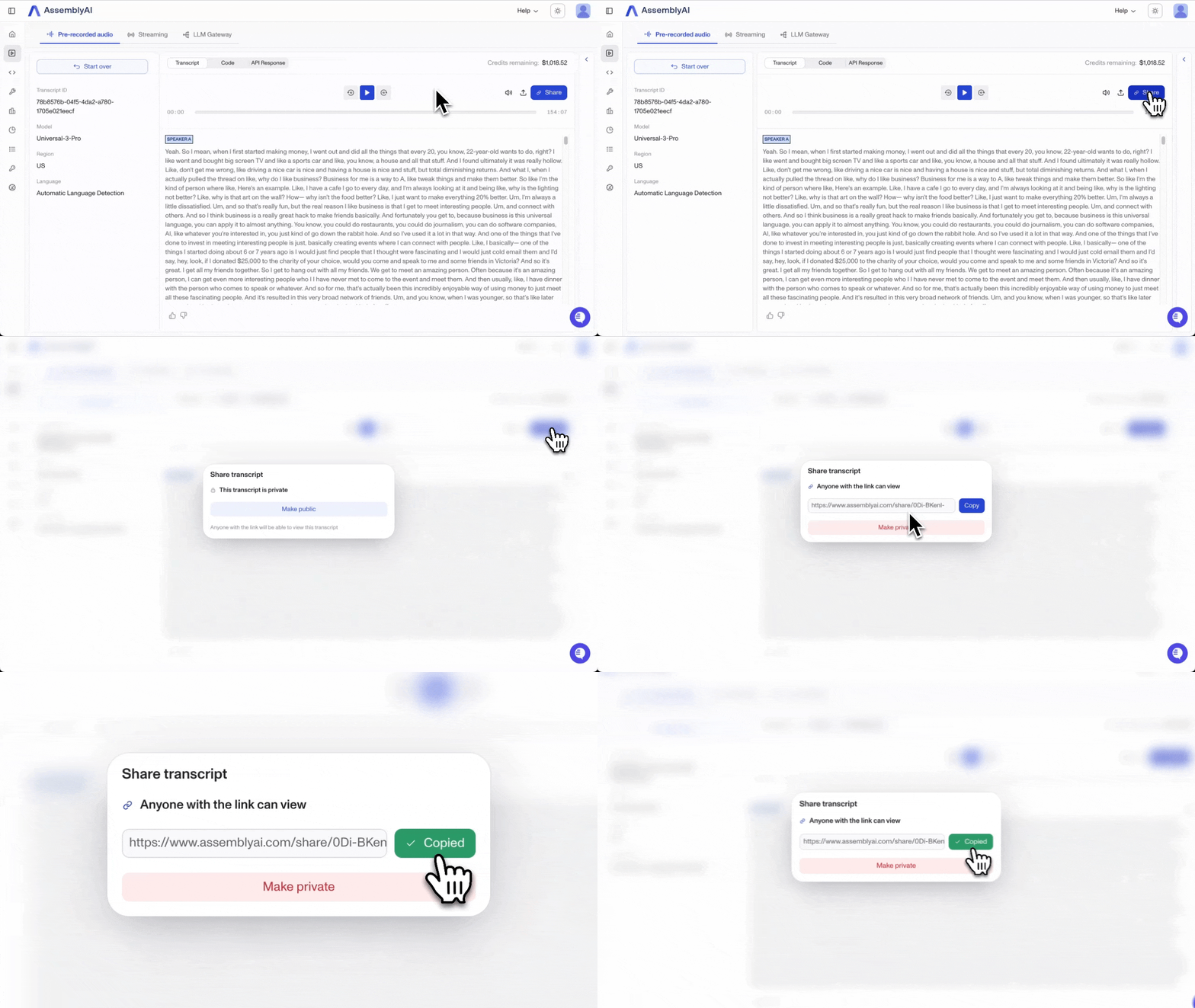
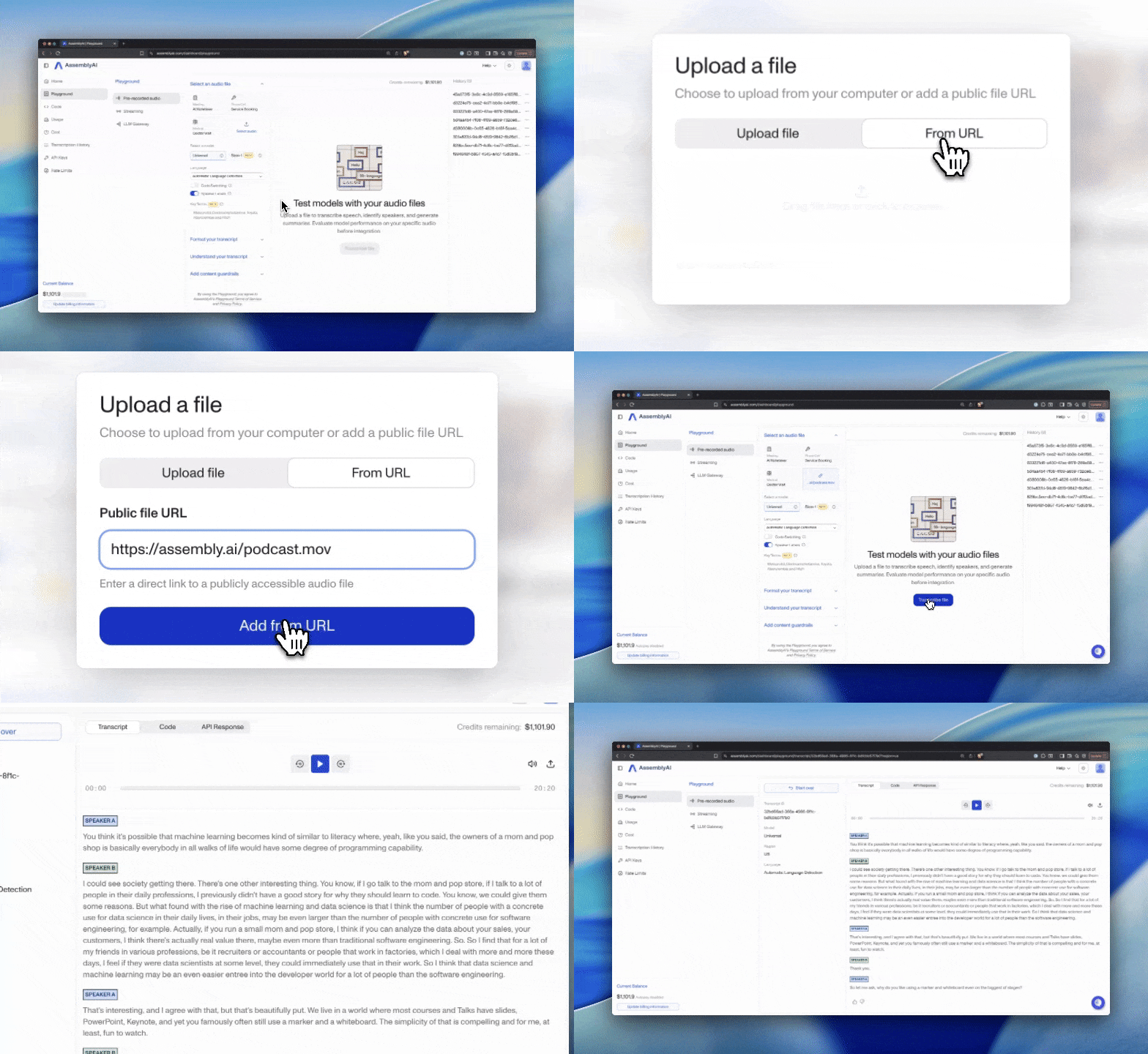
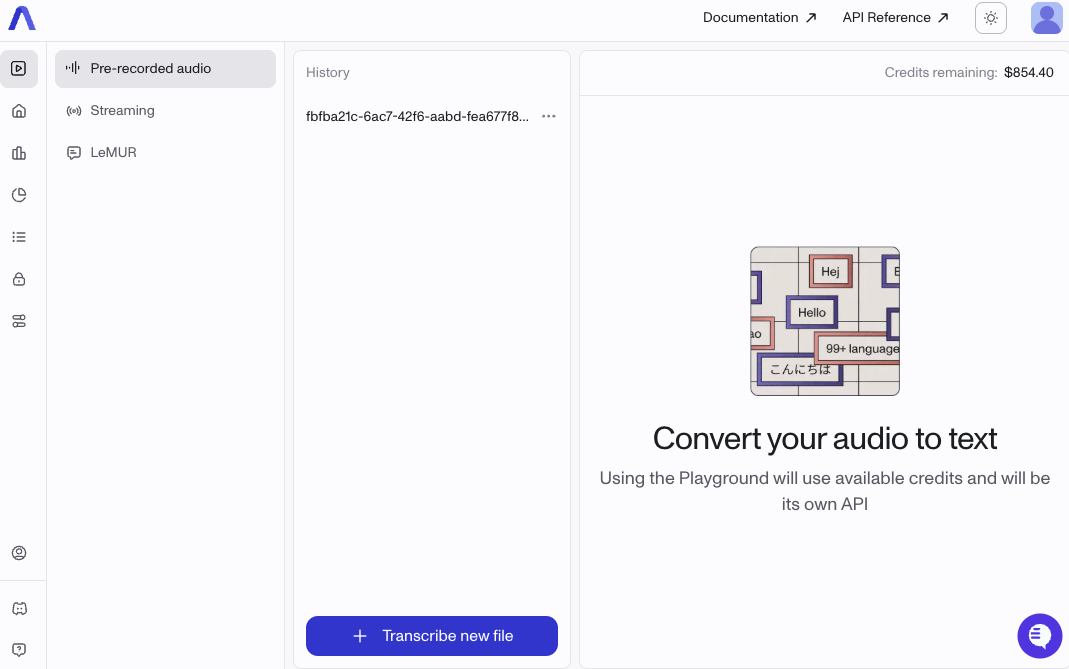
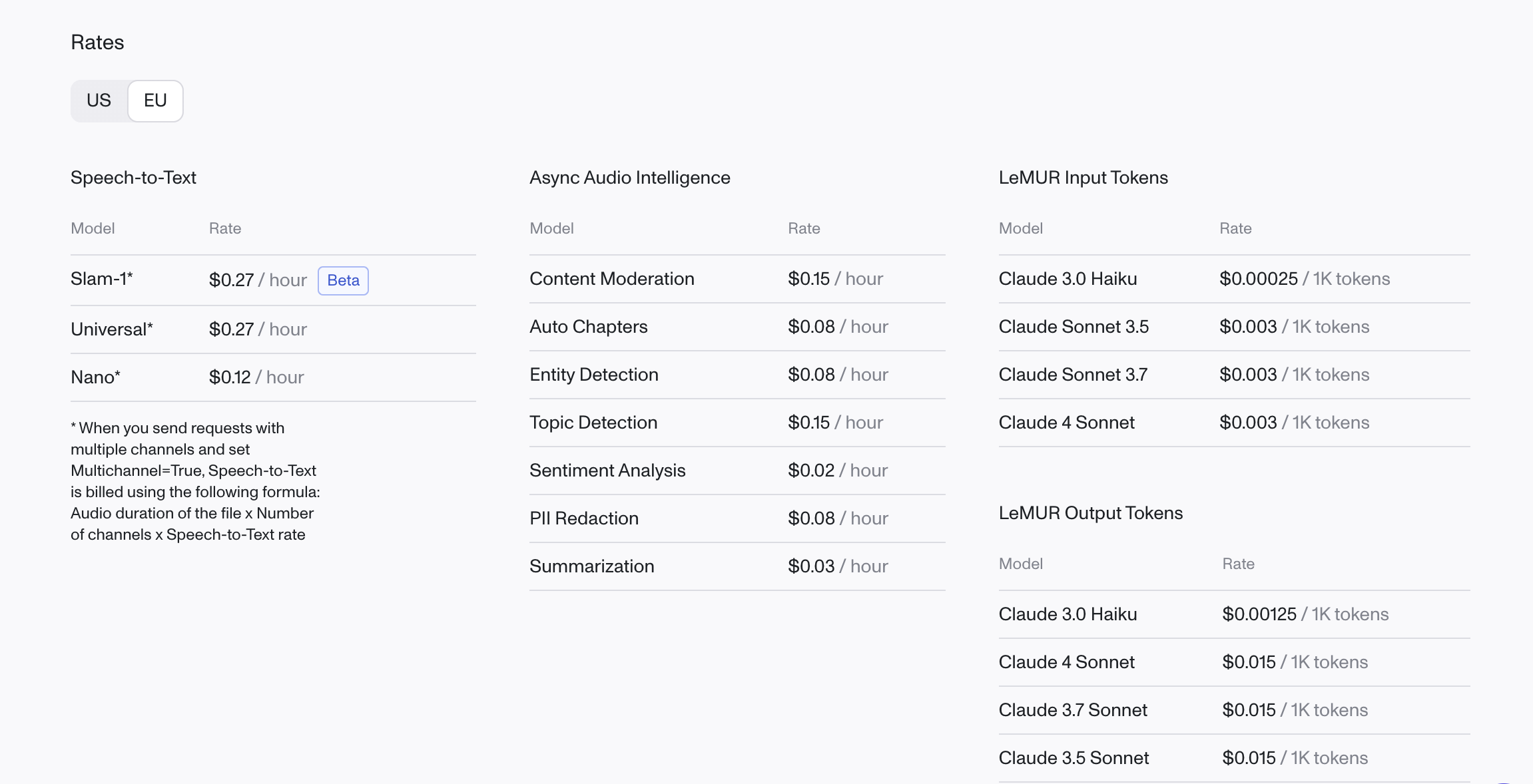


%20Blog%20-%20Slam-1-min.png)
%20Blog%20-%20Slam-1-min.png)


